
llittlestjeff1 - Minecraft Skins & Skin History
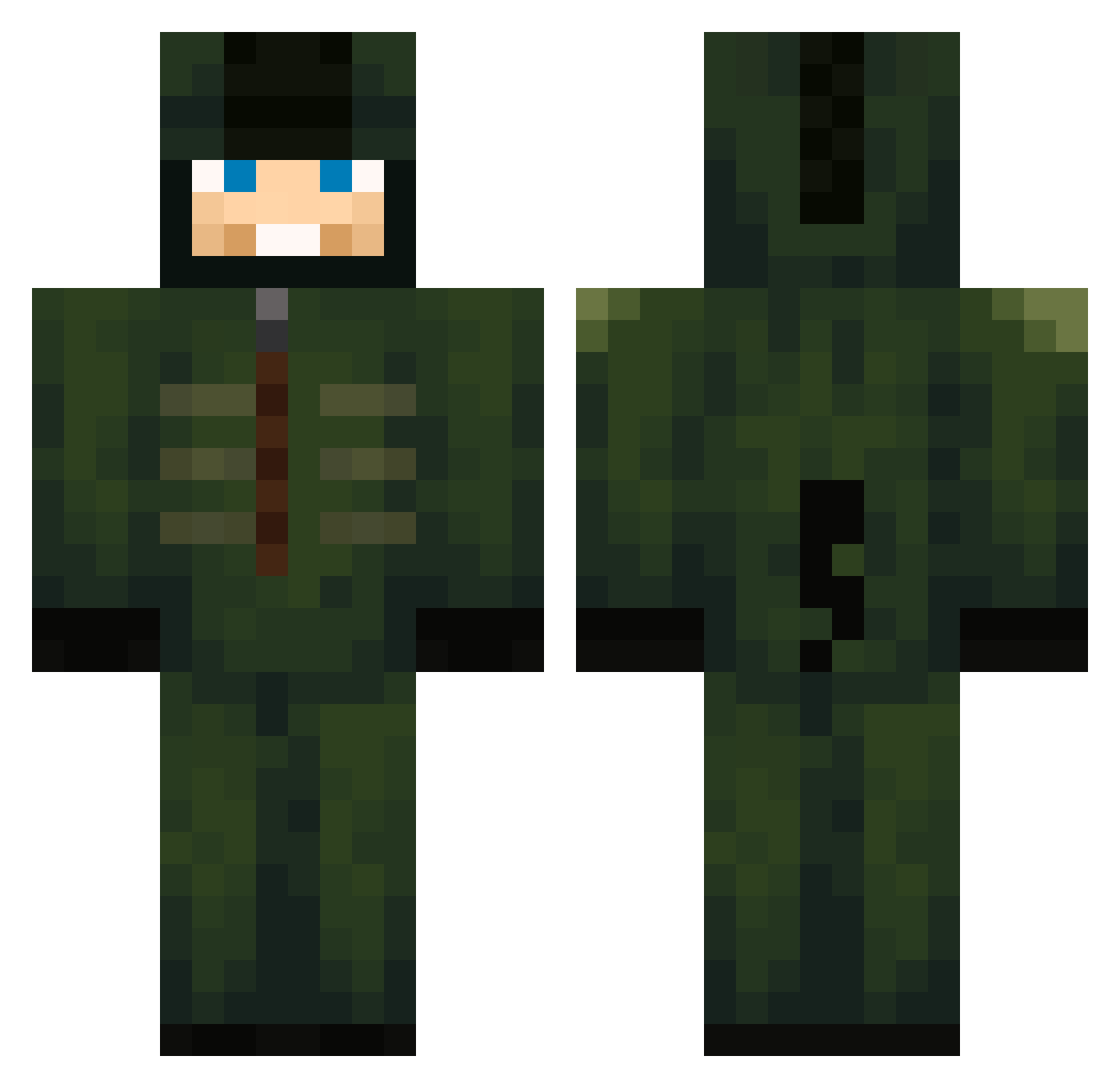
Current Minecraft skin of the player llittlestjeff1, loaded from the official Mojang API. Rotate the 3D model with your mouse or finger, then download the skin as a PNG file and use it in Minecraft: Bedrock Edition or Java Edition for free. When llittlestjeff1 changes their skin, this page updates automatically and the old skin stays in the history below.
Other players with this skin (600)
llittlestjeff1 was the 117th player we have seen with this skin, first spotted on 15.08.2026. The same skin was seen on these players. Open a nickname to see their current skin and skin history.
 lxghtsensei rrrregan JOYB0Y168 Jorellaa Skyblueryan brandiinn Xlatrun Xz_Yuy VitorGamer30 Hi_6 zzva1d3s gamer7god stefa645 APereira10 LilFutureUzi ZapvQ Bouben Tattydafrog WINTERz09 invenciblesan v_dka Yison backsaso HUNLOL Sweetie__Pea Jake3798 Twinsneeze_ HONEyST312 NeoToxzee321 JSupaFly1710 dom_123 lIbreezi Kathy88V victorilex mystical3549 tarex_x alejandropcl
 isnortperks Chilc
 Sn00kie2tog00d worldclassson7 bothyoung
 A1ixd chopol RageApex SirDonger VoVa15 RecentBike079471
 REALCH40S CoronaDesu ShastaPineberry ConnorIsBetter9 gohan192800 Dinglnut tiger13145 Pinbable cxwever Damaskuse Tytoniic GuTsHoTz13
More Kigurumi Minecraft skins
How to install the llittlestjeff1 skin
- Press the Download button above to save the skin as a PNG file.
- Minecraft: Bedrock Edition (PE): open the Dressing Room from the main menu (or tap your character → Edit Character), go to Classic Skins → Owned, press the + (new skin) button, choose the downloaded PNG and pick the Classic (Steve) model. Works on PC and mobile; consoles cannot import custom skins.
- Minecraft: Java Edition: open the Minecraft Launcher, go to the Skins tab, click New Skin, load the PNG, pick the Classic (Steve) model and press Save & Use. You can also upload it at minecraft.net → Profile → Change Skin.
The skin does not show up after import - what should I do?
Restart Minecraft and open the Dressing Room again - imported skins sometimes appear only after a restart. Also make sure you selected the imported skin and picked the Classic (Steve) model.
Which model should I choose, Classic or Slim?
This skin is designed for the Classic (Steve) model. If you pick the wrong model, the arms of the skin will look stretched or squeezed.
Is the skin of llittlestjeff1 free to download?
Yes. Press Download, save the PNG file and use it in Minecraft: Bedrock Edition or Java Edition - no payment or registration needed. The skin also works on multiplayer servers and Realms.
More skins
Looking for more? Go back to all Minecraft skins and check the top skins of the week, month and all time, or find any player's skin by nickname.