
littleojp123 - Minecraft Skins & Skin History
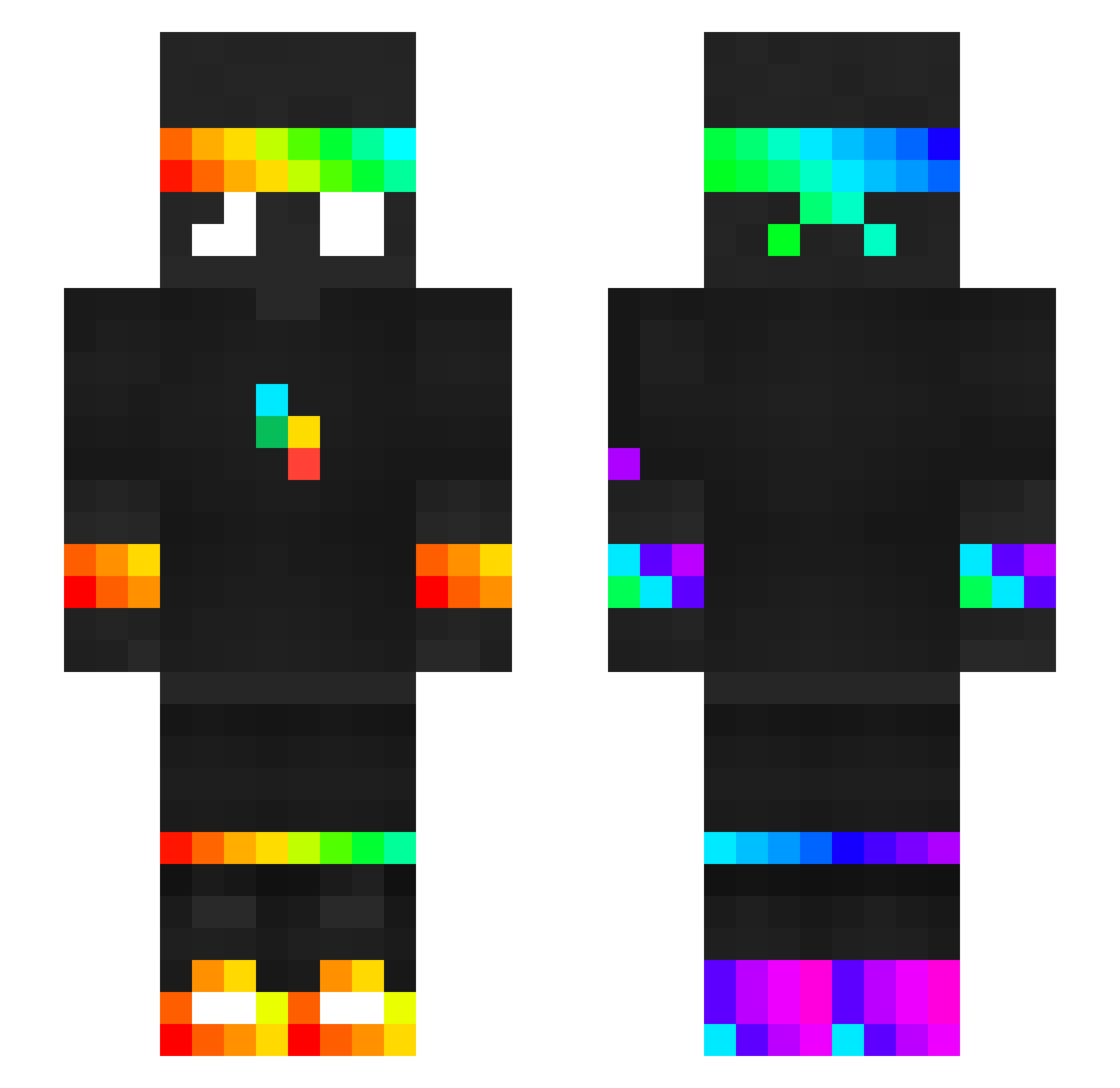
Current Minecraft skin of the player littleojp123, loaded from the official Mojang API. Rotate the 3D model with your mouse or finger, then download the skin as a PNG file and use it in Minecraft: Bedrock Edition or Java Edition for free. When littleojp123 changes their skin, this page updates automatically and the old skin stays in the history below.
Other players with this skin (350)
littleojp123 was the 67th player we have seen with this skin, first spotted on 10.08.2026. The same skin was seen on these players. Open a nickname to see their current skin and skin history.
 lucas__pvp
 ilikesuck SponsKian BashfulAntelope MrCeloCraftBr Angelslyy JahW11 Munchkin51 DummySmart_ Nethermyte
 Viperboy1140 coleis14 spokeishere3 god_gamer29 _NemesisReborn_ MrMilkas
 Sekiro290 BobFish3257 ESPCDopey29
 sigmathor dirty_banana008 amgodXD chris96598
 space_boyfriend
 WitherMC__ Purzy0 PatrikFuFu JoBlivion
 TgamingxYT Carlobaido09
 scoccofausto Samoyed_is_here
 DWEWW52 Jeremiah_Ng
 MonsterCookieZA kegi2928
 Rose_Bunny_Fox ChewielsHere Ang3l120_ Smyku933 arieltur BoaImperator12 Ersi789 Soulz1470
 _m0onieee absentecho XX_Xottic_
 BMTD07 Ned0ko
 SpokeeIsHeree WhiteAlbinoo wackywatermelon1
 Jack_C16 Skater3289 SuperNebu cnxie Duckking12e jojolo171 beebisnoop Adamoskyy
More RGB Minecraft skins
How to install the littleojp123 skin
- Press the Download button above to save the skin as a PNG file.
- Minecraft: Bedrock Edition (PE): open the Dressing Room from the main menu (or tap your character → Edit Character), go to Classic Skins → Owned, press the + (new skin) button, choose the downloaded PNG and pick the Slim (Alex) model. Works on PC and mobile; consoles cannot import custom skins.
- Minecraft: Java Edition: open the Minecraft Launcher, go to the Skins tab, click New Skin, load the PNG, pick the Slim (Alex) model and press Save & Use. You can also upload it at minecraft.net → Profile → Change Skin.
The skin does not show up after import - what should I do?
Restart Minecraft and open the Dressing Room again - imported skins sometimes appear only after a restart. Also make sure you selected the imported skin and picked the Slim (Alex) model.
Which model should I choose, Classic or Slim?
This skin is designed for the Slim (Alex) model. If you pick the wrong model, the arms of the skin will look stretched or squeezed.
Is the skin of littleojp123 free to download?
Yes. Press Download, save the PNG file and use it in Minecraft: Bedrock Edition or Java Edition - no payment or registration needed. The skin also works on multiplayer servers and Realms.
More skins
Looking for more? Go back to all Minecraft skins and check the top skins of the week, month and all time, or find any player's skin by nickname.