
lebronsbootyluvr - Minecraft Skins & Skin History
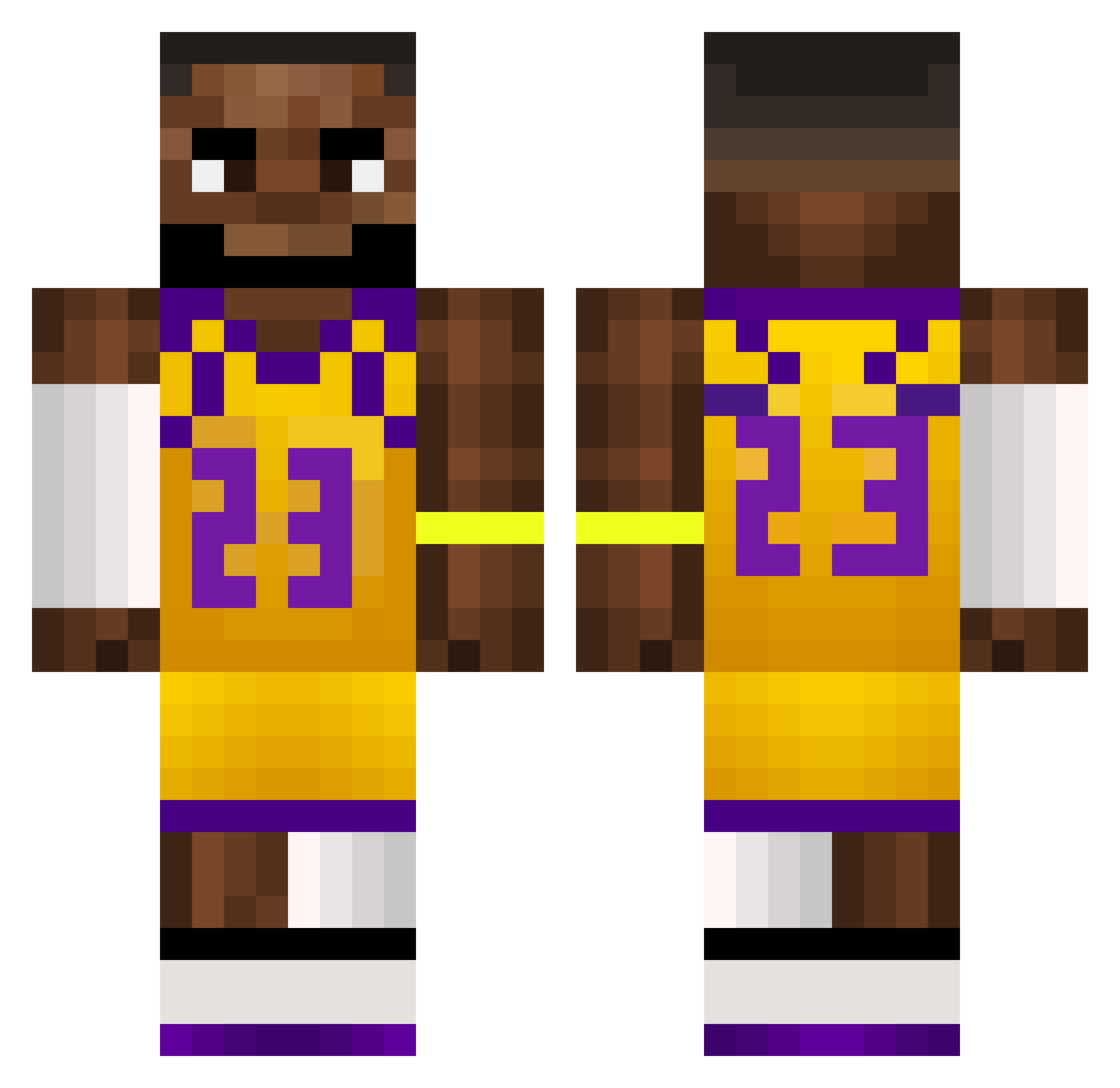
Current Minecraft skin of the player lebronsbootyluvr, loaded from the official Mojang API. Rotate the 3D model with your mouse or finger, then download the skin as a PNG file and use it in Minecraft: Bedrock Edition or Java Edition for free. When lebronsbootyluvr changes their skin, this page updates automatically and the old skin stays in the history below.
Other players with this skin (500)
lebronsbootyluvr was the 359th player we have seen with this skin, first spotted on 28.09.2026. The same skin was seen on these players. Open a nickname to see their current skin and skin history.
 lukagm88 padraicmd odekolonciks 420Jeffrey69 exlaillvox Edu_g AngelinoDelamama cyprian02 rrr336 Fong_Kuok_Fai Dioguitton RDMILLAR Vuxtey Ogzzgo Charakterlos smokedmeat15 chainico lixefy oxtj ShaieWasTaken FanaticSwing GameBridge31048 Dirkinson Thiago_M10 bananaman658 Andr3456 ChoRRIllan Scwr dfarrell2208 Frutsi2 GuangdongRefugee Rain_888_ Botik4 elegant666 smellytoelover Bobtschigerrillo Nityz supegeek olivialalaa 3_4r _Mustii ripper_wp bwteeheeOWO ElectroBonk guppyyyyyyyy Ryunosuke76 RimNutty huris99 KAYthegamer BasketBallll Boston1011 juliusssssss2 NYOSUII LonelyFinger M1K369 ATXvoid ExDeeee wydWhxte toniobooty iUsePaint
More Lakers Minecraft skins
How to install the lebronsbootyluvr skin
- Press the Download button above to save the skin as a PNG file.
- Minecraft: Bedrock Edition (PE): open the Dressing Room from the main menu (or tap your character → Edit Character), go to Classic Skins → Owned, press the + (new skin) button, choose the downloaded PNG and pick the Classic (Steve) model. Works on PC and mobile; consoles cannot import custom skins.
- Minecraft: Java Edition: open the Minecraft Launcher, go to the Skins tab, click New Skin, load the PNG, pick the Classic (Steve) model and press Save & Use. You can also upload it at minecraft.net → Profile → Change Skin.
The skin does not show up after import - what should I do?
Restart Minecraft and open the Dressing Room again - imported skins sometimes appear only after a restart. Also make sure you selected the imported skin and picked the Classic (Steve) model.
Which model should I choose, Classic or Slim?
This skin is designed for the Classic (Steve) model. If you pick the wrong model, the arms of the skin will look stretched or squeezed.
Is the skin of lebronsbootyluvr free to download?
Yes. Press Download, save the PNG file and use it in Minecraft: Bedrock Edition or Java Edition - no payment or registration needed. The skin also works on multiplayer servers and Realms.
More skins
Looking for more? Go back to all Minecraft skins and check the top skins of the week, month and all time, or find any player's skin by nickname.