
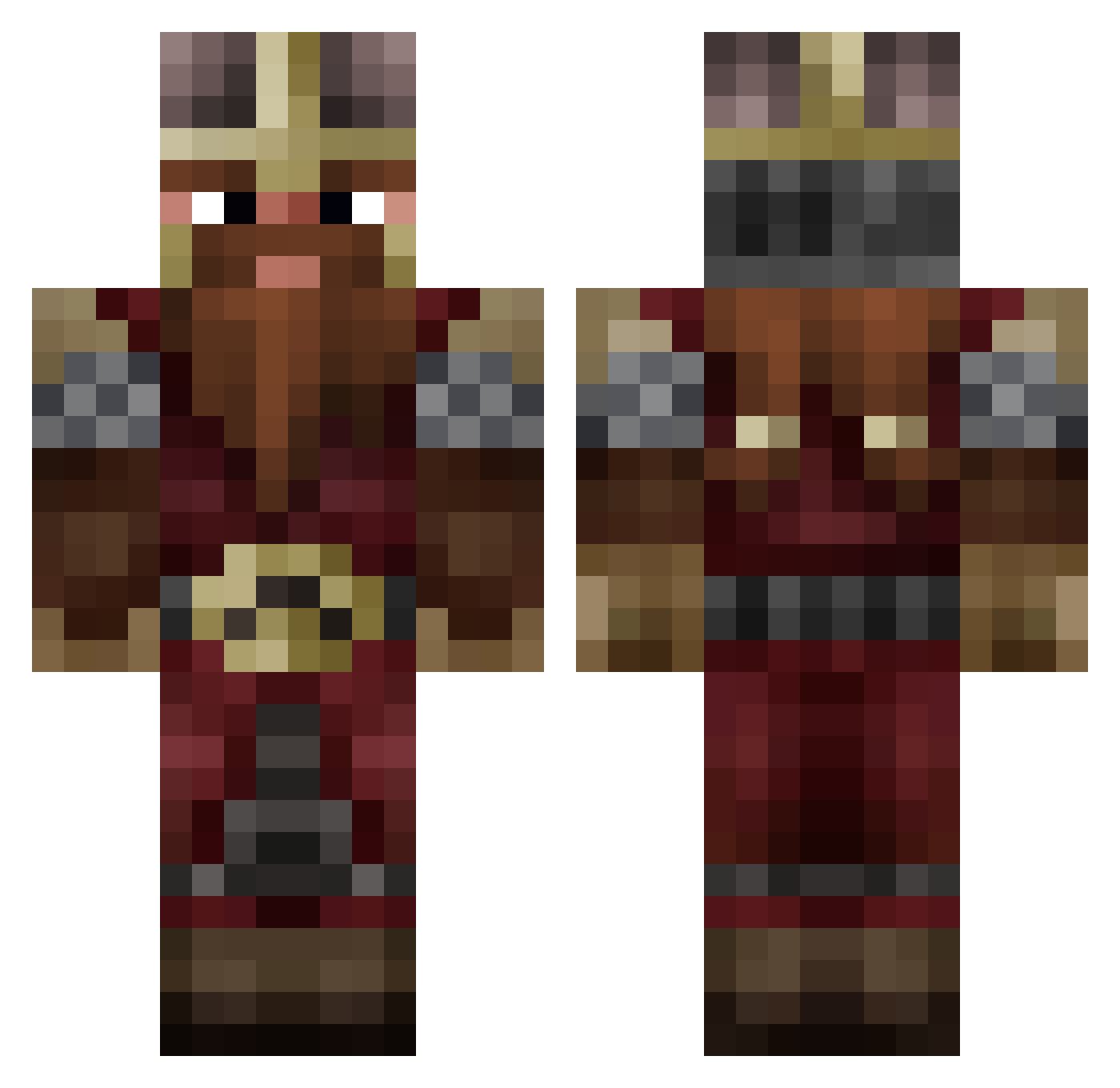
Current Minecraft skin of the player kouba1599, loaded from the official Mojang API. Rotate the 3D model with your mouse or finger, then download the skin as a PNG file and use it in Minecraft: Bedrock Edition or Java Edition for free. When kouba1599 changes their skin, this page updates automatically and the old skin stays in the history below.
Other players with this skin (746)
kouba1599 was the 454th player we have seen with this skin, first spotted on 16.09.2026. The same skin was seen on these players. Open a nickname to see their current skin and skin history.
 Tothio88 red456 CS_Mushroom NoliePolieee lolledgy0066 ClashRay3 Alduin0o WezzaMusic lomaxe Outlaw1034_ ApolloBrian ArchLeviticusB Baudaffi Gimli_the_4warf Rojoes ColCarlo99 RawHydes jeroenBG BogusDuck5 MidasMagor camacho271 IvoMinikowski Stonecarver_2112 PetriuPL Doom_Seeker Othdurn Adsnedos Yechannni Cyb3rlurch HadesYTU S1ncap Gorumahn Burk_M_Burz hugs09_ PONNEY xEATxYOURxSOULx Osulf44 _MegaEpic_ DisabledPeen NinjaInAbruzz Hurratufsen Crenti ThatSkyBlockDad Urukay15 daveywelten Enricochet MrGaming2811 JDBS890 Hamzilla93 Shadow730 Aldineee Legitplayer15 porterico112 Hermit_The_Froug Hejado FragrantBackside Doom_Drum toni_19 lebretonfrilleux Vargi77
More Dwarf Minecraft skins
How to install the kouba1599 skin
- Press the Download button above to save the skin as a PNG file.
- Minecraft: Bedrock Edition (PE): open the Dressing Room from the main menu (or tap your character → Edit Character), go to Classic Skins → Owned, press the + (new skin) button, choose the downloaded PNG and pick the Classic (Steve) model. Works on PC and mobile; consoles cannot import custom skins.
- Minecraft: Java Edition: open the Minecraft Launcher, go to the Skins tab, click New Skin, load the PNG, pick the Classic (Steve) model and press Save & Use. You can also upload it at minecraft.net → Profile → Change Skin.
The skin does not show up after import - what should I do?
Restart Minecraft and open the Dressing Room again - imported skins sometimes appear only after a restart. Also make sure you selected the imported skin and picked the Classic (Steve) model.
Which model should I choose, Classic or Slim?
This skin is designed for the Classic (Steve) model. If you pick the wrong model, the arms of the skin will look stretched or squeezed.
Is the skin of kouba1599 free to download?
Yes. Press Download, save the PNG file and use it in Minecraft: Bedrock Edition or Java Edition - no payment or registration needed. The skin also works on multiplayer servers and Realms.
More skins
Looking for more? Go back to all Minecraft skins and check the top skins of the week, month and all time, or find any player's skin by nickname.