
jimini0823 - Minecraft Skins & Skin History
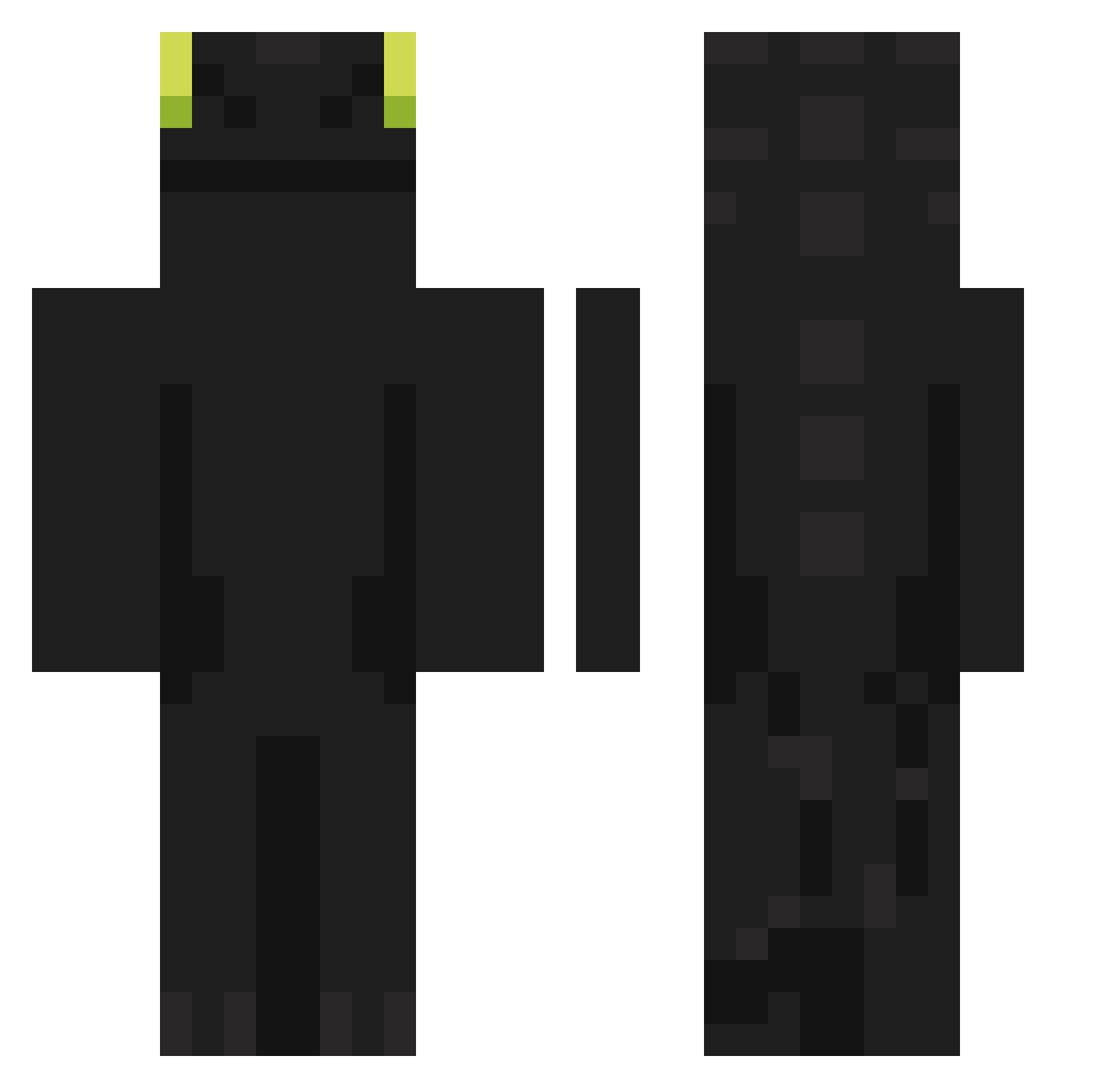
Current Minecraft skin of the player jimini0823, loaded from the official Mojang API. Rotate the 3D model with your mouse or finger, then download the skin as a PNG file and use it in Minecraft: Bedrock Edition or Java Edition for free. When jimini0823 changes their skin, this page updates automatically and the old skin stays in the history below.
Other players with this skin (902)
jimini0823 was the 279th player we have seen with this skin, first spotted on 26.08.2026. The same skin was seen on these players. Open a nickname to see their current skin and skin history.
 MagnumXRooster urikaa tttaek11 JaNeK_1901 Unamed_Fodder135 NightRedFoxy LucasG20 Martiin23 Respawn_TAX twojunbro samuraisaktio Keyles999 steffen_wlm Desiduay BlushingCoffeee ElitePh0enix Cheeeeeee_
 QuirkyRascal AL_MasterD MaunoM rlaqhqo paulolubrificado ReRo9297 1Noya Waki_0223 hoodiehero_4572 BIGBarabas HAHABBQ yeach123 bombu1068 skruuuy SenhoraGilvan Pixelbtw7 Migue_POU dragon0793 VassoPapa Kazakh_Apartus gnu_in_pain kkjun_0420 YourLeftKnee legiiiion FRENCH_OKAMI Lasses_mineworld MicroCille SniperBoleto Lusial sbql FlyFish227 zortex262 ItzMarkz1 lineduu Learsiii iguinz_ Stanch848 Mereset As2pique22 negitama911 Rakkineh voidweber pannocchiarguta
More Night Fury Minecraft skins
How to install the jimini0823 skin
- Press the Download button above to save the skin as a PNG file.
- Minecraft: Bedrock Edition (PE): open the Dressing Room from the main menu (or tap your character → Edit Character), go to Classic Skins → Owned, press the + (new skin) button, choose the downloaded PNG and pick the Classic (Steve) model. Works on PC and mobile; consoles cannot import custom skins.
- Minecraft: Java Edition: open the Minecraft Launcher, go to the Skins tab, click New Skin, load the PNG, pick the Classic (Steve) model and press Save & Use. You can also upload it at minecraft.net → Profile → Change Skin.
The skin does not show up after import - what should I do?
Restart Minecraft and open the Dressing Room again - imported skins sometimes appear only after a restart. Also make sure you selected the imported skin and picked the Classic (Steve) model.
Which model should I choose, Classic or Slim?
This skin is designed for the Classic (Steve) model. If you pick the wrong model, the arms of the skin will look stretched or squeezed.
Is the skin of jimini0823 free to download?
Yes. Press Download, save the PNG file and use it in Minecraft: Bedrock Edition or Java Edition - no payment or registration needed. The skin also works on multiplayer servers and Realms.
More skins
Looking for more? Go back to all Minecraft skins and check the top skins of the week, month and all time, or find any player's skin by nickname.