
jim8901 - Minecraft Skins & Skin History
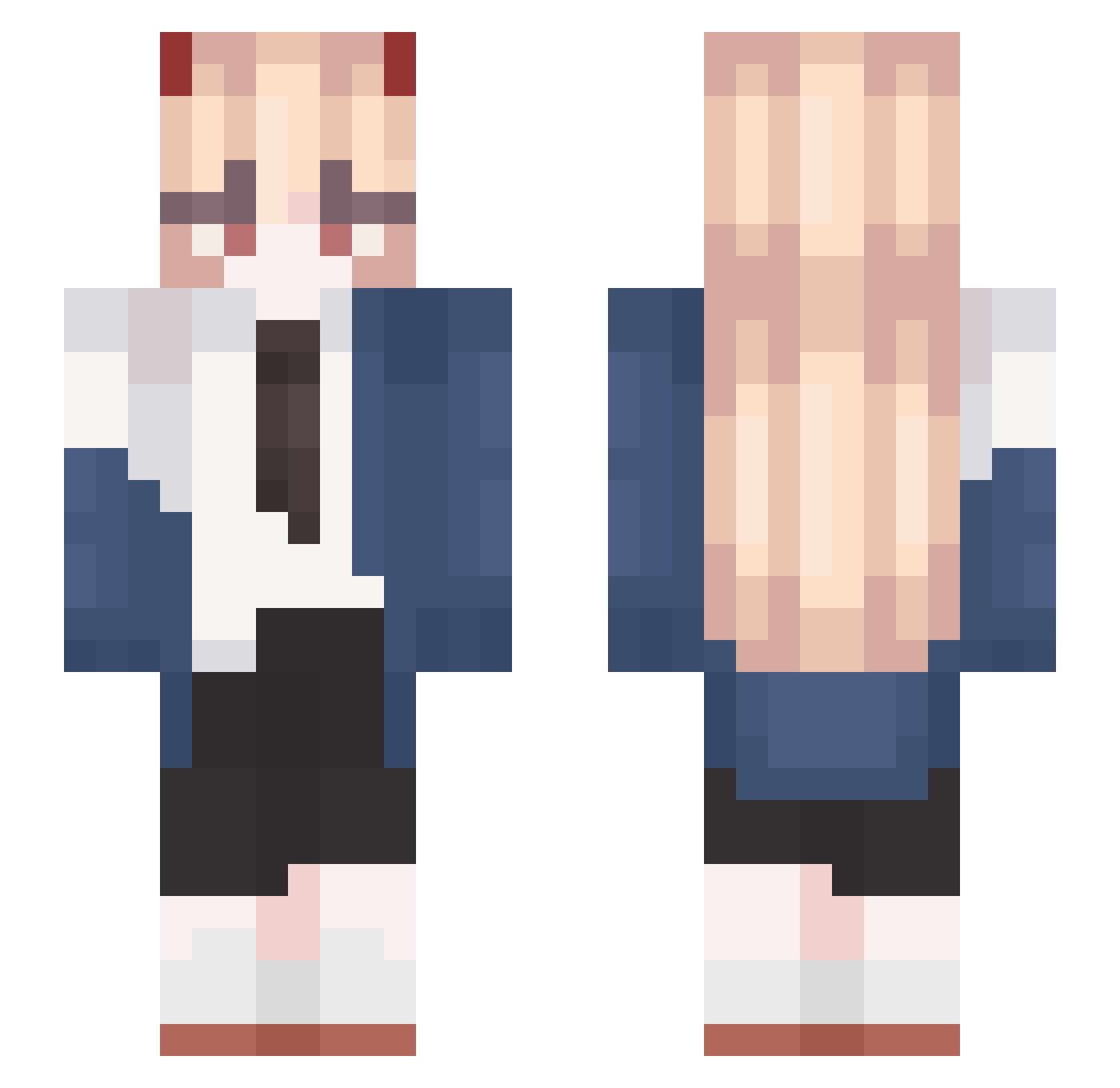
Current Minecraft skin of the player jim8901, loaded from the official Mojang API. Rotate the 3D model with your mouse or finger, then download the skin as a PNG file and use it in Minecraft: Bedrock Edition or Java Edition for free. When jim8901 changes their skin, this page updates automatically and the old skin stays in the history below.
Other players with this skin (519)
jim8901 was the 222nd player we have seen with this skin, first spotted on 02.09.2026. The same skin was seen on these players. Open a nickname to see their current skin and skin history.
 LookAMango_0 skywhykto k1y0_u Lil_autiste Dana24 qkrdnwls2323 mahoBryant izumi177 Spect10n_MC RjTheSimp_ Meggminn misakaha Kavule Rean1043 SHRIN5 Wagg_ APAlt15 Pandamonium5580 Seele_VoIIerei RammusDog Edam_Lau 0eeci SucukAmaMen thdgkwns0810 feifeilong barkies thji daBlriG SeleneElune XsDjf Myqko Suu_real LeoBerlitz Exidna_ Qwrt_ 24wdf Ben_038 LunarOstrich cute_Haerin hongys4063 lis64 Mewison provenance1 lRy0l Thor_QAtDMnwRifd rockandrollted Fr_Joy jiaoniwan FeFinha_ Asiter X_Join43 waffleboy753 CheetoGods Iggy23t3 mcsds cobiri34 lwlfa p1ra__ KissMyLancelot Bruh_couch
More Power Minecraft skins
How to install the jim8901 skin
- Press the Download button above to save the skin as a PNG file.
- Minecraft: Bedrock Edition (PE): open the Dressing Room from the main menu (or tap your character → Edit Character), go to Classic Skins → Owned, press the + (new skin) button, choose the downloaded PNG and pick the Slim (Alex) model. Works on PC and mobile; consoles cannot import custom skins.
- Minecraft: Java Edition: open the Minecraft Launcher, go to the Skins tab, click New Skin, load the PNG, pick the Slim (Alex) model and press Save & Use. You can also upload it at minecraft.net → Profile → Change Skin.
The skin does not show up after import - what should I do?
Restart Minecraft and open the Dressing Room again - imported skins sometimes appear only after a restart. Also make sure you selected the imported skin and picked the Slim (Alex) model.
Which model should I choose, Classic or Slim?
This skin is designed for the Slim (Alex) model. If you pick the wrong model, the arms of the skin will look stretched or squeezed.
Is the skin of jim8901 free to download?
Yes. Press Download, save the PNG file and use it in Minecraft: Bedrock Edition or Java Edition - no payment or registration needed. The skin also works on multiplayer servers and Realms.
More skins
Looking for more? Go back to all Minecraft skins and check the top skins of the week, month and all time, or find any player's skin by nickname.