
jasie_ - Minecraft Skins & Skin History
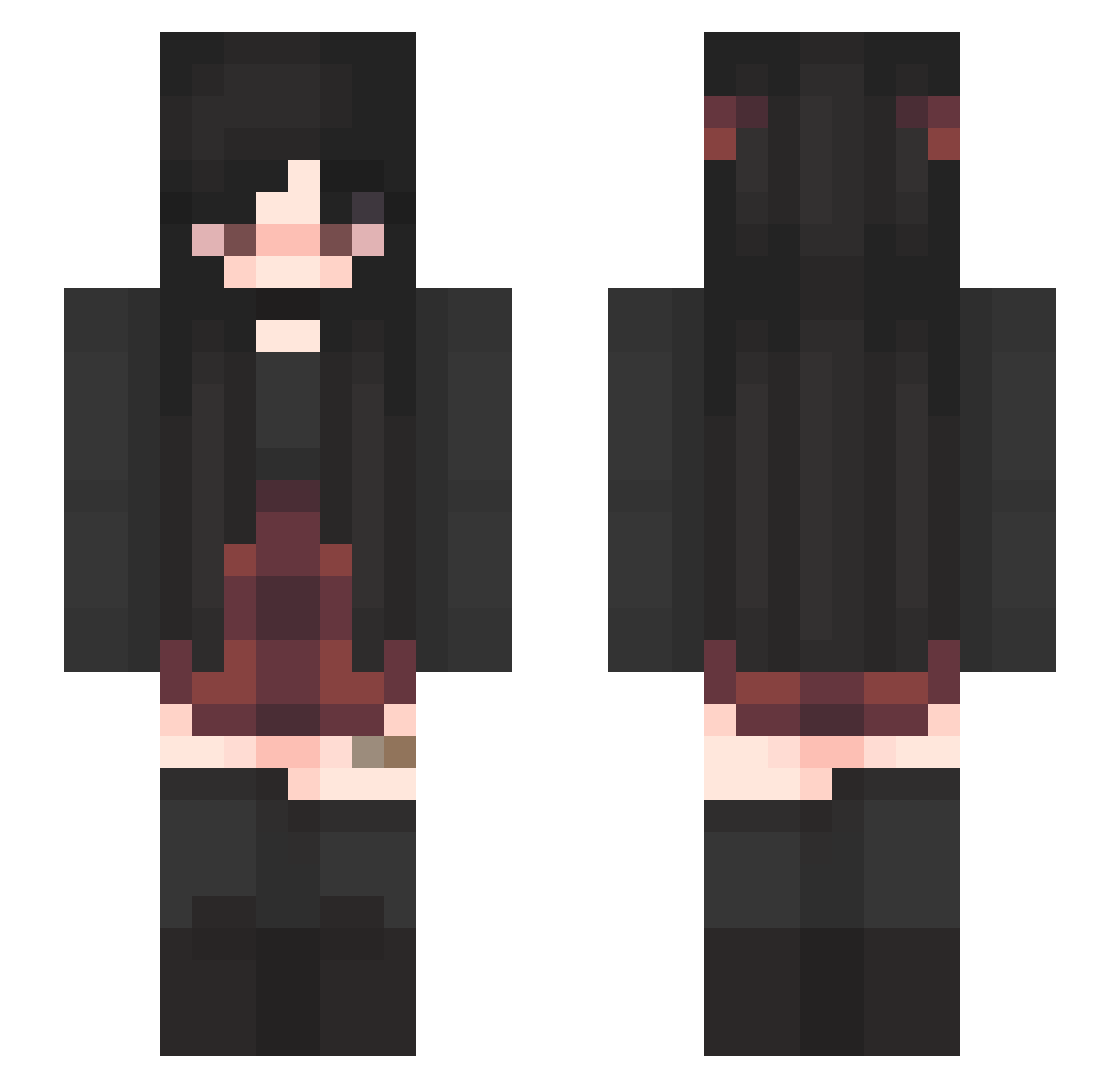
Current Minecraft skin of the player jasie_, loaded from the official Mojang API. Rotate the 3D model with your mouse or finger, then download the skin as a PNG file and use it in Minecraft: Bedrock Edition or Java Edition for free. When jasie_ changes their skin, this page updates automatically and the old skin stays in the history below.
Other players with this skin (340)
jasie_ was the 113th player we have seen with this skin, first spotted on 24.08.2026. The same skin was seen on these players. Open a nickname to see their current skin and skin history.
 wickedblackbear witchygoth666 Hanvinious julyinwinter709 Amine_pvps ExeEmber mlyryan Lizzard006 LilGrimie _seasaw_ Tilly_Penny capriaa liljacjac HaleyXD105 addisony143 Xeleria97 EllaEide Belonoth bhoofy trash_brat BerserkCape124 B0nty Fairen13 lilbucky04 Viksity X_Chaosgirl_X xX_Elise_Xx Lexiajoyce Marielsen _Reyno_ poyra2 your_local_lamp vivssaura flossichen SMFBexy kittttten devilbaby182 GloomyAli SabrinaSch MAXATTACK2013 Metalmexx333 Vaultgirl994 saturn1342 Catsushimi Jinx_SpringDay sottak SaMaMaPi AvoidSpades TinkyBae NELL_03 Fuchsi_1 CDAsXxRoxy KillJoy6040 Kaytap Zolyi Nepturna_ Vxfiel MatriarchE slothiimango alexlolhaha
More Emo Minecraft skins
How to install the jasie_ skin
- Press the Download button above to save the skin as a PNG file.
- Minecraft: Bedrock Edition (PE): open the Dressing Room from the main menu (or tap your character → Edit Character), go to Classic Skins → Owned, press the + (new skin) button, choose the downloaded PNG and pick the Slim (Alex) model. Works on PC and mobile; consoles cannot import custom skins.
- Minecraft: Java Edition: open the Minecraft Launcher, go to the Skins tab, click New Skin, load the PNG, pick the Slim (Alex) model and press Save & Use. You can also upload it at minecraft.net → Profile → Change Skin.
The skin does not show up after import - what should I do?
Restart Minecraft and open the Dressing Room again - imported skins sometimes appear only after a restart. Also make sure you selected the imported skin and picked the Slim (Alex) model.
Which model should I choose, Classic or Slim?
This skin is designed for the Slim (Alex) model. If you pick the wrong model, the arms of the skin will look stretched or squeezed.
Is the skin of jasie_ free to download?
Yes. Press Download, save the PNG file and use it in Minecraft: Bedrock Edition or Java Edition - no payment or registration needed. The skin also works on multiplayer servers and Realms.
More skins
Looking for more? Go back to all Minecraft skins and check the top skins of the week, month and all time, or find any player's skin by nickname.