
inezialiou - Minecraft Skins & Skin History
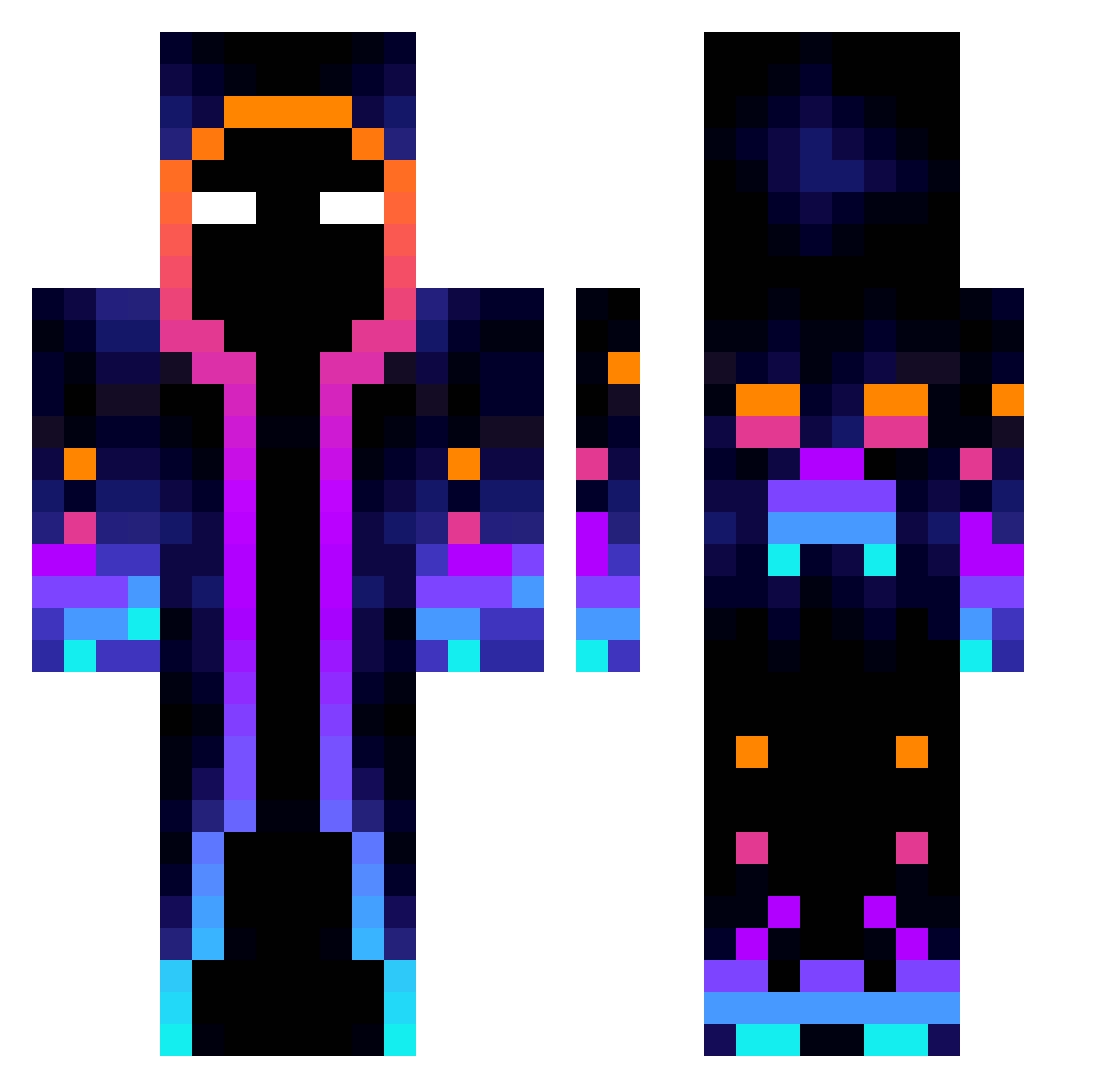
Current Minecraft skin of the player inezialiou, loaded from the official Mojang API. Rotate the 3D model with your mouse or finger, then download the skin as a PNG file and use it in Minecraft: Bedrock Edition or Java Edition for free. When inezialiou changes their skin, this page updates automatically and the old skin stays in the history below.
Other players with this skin (812)
inezialiou was the 16th player we have seen with this skin, first spotted on 24.07.2026. The same skin was seen on these players. Open a nickname to see their current skin and skin history.
 KinoH1311 Realtoxic27 JoSsang99 Ipermaxter999 Kitemuorto4 ScienceDivison Omgitsme_ Ekon21 Pokiy FunkyBacon19 Andros13 Lawliet33001 Dinomuncher24 SOVIETSOLDIERw andres142 POLARssj marsrover22 NicoS80 Chrispao Wavern45 Bori17 VideoAxis ilikeabigman2_0 JASON888666 AlexPercy7 winbuttler Lux_Acadia Griefiil Xiangzai165 PREXENN cigerci02 wfu1 AegeanYU omagakiller13 AsinixT ExtraSugar Grabbings POJJZE K4jonix333 mpc1279 utiragir Daniels_02 lv113 Vall9 ValeX2003 rcgb1 ZhuoJiu66 Davi2lu RainyT0ne uu0130
 Myrale98 ggumba Fir3_Fly_ lailikang Drlint Sheep_Sh4GGA1 redkillVS_heppad cafenzi Gravity213 ToTan_N
More Galaxy Minecraft skins
How to install the inezialiou skin
- Press the Download button above to save the skin as a PNG file.
- Minecraft: Bedrock Edition (PE): open the Dressing Room from the main menu (or tap your character → Edit Character), go to Classic Skins → Owned, press the + (new skin) button, choose the downloaded PNG and pick the Classic (Steve) model. Works on PC and mobile; consoles cannot import custom skins.
- Minecraft: Java Edition: open the Minecraft Launcher, go to the Skins tab, click New Skin, load the PNG, pick the Classic (Steve) model and press Save & Use. You can also upload it at minecraft.net → Profile → Change Skin.
The skin does not show up after import - what should I do?
Restart Minecraft and open the Dressing Room again - imported skins sometimes appear only after a restart. Also make sure you selected the imported skin and picked the Classic (Steve) model.
Which model should I choose, Classic or Slim?
This skin is designed for the Classic (Steve) model. If you pick the wrong model, the arms of the skin will look stretched or squeezed.
Is the skin of inezialiou free to download?
Yes. Press Download, save the PNG file and use it in Minecraft: Bedrock Edition or Java Edition - no payment or registration needed. The skin also works on multiplayer servers and Realms.
More skins
Looking for more? Go back to all Minecraft skins and check the top skins of the week, month and all time, or find any player's skin by nickname.