
iiDr3aWi - Minecraft Skins & Skin History
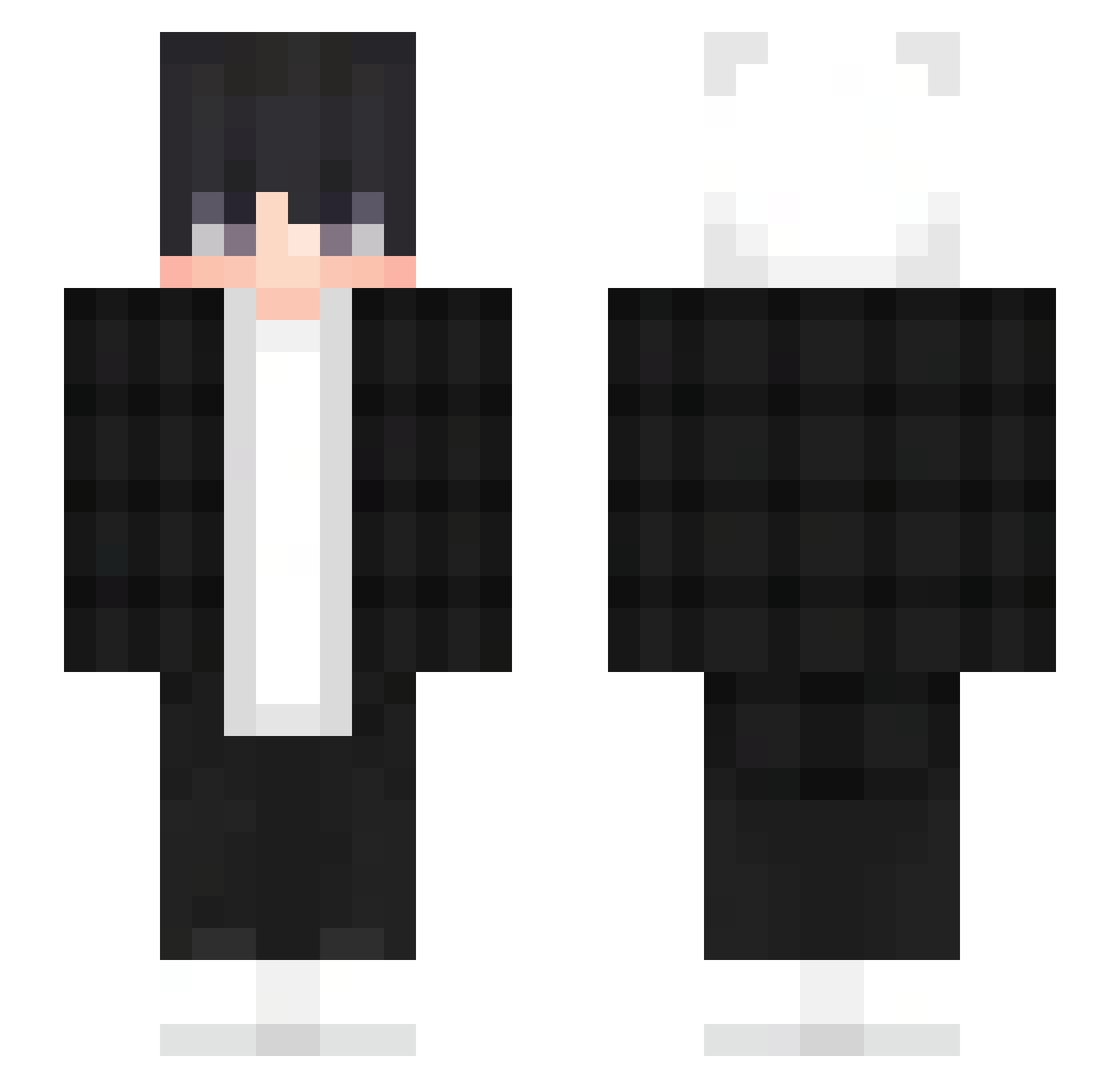
Current Minecraft skin of the player iiDr3aWi, loaded from the official Mojang API. Rotate the 3D model with your mouse or finger, then download the skin as a PNG file and use it in Minecraft: Bedrock Edition or Java Edition for free. When iiDr3aWi changes their skin, this page updates automatically and the old skin stays in the history below.
Other players with this skin (303)
iiDr3aWi was the 13th player we have seen with this skin, first spotted on 27.07.2026. The same skin was seen on these players. Open a nickname to see their current skin and skin history.
 sidgv_ _D0mca_ chskull8 SnowFlakes57
 Aut3n GGAARON7199 benunuya0330 Customs2025 mengli11 ZYB3329 JesterAmHeulen ruzgarozkan DontLooK1010 WalnussGelenk Kamauu trex09gbonyt Fravs__
 GhostBlox1 El_Tobio_ GiulioFecondo_ tropagamer e2r0i0k7 Yurouzi Hosoek0 KeremkyC NinjaX_X moicito n1avzyxcb_ _J4ce_ slsllel Kevin_1225 Stelar_24 AlanCar07 bujieee Ble3uBerry stoneflower1410 DuplexVII P1KY4 mateibetter XxDanielProxX GutoAnubis Konisegg codyacuite KrisSam_123456 haresora_air GGboy212 rune_lunar Dn_1025 senruku adios43 471ms thedudemando BlackSilvers TheRealDash_ realmarvz ZEROULTRAMAN DAAM2005 ch4nss westi69_ Arcadia390
How to install the iiDr3aWi skin
- Press the Download button above to save the skin as a PNG file.
- Minecraft: Bedrock Edition (PE): open the Dressing Room from the main menu (or tap your character → Edit Character), go to Classic Skins → Owned, press the + (new skin) button, choose the downloaded PNG and pick the Slim (Alex) model. Works on PC and mobile; consoles cannot import custom skins.
- Minecraft: Java Edition: open the Minecraft Launcher, go to the Skins tab, click New Skin, load the PNG, pick the Slim (Alex) model and press Save & Use. You can also upload it at minecraft.net → Profile → Change Skin.
The skin does not show up after import - what should I do?
Restart Minecraft and open the Dressing Room again - imported skins sometimes appear only after a restart. Also make sure you selected the imported skin and picked the Slim (Alex) model.
Which model should I choose, Classic or Slim?
This skin is designed for the Slim (Alex) model. If you pick the wrong model, the arms of the skin will look stretched or squeezed.
Is the skin of iiDr3aWi free to download?
Yes. Press Download, save the PNG file and use it in Minecraft: Bedrock Edition or Java Edition - no payment or registration needed. The skin also works on multiplayer servers and Realms.
More skins
Looking for more? Go back to all Minecraft skins and check the top skins of the week, month and all time, or find any player's skin by nickname.