
iNasax - Minecraft Skins & Skin History
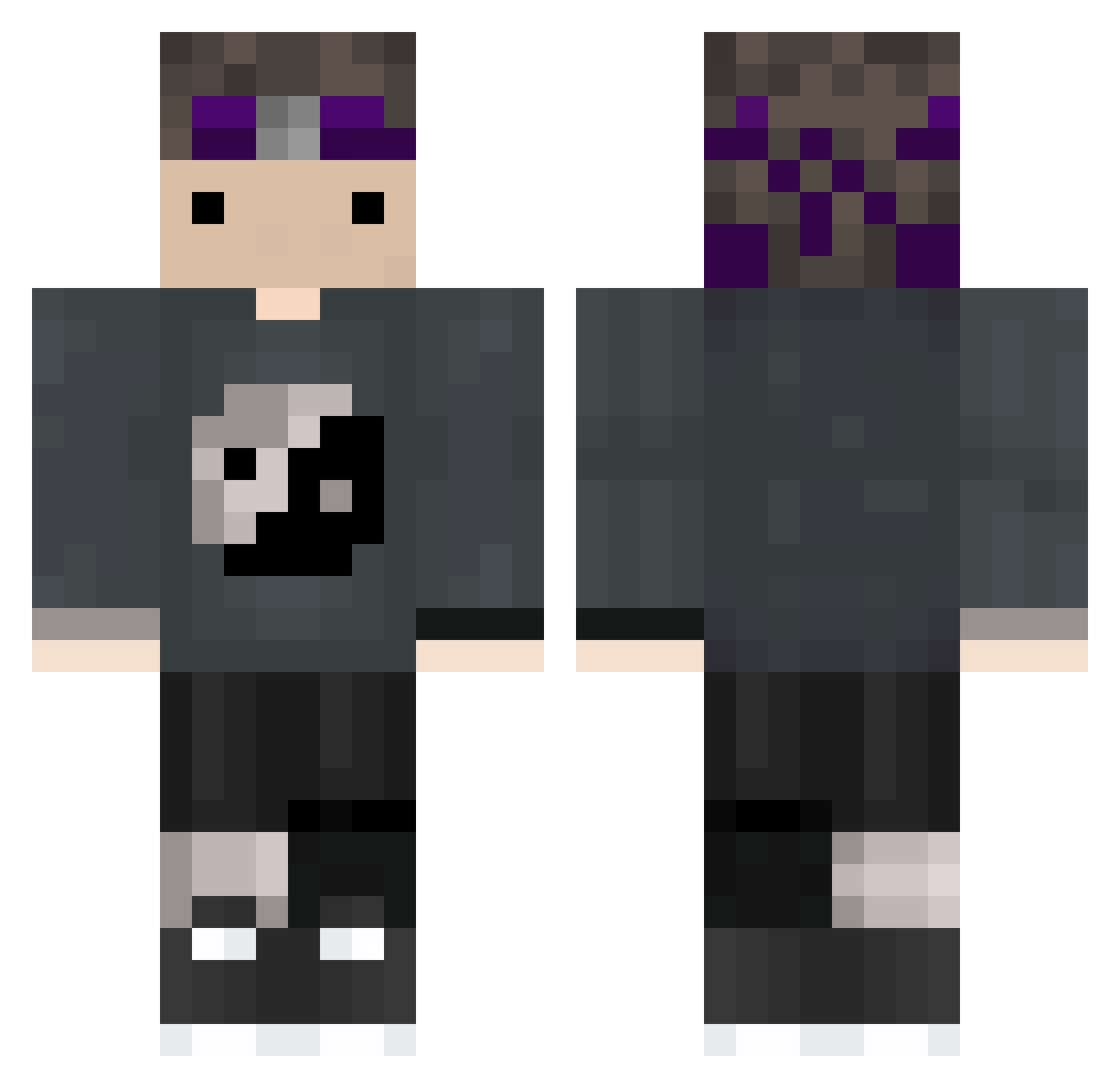
Current Minecraft skin of the player iNasax, loaded from the official Mojang API. Rotate the 3D model with your mouse or finger, then download the skin as a PNG file and use it in Minecraft: Bedrock Edition or Java Edition for free. When iNasax changes their skin, this page updates automatically and the old skin stays in the history below.
Other players with this skin (63)
iNasax was the 22nd player we have seen with this skin, first spotted on 30.08.2026. The same skin was seen on these players. Open a nickname to see their current skin and skin history.
 OnlyShadeX
 volszop MHF_Armor xGiesela
 kd_gaming2 Monge_Sono inveruse spraytmc
 Tabbiez_ HarryPotcraft1 VitezaOnTop
 Parrot875
 Pointed_Jester torpan_kingi mocchann777 _Toshir0
 4kjewels Drdonutt_Isgood l4vina Sbadutti Wifies MyneBR akarayme
 hearts4Aaron_ UltraVice 0007351 policemike_55 Fizzeer Haga1999
 STAUBS JumpinJules King0fCrimes breachswaapp
 yukiterr MAQ7L_ILH4M Yqz5
 twikking _nemzzy Noah0270 14letni_fajter daragon_crack loveadog9 Bubz_0 JvkeOnTwitch PitcherFrog ProEmir25
 VanWacky_Sus Pepkos Avg_Yaoi_Enjoyer DarkBoss1412 plsBuyNitro Karaxmella d0rkness_is_mc degoatednoobZ Fxfalls Sxsuke2 Kleesbombss potionchan Jepat GhostV121
More Yin Yang Minecraft skins
How to install the iNasax skin
- Press the Download button above to save the skin as a PNG file.
- Minecraft: Bedrock Edition (PE): open the Dressing Room from the main menu (or tap your character → Edit Character), go to Classic Skins → Owned, press the + (new skin) button, choose the downloaded PNG and pick the Classic (Steve) model. Works on PC and mobile; consoles cannot import custom skins.
- Minecraft: Java Edition: open the Minecraft Launcher, go to the Skins tab, click New Skin, load the PNG, pick the Classic (Steve) model and press Save & Use. You can also upload it at minecraft.net → Profile → Change Skin.
The skin does not show up after import - what should I do?
Restart Minecraft and open the Dressing Room again - imported skins sometimes appear only after a restart. Also make sure you selected the imported skin and picked the Classic (Steve) model.
Which model should I choose, Classic or Slim?
This skin is designed for the Classic (Steve) model. If you pick the wrong model, the arms of the skin will look stretched or squeezed.
Is the skin of iNasax free to download?
Yes. Press Download, save the PNG file and use it in Minecraft: Bedrock Edition or Java Edition - no payment or registration needed. The skin also works on multiplayer servers and Realms.
More skins
Looking for more? Go back to all Minecraft skins and check the top skins of the week, month and all time, or find any player's skin by nickname.