
henrykinzel - Minecraft Skins & Skin History
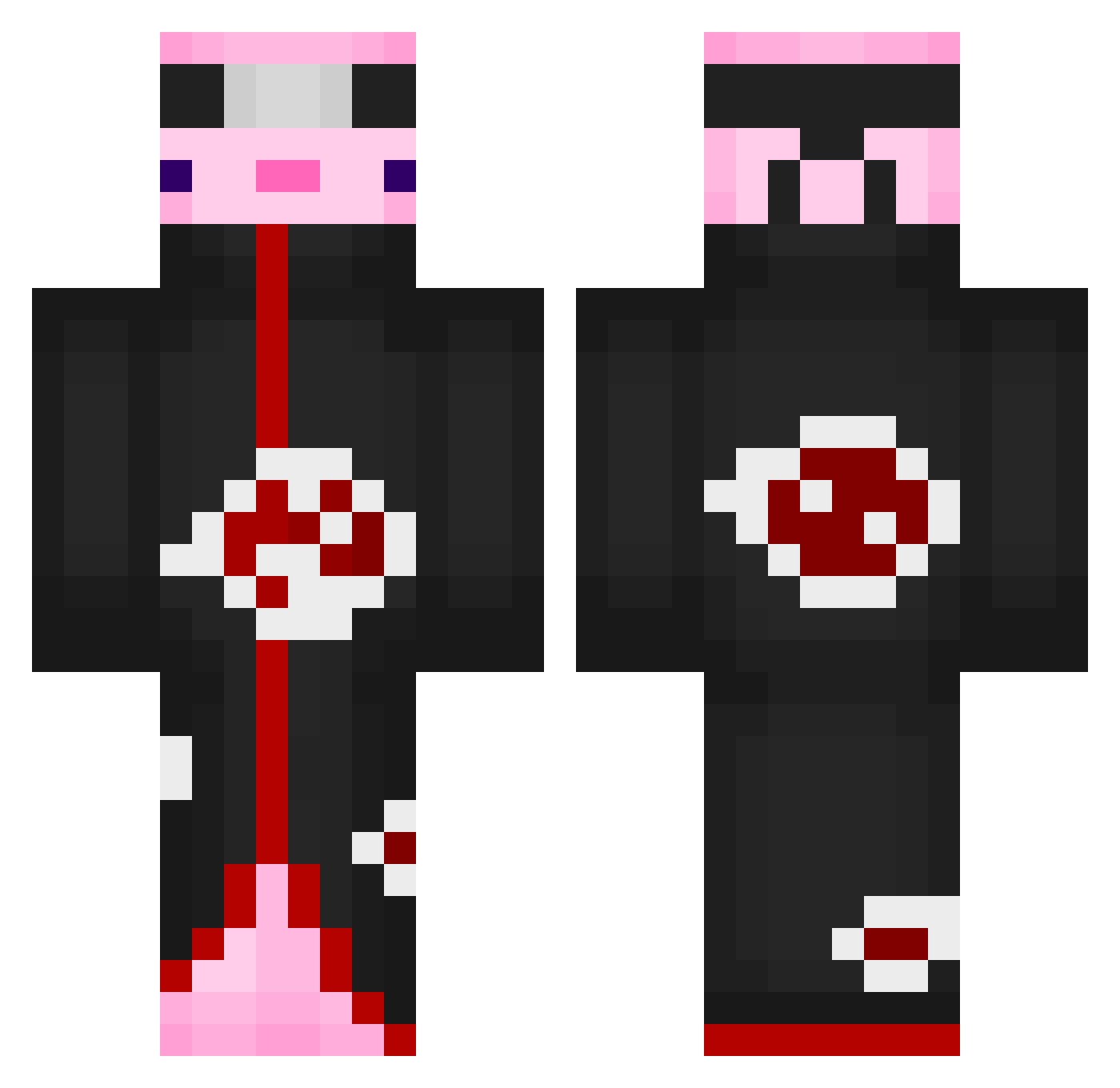
Current Minecraft skin of the player henrykinzel, loaded from the official Mojang API. Rotate the 3D model with your mouse or finger, then download the skin as a PNG file and use it in Minecraft: Bedrock Edition or Java Edition for free. When henrykinzel changes their skin, this page updates automatically and the old skin stays in the history below.
Other players with this skin (552)
henrykinzel was the 96th player we have seen with this skin, first spotted on 08.08.2026. The same skin was seen on these players. Open a nickname to see their current skin and skin history.
 Fingolia LATEPlay
 Luxebois SuperiorSalt Ariwan001 El_Jc Elcwuz kampfbrot1 2yeahah
 alexajanuary Zenax_19 chubbybunnychan ickty Lilfeffy Kasume3 BenjiQ181 _back2lobby_ gOmalito Zeldafanaticc swiftRapid sweetiesleep UnusablAlpca jamesthes15 Lamune99
 Loaf_oBeans Benny0313 Axolot42 ain1030 KanpekiZero Savingz SkunkC Grymlona devils_wish27 ItzRedixiont c4ss1s 6AND HoPicchiato2Neri gggamer6 rudwn355 xRabil Awesome_1H SalBriseno Piece_Ctrl_ANDY fachelitoXX NJO210X Rainingdimonds sardhex LuvTheWayUKissMe Eien12 SkyDuchesse Quixi73 Dcuwei xpv19x isracir AniseAs Starlight__1014 antoinevdo Hokyokuguma_
 Xaca10 Patrixpro123
More Akatsuki Minecraft skins
How to install the henrykinzel skin
- Press the Download button above to save the skin as a PNG file.
- Minecraft: Bedrock Edition (PE): open the Dressing Room from the main menu (or tap your character → Edit Character), go to Classic Skins → Owned, press the + (new skin) button, choose the downloaded PNG and pick the Classic (Steve) model. Works on PC and mobile; consoles cannot import custom skins.
- Minecraft: Java Edition: open the Minecraft Launcher, go to the Skins tab, click New Skin, load the PNG, pick the Classic (Steve) model and press Save & Use. You can also upload it at minecraft.net → Profile → Change Skin.
The skin does not show up after import - what should I do?
Restart Minecraft and open the Dressing Room again - imported skins sometimes appear only after a restart. Also make sure you selected the imported skin and picked the Classic (Steve) model.
Which model should I choose, Classic or Slim?
This skin is designed for the Classic (Steve) model. If you pick the wrong model, the arms of the skin will look stretched or squeezed.
Is the skin of henrykinzel free to download?
Yes. Press Download, save the PNG file and use it in Minecraft: Bedrock Edition or Java Edition - no payment or registration needed. The skin also works on multiplayer servers and Realms.
More skins
Looking for more? Go back to all Minecraft skins and check the top skins of the week, month and all time, or find any player's skin by nickname.