
greenbean847 - Minecraft Skins & Skin History
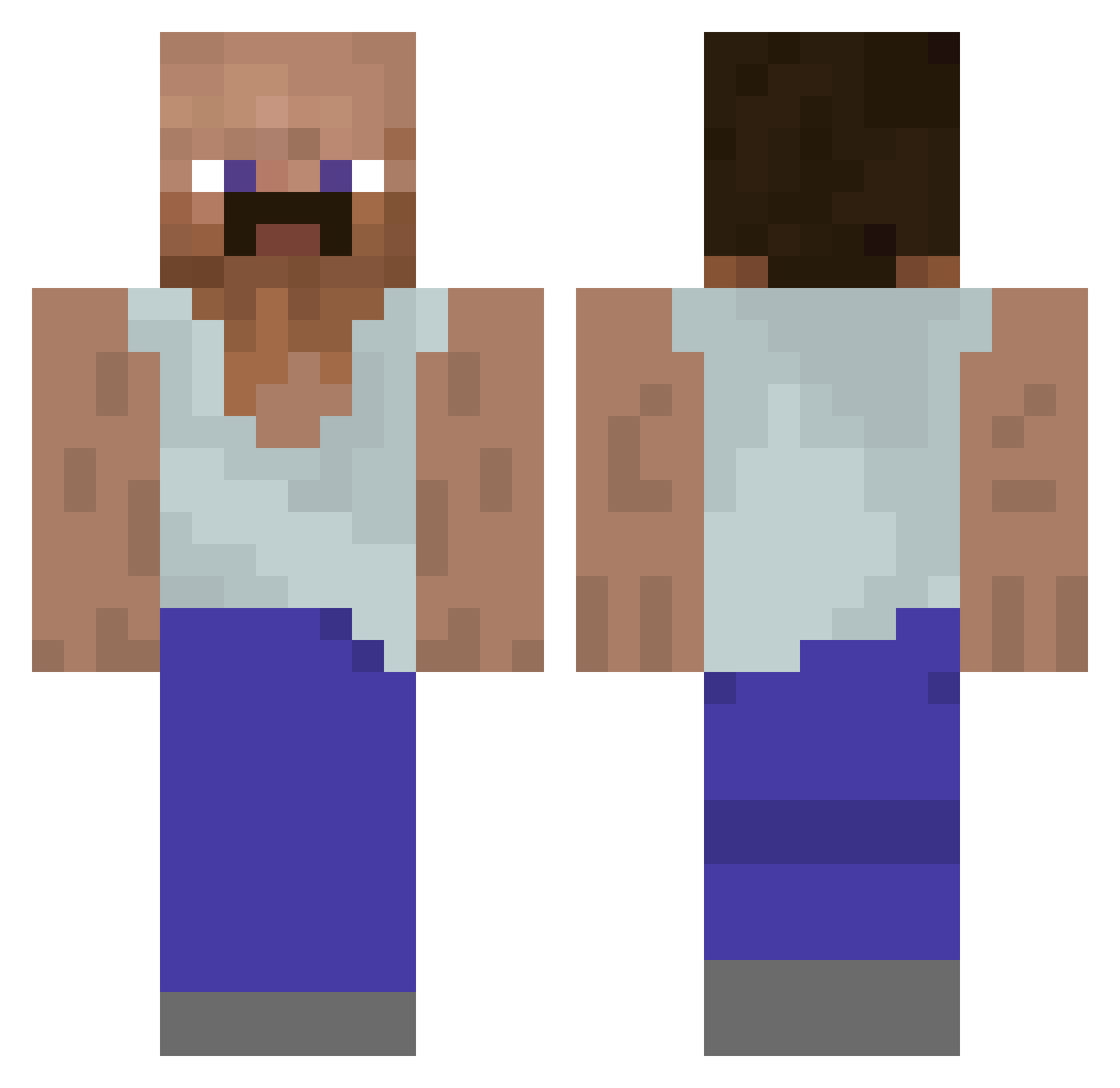
Current Minecraft skin of the player greenbean847, loaded from the official Mojang API. Rotate the 3D model with your mouse or finger, then download the skin as a PNG file and use it in Minecraft: Bedrock Edition or Java Edition for free. When greenbean847 changes their skin, this page updates automatically and the old skin stays in the history below.
Other players with this skin (928)
greenbean847 was the 137th player we have seen with this skin, first spotted on 08.08.2026. The same skin was seen on these players. Open a nickname to see their current skin and skin history.
 CalvaMaria Fabio148 y0ev
 Appelkaneelsaus Mrdoggo59 Frenchfryguy149 xOrpheon pogiboi Thefarter101 dappProtecter vytautomegejas Shizuyy St_Hugo LGHX Eilmao liaoweiyi Malgrado Scuse_me_m8 notvoidd_ damiiy vile69 ZarqoF31 dieg0_L Forg_Gamer ninja6543 ELD4R7 Scarpo74 sviatontheZaza56
 HamoodeGG Loukas420 RAMAZAN31 HerrMakke Waydmann NOREK1 LiteratureBoy JMaicon BedNukerTrin xSolo Valejo277 DREVERT Natura_Paradisus 100sung RobloxRobert BroshikiZ SleepySnowman1 24Volt Yamino01 Eskii612 Liquidfyier ebuaa xMzim vIschlekAya MattifyGOAT Rooty0325 Cryno ZeniPL KristofferTheis rodriguesgsr xMr0waa UnshavenOrc
More Mustache Minecraft skins
How to install the greenbean847 skin
- Press the Download button above to save the skin as a PNG file.
- Minecraft: Bedrock Edition (PE): open the Dressing Room from the main menu (or tap your character → Edit Character), go to Classic Skins → Owned, press the + (new skin) button, choose the downloaded PNG and pick the Classic (Steve) model. Works on PC and mobile; consoles cannot import custom skins.
- Minecraft: Java Edition: open the Minecraft Launcher, go to the Skins tab, click New Skin, load the PNG, pick the Classic (Steve) model and press Save & Use. You can also upload it at minecraft.net → Profile → Change Skin.
The skin does not show up after import - what should I do?
Restart Minecraft and open the Dressing Room again - imported skins sometimes appear only after a restart. Also make sure you selected the imported skin and picked the Classic (Steve) model.
Which model should I choose, Classic or Slim?
This skin is designed for the Classic (Steve) model. If you pick the wrong model, the arms of the skin will look stretched or squeezed.
Is the skin of greenbean847 free to download?
Yes. Press Download, save the PNG file and use it in Minecraft: Bedrock Edition or Java Edition - no payment or registration needed. The skin also works on multiplayer servers and Realms.
More skins
Looking for more? Go back to all Minecraft skins and check the top skins of the week, month and all time, or find any player's skin by nickname.