
glitchygamer3214 - Minecraft Skins & Skin History
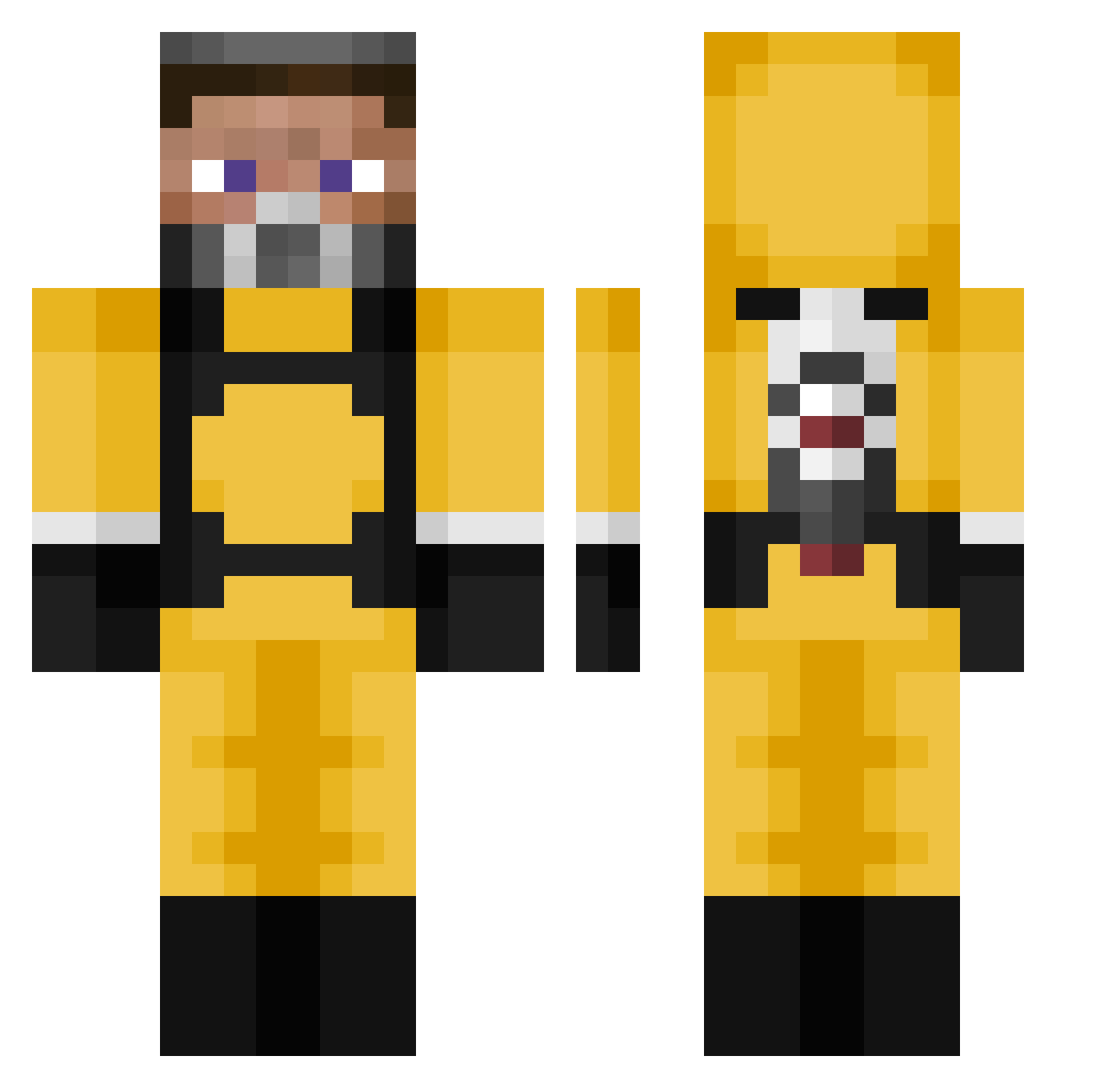
Current Minecraft skin of the player glitchygamer3214, loaded from the official Mojang API. Rotate the 3D model with your mouse or finger, then download the skin as a PNG file and use it in Minecraft: Bedrock Edition or Java Edition for free. When glitchygamer3214 changes their skin, this page updates automatically and the old skin stays in the history below.
Other players with this skin (105)
glitchygamer3214 was the 25th player we have seen with this skin, first spotted on 21.08.2026. The same skin was seen on these players. Open a nickname to see their current skin and skin history.
 GizaBlacky vatomatem leif
 Guy_With_Wisdom Johnnyify Parnuha Ech0e543
 Dbjdhdheheh Cesarit0 Rileytje epicfai1 Dead_Triger Nomore1 DaviWolfz kacperk0pytko Shanksyy xdNoah dongdong0710 JoonsII offended itsverslolxd stingtail Atreus SiiSter MrCramps Wdot solrasido1 senpainizm adek11333 Fl0wCOntr0l heyimbee2 TURKKARTALI09 GetL VCeeee ExtazikK kmarcel
 Diaster ddj20262g M4RCEP4N xudk yusufyuce Trakcost efe1907 Mouthmaker Mac_Ouille_ Ne0Glitch Bakugawn saintlaurentdan shifukatuNA vika_cz BatYoda babygoro vv67 Frshavocado serafim09 alperprotr2 Seba_28 __Boomer Maj0rr MonsIsIdle
More Gordon Freeman Minecraft skins
See all 333 Gordon Freeman skins
How to install the glitchygamer3214 skin
- Press the Download button above to save the skin as a PNG file.
- Minecraft: Bedrock Edition (PE): open the Dressing Room from the main menu (or tap your character → Edit Character), go to Classic Skins → Owned, press the + (new skin) button, choose the downloaded PNG and pick the Classic (Steve) model. Works on PC and mobile; consoles cannot import custom skins.
- Minecraft: Java Edition: open the Minecraft Launcher, go to the Skins tab, click New Skin, load the PNG, pick the Classic (Steve) model and press Save & Use. You can also upload it at minecraft.net → Profile → Change Skin.
The skin does not show up after import - what should I do?
Restart Minecraft and open the Dressing Room again - imported skins sometimes appear only after a restart. Also make sure you selected the imported skin and picked the Classic (Steve) model.
Which model should I choose, Classic or Slim?
This skin is designed for the Classic (Steve) model. If you pick the wrong model, the arms of the skin will look stretched or squeezed.
Is the skin of glitchygamer3214 free to download?
Yes. Press Download, save the PNG file and use it in Minecraft: Bedrock Edition or Java Edition - no payment or registration needed. The skin also works on multiplayer servers and Realms.
More skins
Looking for more? Go back to all Minecraft skins and check the top skins of the week, month and all time, or find any player's skin by nickname.