
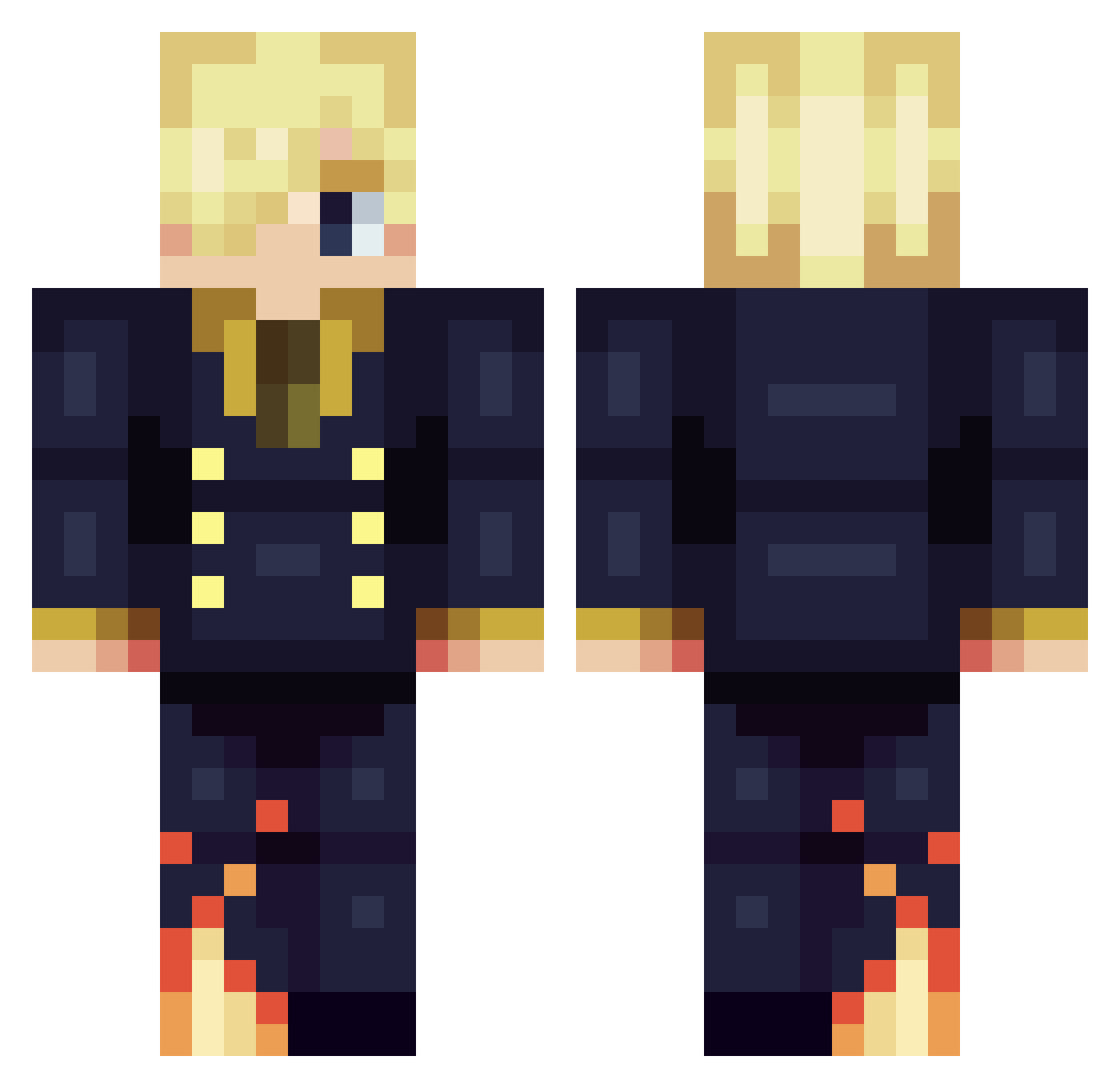
Current Minecraft skin of the player ginko51, loaded from the official Mojang API. Rotate the 3D model with your mouse or finger, then download the skin as a PNG file and use it in Minecraft: Bedrock Edition or Java Edition for free. When ginko51 changes their skin, this page updates automatically and the old skin stays in the history below.
Other players with this skin (306)
ginko51 was the 294th player we have seen with this skin, first spotted on 13.10.2026. The same skin was seen on these players. Open a nickname to see their current skin and skin history.
 Eikyy WPeibolW Cip47 Szaszqa FriendshipCheeta DBCOOPER17 NOTS8 Lafaiko 4eyvx Goriren2803 Eisyu1002 shabjdeed00 LazuraGaming ItharDePhilae Boss_Slayer101 Mygalon01_ __KK__ yasinyagmur0 VINSMOG Lensslo Yikersssssssss Mikatsuki512 noitceneZ Bilunk Ahmed_III Zuzules tobE_Asta Has3l Gaodiaz 89justgame Kynigth CenturyCR DuranJ AADC1 BANDITODU44 ChocWave enzovo polish_leniviec nevvermind7 KyngKez LucoMachado oliverbajo Crowleur MafiaCheese NTRM4N PeppaTheSimp Florlinoux uSleepz SuRVolTeR Pineappleartist BulochkaX xFESHx LoneRonin77 YuYu38711 toshi753 d1able yonkorng Selarch_ KlKI_TO Cremch
More Sanji Minecraft skins
How to install the ginko51 skin
- Press the Download button above to save the skin as a PNG file.
- Minecraft: Bedrock Edition (PE): open the Dressing Room from the main menu (or tap your character → Edit Character), go to Classic Skins → Owned, press the + (new skin) button, choose the downloaded PNG and pick the Classic (Steve) model. Works on PC and mobile; consoles cannot import custom skins.
- Minecraft: Java Edition: open the Minecraft Launcher, go to the Skins tab, click New Skin, load the PNG, pick the Classic (Steve) model and press Save & Use. You can also upload it at minecraft.net → Profile → Change Skin.
The skin does not show up after import - what should I do?
Restart Minecraft and open the Dressing Room again - imported skins sometimes appear only after a restart. Also make sure you selected the imported skin and picked the Classic (Steve) model.
Which model should I choose, Classic or Slim?
This skin is designed for the Classic (Steve) model. If you pick the wrong model, the arms of the skin will look stretched or squeezed.
Is the skin of ginko51 free to download?
Yes. Press Download, save the PNG file and use it in Minecraft: Bedrock Edition or Java Edition - no payment or registration needed. The skin also works on multiplayer servers and Realms.
More skins
Looking for more? Go back to all Minecraft skins and check the top skins of the week, month and all time, or find any player's skin by nickname.