
gg44sergey0909 - Minecraft Skins & Skin History
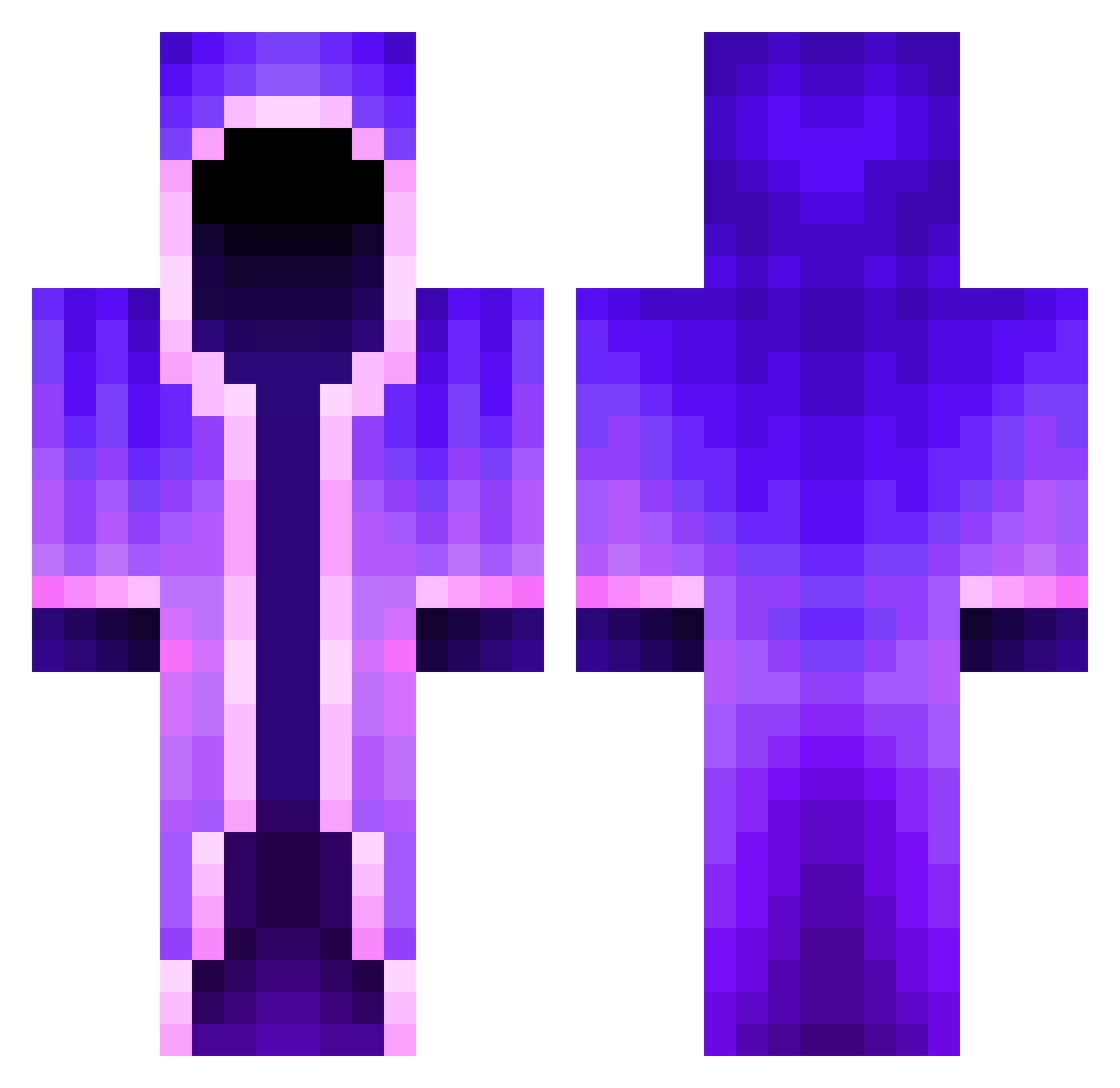
Current Minecraft skin of the player gg44sergey0909, loaded from the official Mojang API. Rotate the 3D model with your mouse or finger, then download the skin as a PNG file and use it in Minecraft: Bedrock Edition or Java Edition for free. When gg44sergey0909 changes their skin, this page updates automatically and the old skin stays in the history below.
Other players with this skin (462)
gg44sergey0909 was the 36th player we have seen with this skin, first spotted on 03.08.2026. The same skin was seen on these players. Open a nickname to see their current skin and skin history.
 ZombieSlayr289 Brocksperry595 Atlantianer Chipsandcheese Poweth Naulerino StoffelCartoffel Michoop Calzone15 Banado69 MFG40er ElioAlby kanin1412 PASKUALIN oloDerI NtolCulo Captain_C00per kevinjaa UgiBugiii Stella_0725 Kevng_ 0z1z unbeatfull1233 CHOCH3N bizi_de SassyTy thopa EMZZ27 Devon200 Jaxkzn AlanReturns syed_ways Stoisy_Boisy mQubed OllyAOmen RD4200 HATIS69 Hatsonus iGioDude Macboxxx chinChillng SnugGm5 Cascadia2023 GIGABJORN
 lorko1234 Warcaller_Eggnog BHOONAA_ SBilly01 water1904 voiders118 Drop_Shift_it FOXYNEL PredatorNelson benhall1269 ubu_ BrodieWool Itz_Gosho2 warsurvivor214 Anonycyn Dyztic
More Mage Minecraft skins
How to install the gg44sergey0909 skin
- Press the Download button above to save the skin as a PNG file.
- Minecraft: Bedrock Edition (PE): open the Dressing Room from the main menu (or tap your character → Edit Character), go to Classic Skins → Owned, press the + (new skin) button, choose the downloaded PNG and pick the Classic (Steve) model. Works on PC and mobile; consoles cannot import custom skins.
- Minecraft: Java Edition: open the Minecraft Launcher, go to the Skins tab, click New Skin, load the PNG, pick the Classic (Steve) model and press Save & Use. You can also upload it at minecraft.net → Profile → Change Skin.
The skin does not show up after import - what should I do?
Restart Minecraft and open the Dressing Room again - imported skins sometimes appear only after a restart. Also make sure you selected the imported skin and picked the Classic (Steve) model.
Which model should I choose, Classic or Slim?
This skin is designed for the Classic (Steve) model. If you pick the wrong model, the arms of the skin will look stretched or squeezed.
Is the skin of gg44sergey0909 free to download?
Yes. Press Download, save the PNG file and use it in Minecraft: Bedrock Edition or Java Edition - no payment or registration needed. The skin also works on multiplayer servers and Realms.
More skins
Looking for more? Go back to all Minecraft skins and check the top skins of the week, month and all time, or find any player's skin by nickname.