
florianbaron - Minecraft Skins & Skin History
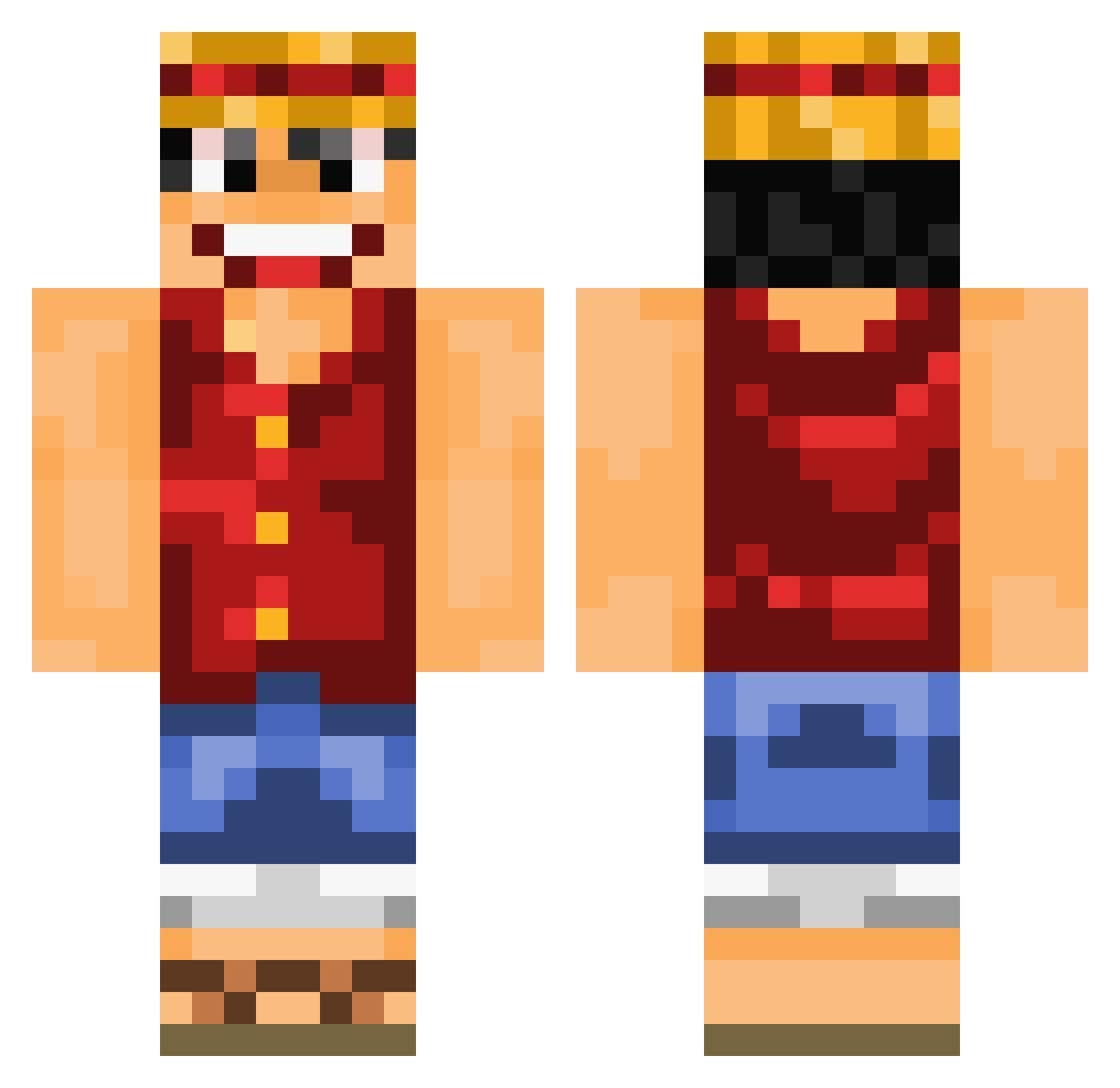
Current Minecraft skin of the player florianbaron, loaded from the official Mojang API. Rotate the 3D model with your mouse or finger, then download the skin as a PNG file and use it in Minecraft: Bedrock Edition or Java Edition for free. When florianbaron changes their skin, this page updates automatically and the old skin stays in the history below.
Other players with this skin (891)
florianbaron was the 438th player we have seen with this skin, first spotted on 13.09.2026. The same skin was seen on these players. Open a nickname to see their current skin and skin history.
 benum_c dagocraft nredain majintom Ruffinator T___Blank___T Trafalgar_Lynch AlvaroGamer5 Peppel1409 Joghurt1990 Schulbus WildCatWrestler PepinosMc Navinatore OsaSA1 iFaGoZ Heartsz Patrickulous FabiUltimate IvinatorxD Zahanffxi jjescamilla Puttycat93 Ruffy215 Capino1893 Ragowell Troltz prince_algerien Snickerskeks calydu33 rohrkoma TheNickrocks Toto78 SirClydus Phonkaa aholybagel BenumC KelioNx big0920 Ninho045 Ruslan_54 _Andrenalin ypsy ipok91 Gary_Winthorpe giriasu Wayward_Pines Ludodu57 Radiantphoenix stonkogto MrBlogger Dr_Fatzert_008 Dextro DemoFire Kekep67 Rhaellios Akujinn01 Dougydoo bluebandsss ICECUBE12344
More Luffy Minecraft skins
How to install the florianbaron skin
- Press the Download button above to save the skin as a PNG file.
- Minecraft: Bedrock Edition (PE): open the Dressing Room from the main menu (or tap your character → Edit Character), go to Classic Skins → Owned, press the + (new skin) button, choose the downloaded PNG and pick the Classic (Steve) model. Works on PC and mobile; consoles cannot import custom skins.
- Minecraft: Java Edition: open the Minecraft Launcher, go to the Skins tab, click New Skin, load the PNG, pick the Classic (Steve) model and press Save & Use. You can also upload it at minecraft.net → Profile → Change Skin.
The skin does not show up after import - what should I do?
Restart Minecraft and open the Dressing Room again - imported skins sometimes appear only after a restart. Also make sure you selected the imported skin and picked the Classic (Steve) model.
Which model should I choose, Classic or Slim?
This skin is designed for the Classic (Steve) model. If you pick the wrong model, the arms of the skin will look stretched or squeezed.
Is the skin of florianbaron free to download?
Yes. Press Download, save the PNG file and use it in Minecraft: Bedrock Edition or Java Edition - no payment or registration needed. The skin also works on multiplayer servers and Realms.
More skins
Looking for more? Go back to all Minecraft skins and check the top skins of the week, month and all time, or find any player's skin by nickname.