
flaviuuthefirsts - Minecraft Skins & Skin History
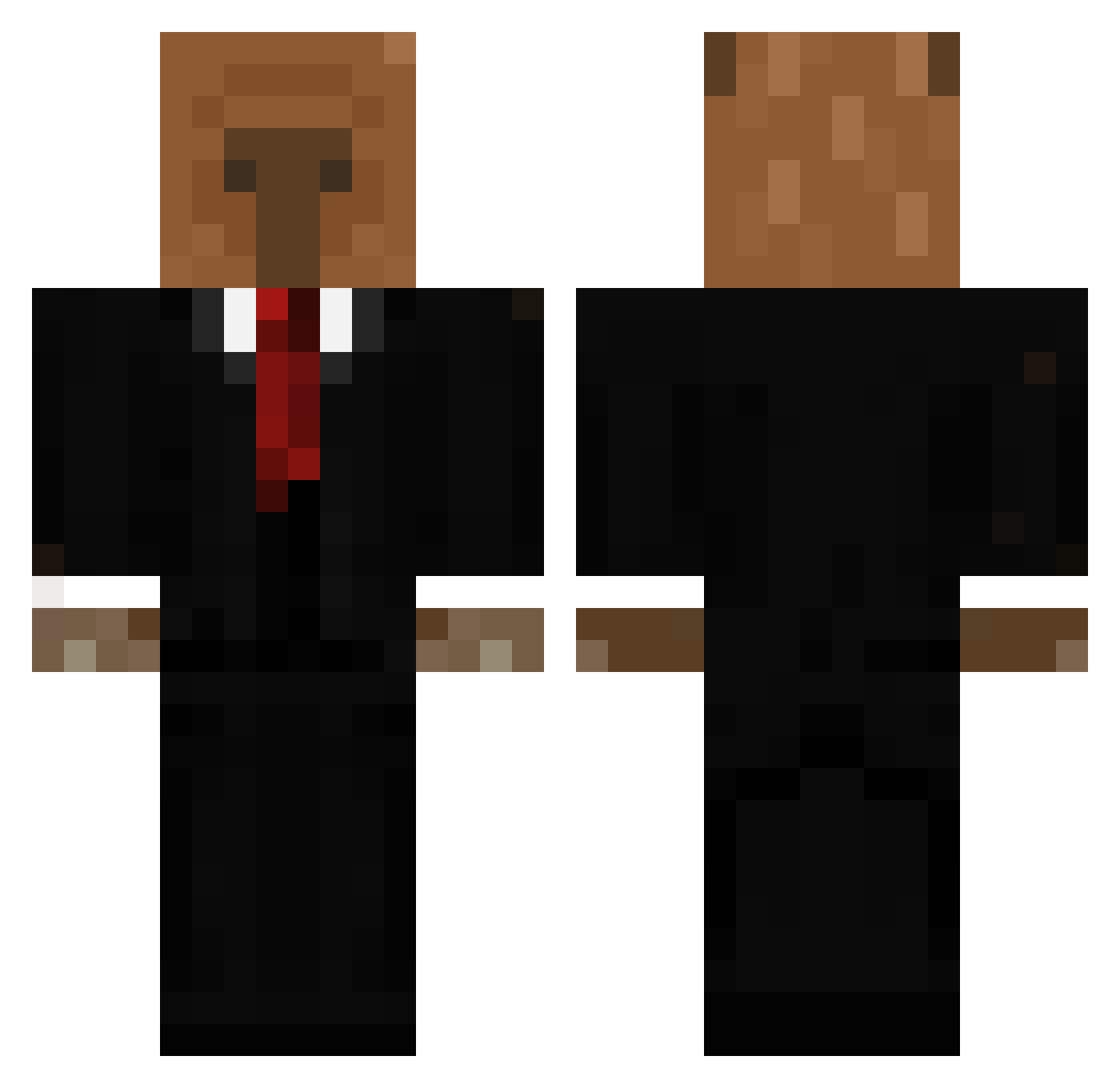
Current Minecraft skin of the player flaviuuthefirsts, loaded from the official Mojang API. Rotate the 3D model with your mouse or finger, then download the skin as a PNG file and use it in Minecraft: Bedrock Edition or Java Edition for free. When flaviuuthefirsts changes their skin, this page updates automatically and the old skin stays in the history below.
Other players with this skin (761)
flaviuuthefirsts was the 685th player we have seen with this skin, first spotted on 09.11.2026. The same skin was seen on these players. Open a nickname to see their current skin and skin history.
 sergiofishy gotaaglock Dlmrk05 DasPikachu MikeT207 Gurros fortoon zaitrone EGGMMAN TsouBis Jesseboy1807 Pandabonito2 fristi_man ichtomek OLYIX guappo400 Galaxy_uri BohmannN ExpertTickp1 ElVavaldo ma_ah1018 Savolainen Gariglio Wuestensohn1 DeathSynchronize itaytrt Necher_nech Pxzitep bobr_0 da2jedek Brother_Bilo69 MUNEAKI95 Ohcarb Leox0 MR_Silver139 PALADIN22822 Ey_Qui Adam_kr NottyDan ilovecheese404 Roflcopter__XD BebitoFefe hxpp BlackKimchi10 seba0928 jst_liza douthedev Jakedemo dmsehdehdehd SpookyTemplar JohnTotor CYLINDROWA BubatzBanaus frnj CapyCreativo SansyBurger ghego_ Brennerzin fruityunicorns _Mateo_LBN_
More Business Bear Minecraft skins
See all 11 Business Bear skins
How to install the flaviuuthefirsts skin
- Press the Download button above to save the skin as a PNG file.
- Minecraft: Bedrock Edition (PE): open the Dressing Room from the main menu (or tap your character → Edit Character), go to Classic Skins → Owned, press the + (new skin) button, choose the downloaded PNG and pick the Classic (Steve) model. Works on PC and mobile; consoles cannot import custom skins.
- Minecraft: Java Edition: open the Minecraft Launcher, go to the Skins tab, click New Skin, load the PNG, pick the Classic (Steve) model and press Save & Use. You can also upload it at minecraft.net → Profile → Change Skin.
The skin does not show up after import - what should I do?
Restart Minecraft and open the Dressing Room again - imported skins sometimes appear only after a restart. Also make sure you selected the imported skin and picked the Classic (Steve) model.
Which model should I choose, Classic or Slim?
This skin is designed for the Classic (Steve) model. If you pick the wrong model, the arms of the skin will look stretched or squeezed.
Is the skin of flaviuuthefirsts free to download?
Yes. Press Download, save the PNG file and use it in Minecraft: Bedrock Edition or Java Edition - no payment or registration needed. The skin also works on multiplayer servers and Realms.
More skins
Looking for more? Go back to all Minecraft skins and check the top skins of the week, month and all time, or find any player's skin by nickname.