
door_matt123 - Minecraft Skins & Skin History
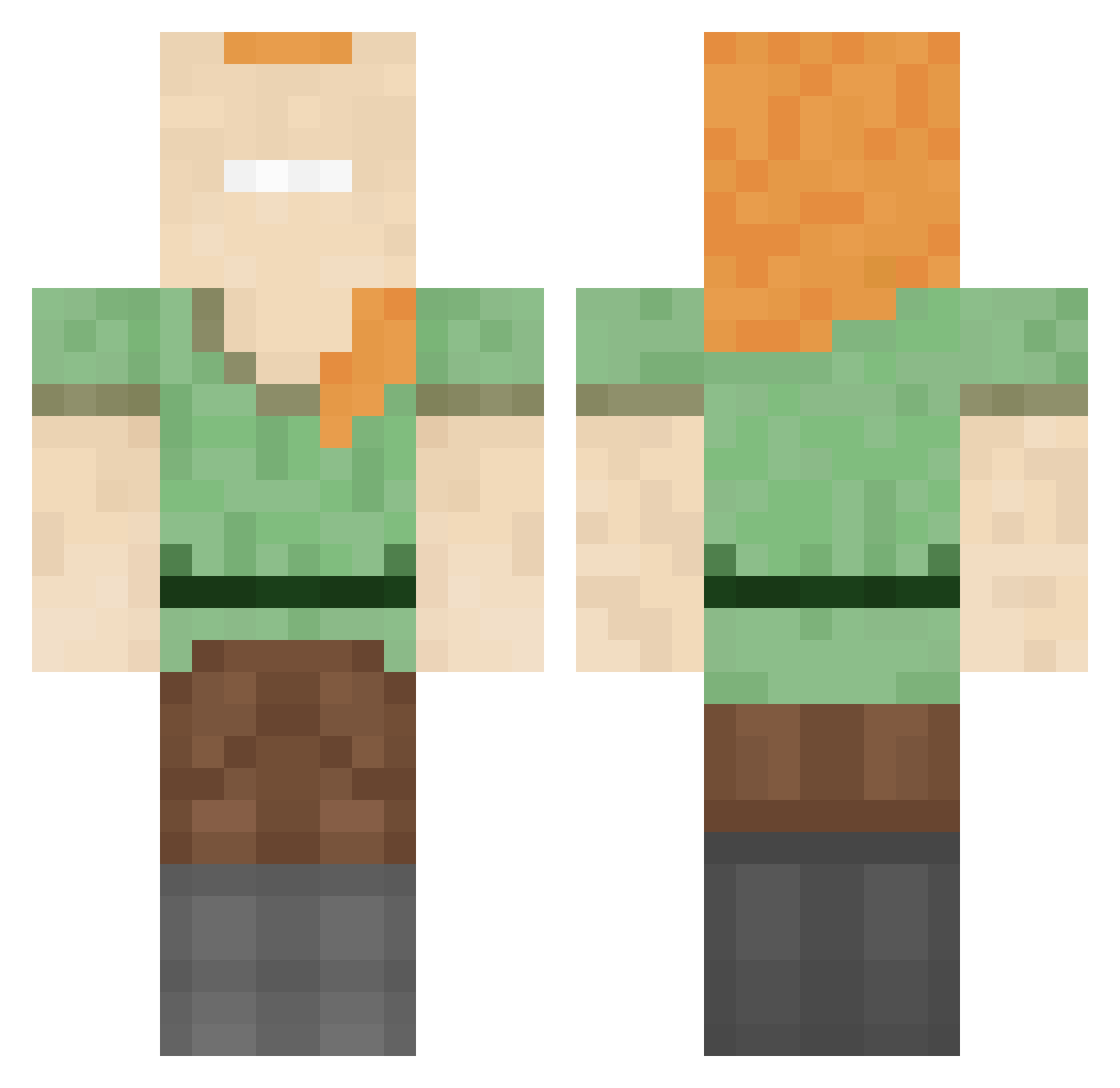
Current Minecraft skin of the player door_matt123, loaded from the official Mojang API. Rotate the 3D model with your mouse or finger, then download the skin as a PNG file and use it in Minecraft: Bedrock Edition or Java Edition for free. When door_matt123 changes their skin, this page updates automatically and the old skin stays in the history below.
Other players with this skin (146)
door_matt123 was the 75th player we have seen with this skin, first spotted on 22.09.2026. The same skin was seen on these players. Open a nickname to see their current skin and skin history.
 TheEmperor123 pogscar223 mamalulu_ irishcre4m TheRedstoner321 Tooooooooooona prodelliot peder700 frecame11 pehzy CTEBUS2007 M00sterzz imzcy DandinouTeBzzzz Amean mooalienbaby EpicGamer472 ywnb EliasRaphael08 GUYINGLE Crazy_Boy_01 _Fazii_ Gamingtron1234 fritochilipie TomisOffline georgiaconlan jthyiodtj homegung VerzSichtbar denfinakosan Sm1le_Is_Loser TC5454 playOmg2 Algorhythmics stutzkestutzke The_Sin_Lord RuhRohRaggyyyyyy Unheilig666 RogerBoule asdfghjkl0418 Enoking0909 Ingtita MamyGotTheDrip pooh_0822 LostAtSeaWorld SLYxMONSTER Orochi_Doppo Just_Build_Lol SantiJesus19 Par0wUz KARASIZAMURAI Miesi Caden_ph HardGame2001 Darkfinst7567 Analoq Steely994 TNTDerek Yo_0429 sacnut
How to install the door_matt123 skin
- Press the Download button above to save the skin as a PNG file.
- Minecraft: Bedrock Edition (PE): open the Dressing Room from the main menu (or tap your character → Edit Character), go to Classic Skins → Owned, press the + (new skin) button, choose the downloaded PNG and pick the Classic (Steve) model. Works on PC and mobile; consoles cannot import custom skins.
- Minecraft: Java Edition: open the Minecraft Launcher, go to the Skins tab, click New Skin, load the PNG, pick the Classic (Steve) model and press Save & Use. You can also upload it at minecraft.net → Profile → Change Skin.
The skin does not show up after import - what should I do?
Restart Minecraft and open the Dressing Room again - imported skins sometimes appear only after a restart. Also make sure you selected the imported skin and picked the Classic (Steve) model.
Which model should I choose, Classic or Slim?
This skin is designed for the Classic (Steve) model. If you pick the wrong model, the arms of the skin will look stretched or squeezed.
Is the skin of door_matt123 free to download?
Yes. Press Download, save the PNG file and use it in Minecraft: Bedrock Edition or Java Edition - no payment or registration needed. The skin also works on multiplayer servers and Realms.
More skins
Looking for more? Go back to all Minecraft skins and check the top skins of the week, month and all time, or find any player's skin by nickname.