
divijlkzz - Minecraft Skins & Skin History
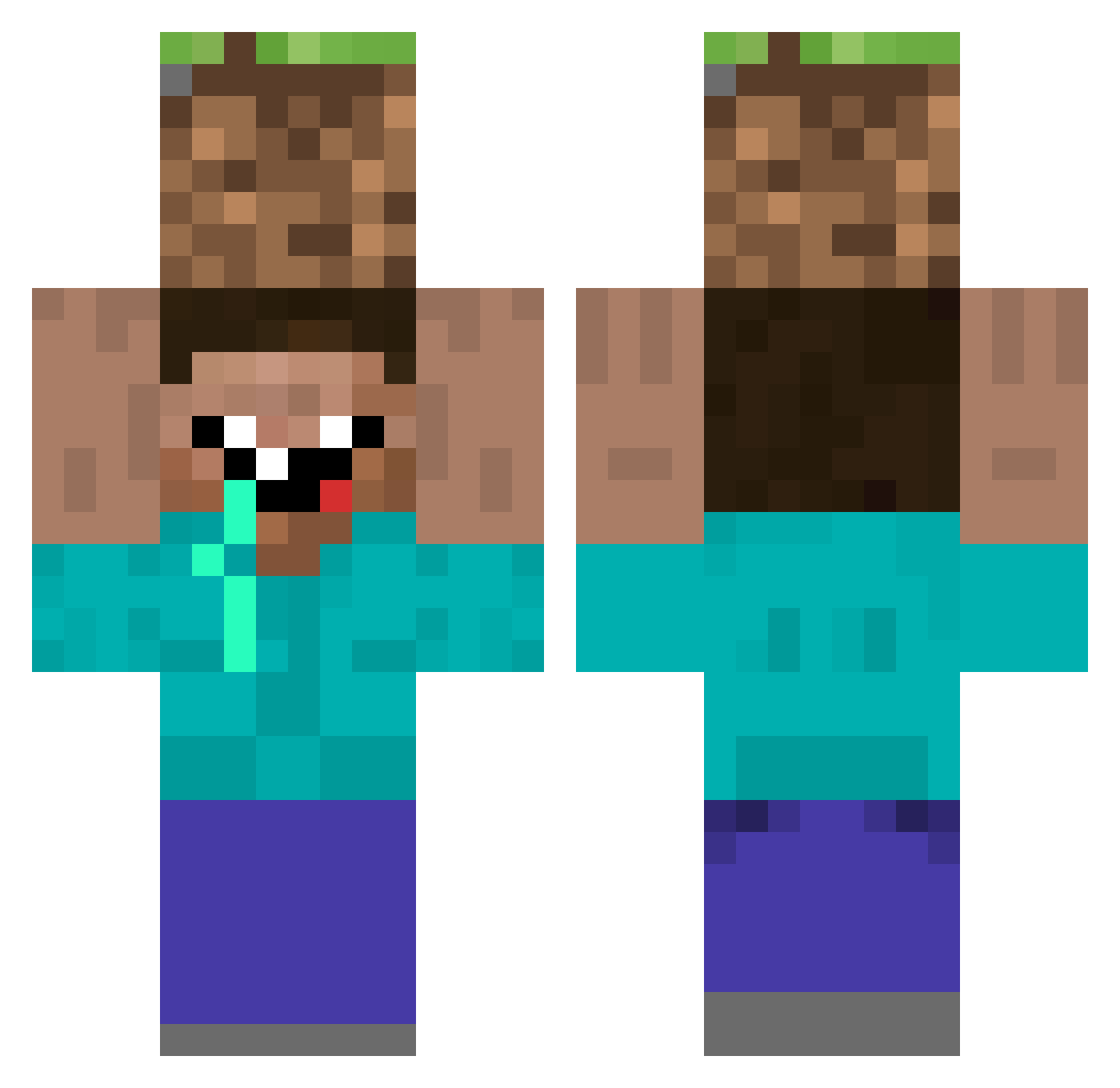
Current Minecraft skin of the player divijlkzz, loaded from the official Mojang API. Rotate the 3D model with your mouse or finger, then download the skin as a PNG file and use it in Minecraft: Bedrock Edition or Java Edition for free. When divijlkzz changes their skin, this page updates automatically and the old skin stays in the history below.
Other players with this skin (307)
divijlkzz was the 182nd player we have seen with this skin, first spotted on 24.09.2026. The same skin was seen on these players. Open a nickname to see their current skin and skin history.
 Adiboux AllsehendesAuge cex__machine dogukancinek Hihunsong BrowniesRAwsome fabi38 kossorizzz MAT_PO _Kazutoshi Umuthan_Bey AryeV kul53059 Cosmoman Vicko123 pewpew27 ItsH4ku nathans72 Savoieman BigPsycho A5j3c6 takasi00 GT86_G8 StormBlitzInc ssmcute10 Matt0803 Gimoddi1 Flo6784 Alban_84 gyu_gyu27 Moran9999 presidentproob Beedvin RedHoodBeast Waleer EastSang AuroraFF Mr_Name10 pastelcomfrango andety Carter19455 Huwmen AleMari14 ZahTheGreat Whatzitt00ya Vlonely0ne Olivayey linzx1010 bopenafe rubenjiji rayhsu1124 Stumpy_Long_Nose Frenan Rovein VoteUkeep NONOMOTO moelava DopeRev_ mauricebob hijirinngo
More Dirt Block Minecraft skins
How to install the divijlkzz skin
- Press the Download button above to save the skin as a PNG file.
- Minecraft: Bedrock Edition (PE): open the Dressing Room from the main menu (or tap your character → Edit Character), go to Classic Skins → Owned, press the + (new skin) button, choose the downloaded PNG and pick the Classic (Steve) model. Works on PC and mobile; consoles cannot import custom skins.
- Minecraft: Java Edition: open the Minecraft Launcher, go to the Skins tab, click New Skin, load the PNG, pick the Classic (Steve) model and press Save & Use. You can also upload it at minecraft.net → Profile → Change Skin.
The skin does not show up after import - what should I do?
Restart Minecraft and open the Dressing Room again - imported skins sometimes appear only after a restart. Also make sure you selected the imported skin and picked the Classic (Steve) model.
Which model should I choose, Classic or Slim?
This skin is designed for the Classic (Steve) model. If you pick the wrong model, the arms of the skin will look stretched or squeezed.
Is the skin of divijlkzz free to download?
Yes. Press Download, save the PNG file and use it in Minecraft: Bedrock Edition or Java Edition - no payment or registration needed. The skin also works on multiplayer servers and Realms.
More skins
Looking for more? Go back to all Minecraft skins and check the top skins of the week, month and all time, or find any player's skin by nickname.