
dajugija - Minecraft Skins & Skin History
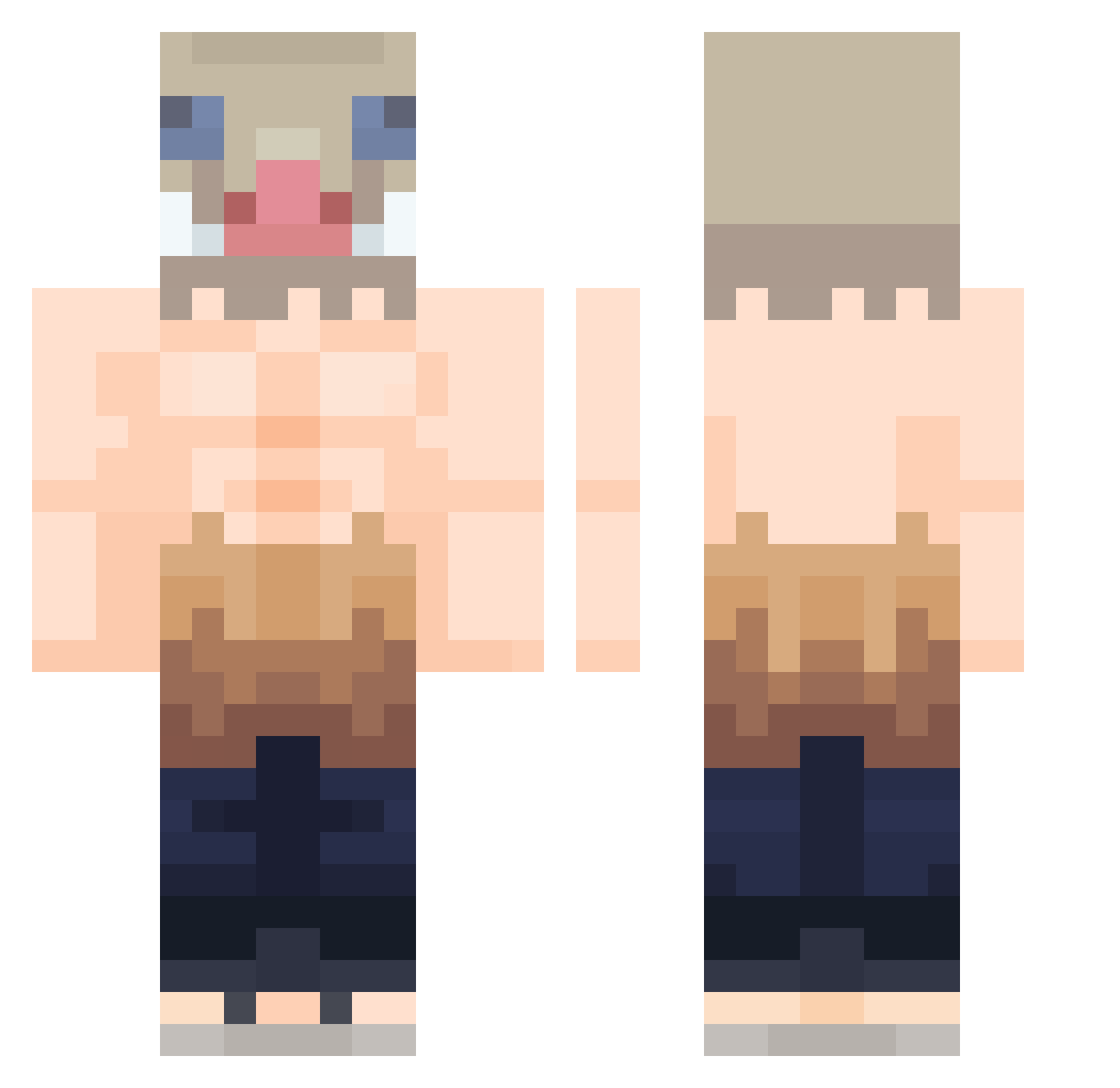
Current Minecraft skin of the player dajugija, loaded from the official Mojang API. Rotate the 3D model with your mouse or finger, then download the skin as a PNG file and use it in Minecraft: Bedrock Edition or Java Edition for free. When dajugija changes their skin, this page updates automatically and the old skin stays in the history below.
Other players with this skin (520)
dajugija was the 461st player we have seen with this skin, first spotted on 07.11.2026. The same skin was seen on these players. Open a nickname to see their current skin and skin history.
 Kyliann1810 Fontimer bennettdontknow JosoJtr Takemi_ Asaile iker03 PromemRauder Landing_Brownie LeXsFtP davschutz Atorrez20 Meepow91 giammei99 nappyxd TPalto farouklebg abriellemp jokerlou GGstuida nosoupforyou143 FeDrick00 sagivnasi DYROFFICIAL KR_dime Budweiser_Man lubiecement123 ehdghks141 Grifter32 L1keCc ItzAmeen Nalhun_ FabRico07 Manu_tr8n LucasLeonardo Maroon_Inferno zizon29 Balzer2017 qkrrbxoo lololezerg Caphey Inosukebb YurgonClopurbals Lopzit0 Castllll MetalAsh20 _R0BlN_ Gottes_Gamer ArousedAcorn SuperGetAway Escak Inosuuke uchxha05 Armadillegg In0sukee terrorwalker345 DarkHuunter OrMkS Char_RV skinnyflakko
More Boar Mask Minecraft skins
How to install the dajugija skin
- Press the Download button above to save the skin as a PNG file.
- Minecraft: Bedrock Edition (PE): open the Dressing Room from the main menu (or tap your character → Edit Character), go to Classic Skins → Owned, press the + (new skin) button, choose the downloaded PNG and pick the Classic (Steve) model. Works on PC and mobile; consoles cannot import custom skins.
- Minecraft: Java Edition: open the Minecraft Launcher, go to the Skins tab, click New Skin, load the PNG, pick the Classic (Steve) model and press Save & Use. You can also upload it at minecraft.net → Profile → Change Skin.
The skin does not show up after import - what should I do?
Restart Minecraft and open the Dressing Room again - imported skins sometimes appear only after a restart. Also make sure you selected the imported skin and picked the Classic (Steve) model.
Which model should I choose, Classic or Slim?
This skin is designed for the Classic (Steve) model. If you pick the wrong model, the arms of the skin will look stretched or squeezed.
Is the skin of dajugija free to download?
Yes. Press Download, save the PNG file and use it in Minecraft: Bedrock Edition or Java Edition - no payment or registration needed. The skin also works on multiplayer servers and Realms.
More skins
Looking for more? Go back to all Minecraft skins and check the top skins of the week, month and all time, or find any player's skin by nickname.