
corpse_xyz - Minecraft Skins & Skin History
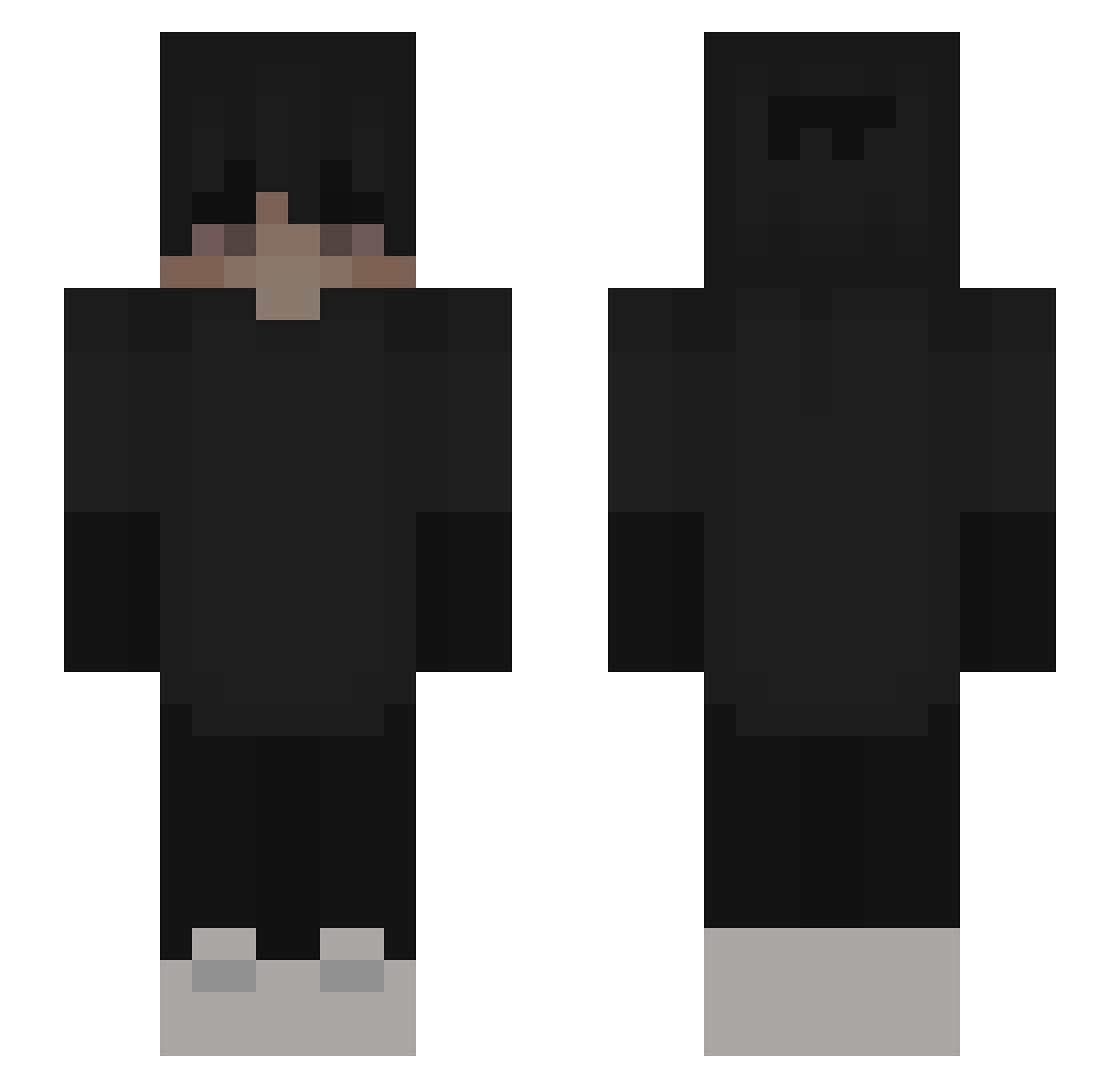
Current Minecraft skin of the player corpse_xyz, loaded from the official Mojang API. Rotate the 3D model with your mouse or finger, then download the skin as a PNG file and use it in Minecraft: Bedrock Edition or Java Edition for free. When corpse_xyz changes their skin, this page updates automatically and the old skin stays in the history below.
Other players with this skin (163)
corpse_xyz was the 132nd player we have seen with this skin, first spotted on 02.10.2026. The same skin was seen on these players. Open a nickname to see their current skin and skin history.
 SadBoyRain LuciDream23 zlotuwa__ Morfeuu KITISHANDSOME xQT3v __Renzz__ last_nurik cFisch LostMember _DxcK_XD MuLc_ placcuniowy ILostMySelff Cotroxz Secret_gfgh nosMc XenoTakaya Lertzyy vetementsuser InfinitySegx Dominikx42 ghyy AARTURR0SS Hard_rolex EfeTwuNN Ch4yOff 456x Arshalll igors12 Kluxie Sorlance CuteyChoco bensaida Shefelt Nasrina LXzon dongwook_ MickGamer45 Podloga___ moocow10101 Newardx _shltho pepen212 xOrPlayz Qarix Oldschoolrage katzekatze_ MyGir1CheatiN Sk1pe Zoby13 Blixysant Leffeh SleepyShade crRazvan chille1 danieloxd Ztomasx xCreno0 WhyBeGood
More Emo Minecraft skins
How to install the corpse_xyz skin
- Press the Download button above to save the skin as a PNG file.
- Minecraft: Bedrock Edition (PE): open the Dressing Room from the main menu (or tap your character → Edit Character), go to Classic Skins → Owned, press the + (new skin) button, choose the downloaded PNG and pick the Slim (Alex) model. Works on PC and mobile; consoles cannot import custom skins.
- Minecraft: Java Edition: open the Minecraft Launcher, go to the Skins tab, click New Skin, load the PNG, pick the Slim (Alex) model and press Save & Use. You can also upload it at minecraft.net → Profile → Change Skin.
The skin does not show up after import - what should I do?
Restart Minecraft and open the Dressing Room again - imported skins sometimes appear only after a restart. Also make sure you selected the imported skin and picked the Slim (Alex) model.
Which model should I choose, Classic or Slim?
This skin is designed for the Slim (Alex) model. If you pick the wrong model, the arms of the skin will look stretched or squeezed.
Is the skin of corpse_xyz free to download?
Yes. Press Download, save the PNG file and use it in Minecraft: Bedrock Edition or Java Edition - no payment or registration needed. The skin also works on multiplayer servers and Realms.
More skins
Looking for more? Go back to all Minecraft skins and check the top skins of the week, month and all time, or find any player's skin by nickname.