
carlosanchez - Minecraft Skins & Skin History
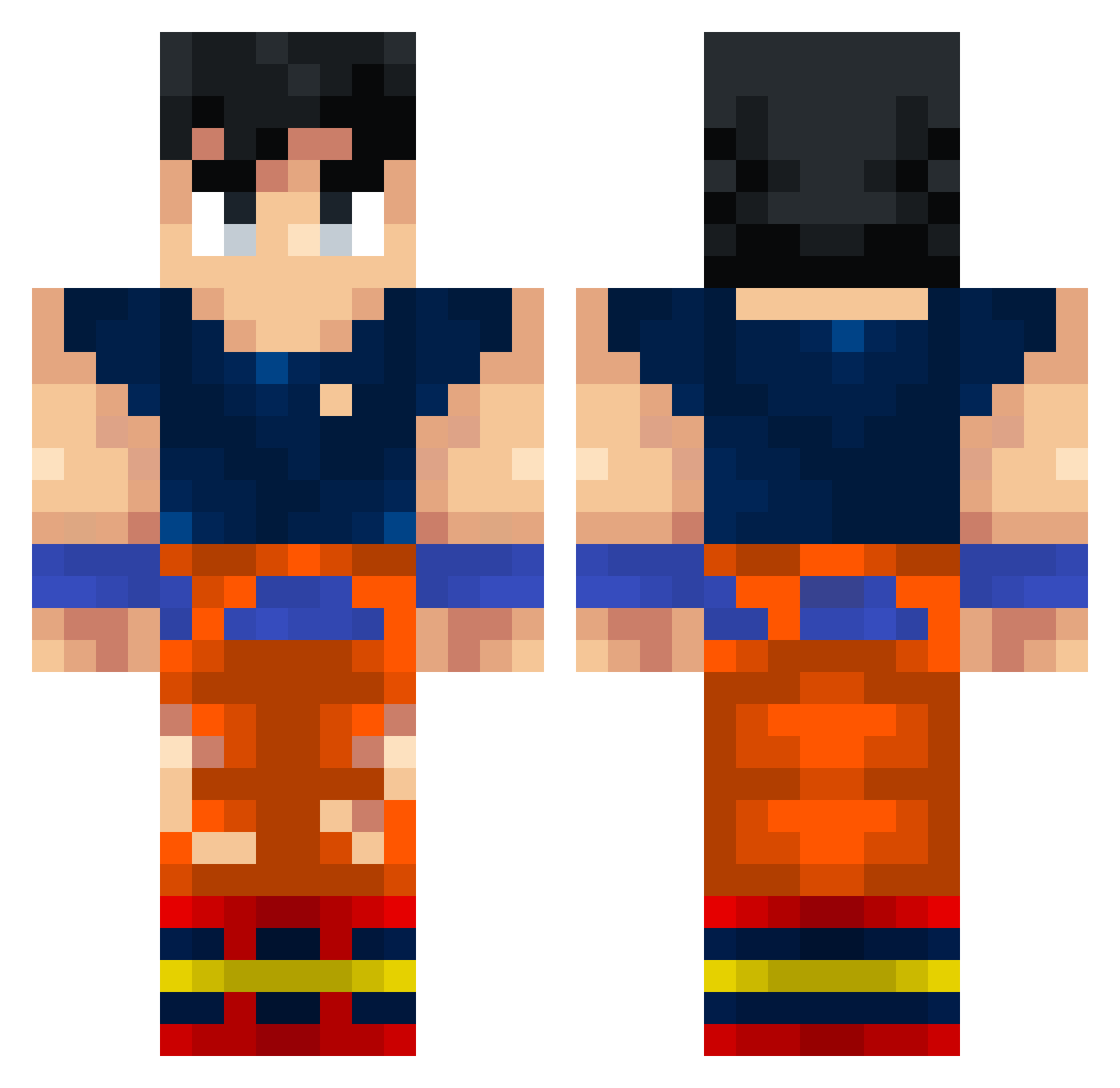
Current Minecraft skin of the player carlosanchez, loaded from the official Mojang API. Rotate the 3D model with your mouse or finger, then download the skin as a PNG file and use it in Minecraft: Bedrock Edition or Java Edition for free. When carlosanchez changes their skin, this page updates automatically and the old skin stays in the history below.
Other players with this skin (338)
carlosanchez was the 180th player we have seen with this skin, first spotted on 22.09.2026. The same skin was seen on these players. Open a nickname to see their current skin and skin history.
 Ntxbb inakox burgerbolle iTeo2285 nichjimmy Carlos320 NeryHD27 WachoPistola crazykiddo63 markoen10 Ferreira13 Phud3141 Pacioccone04 gogoTR XxmaxixXx angryfireballrob Spiderine005 OlPlays jankenpo DeltaCapo YoSoySeba soporter_2010 TrollMan264 SweatyFishsticks SussySlime69 Nukeclearbomb Ian_wil ItzN3xion senpai_dev Vakshe ClassicPizza DaViper101 EPC_11 Os_Salwen sporcizia kimdmdrk prabh_ss8 Fiditogei kakaroth MichoElGato jarek513 Tote_87 Siwerzak AbramMC azhair1 Nanovik rFrazzles Bjaos Darwinpro jdt000 Wzrd_69 RoyNinety7Ward colemedaddy Me19rt marrtincho KrigerDelle iansantos14jorge Pohlinho82 Neizz12 Turlough2011
More Goku Minecraft skins
How to install the carlosanchez skin
- Press the Download button above to save the skin as a PNG file.
- Minecraft: Bedrock Edition (PE): open the Dressing Room from the main menu (or tap your character → Edit Character), go to Classic Skins → Owned, press the + (new skin) button, choose the downloaded PNG and pick the Classic (Steve) model. Works on PC and mobile; consoles cannot import custom skins.
- Minecraft: Java Edition: open the Minecraft Launcher, go to the Skins tab, click New Skin, load the PNG, pick the Classic (Steve) model and press Save & Use. You can also upload it at minecraft.net → Profile → Change Skin.
The skin does not show up after import - what should I do?
Restart Minecraft and open the Dressing Room again - imported skins sometimes appear only after a restart. Also make sure you selected the imported skin and picked the Classic (Steve) model.
Which model should I choose, Classic or Slim?
This skin is designed for the Classic (Steve) model. If you pick the wrong model, the arms of the skin will look stretched or squeezed.
Is the skin of carlosanchez free to download?
Yes. Press Download, save the PNG file and use it in Minecraft: Bedrock Edition or Java Edition - no payment or registration needed. The skin also works on multiplayer servers and Realms.
More skins
Looking for more? Go back to all Minecraft skins and check the top skins of the week, month and all time, or find any player's skin by nickname.