
beanbandit42069 - Minecraft Skins & Skin History
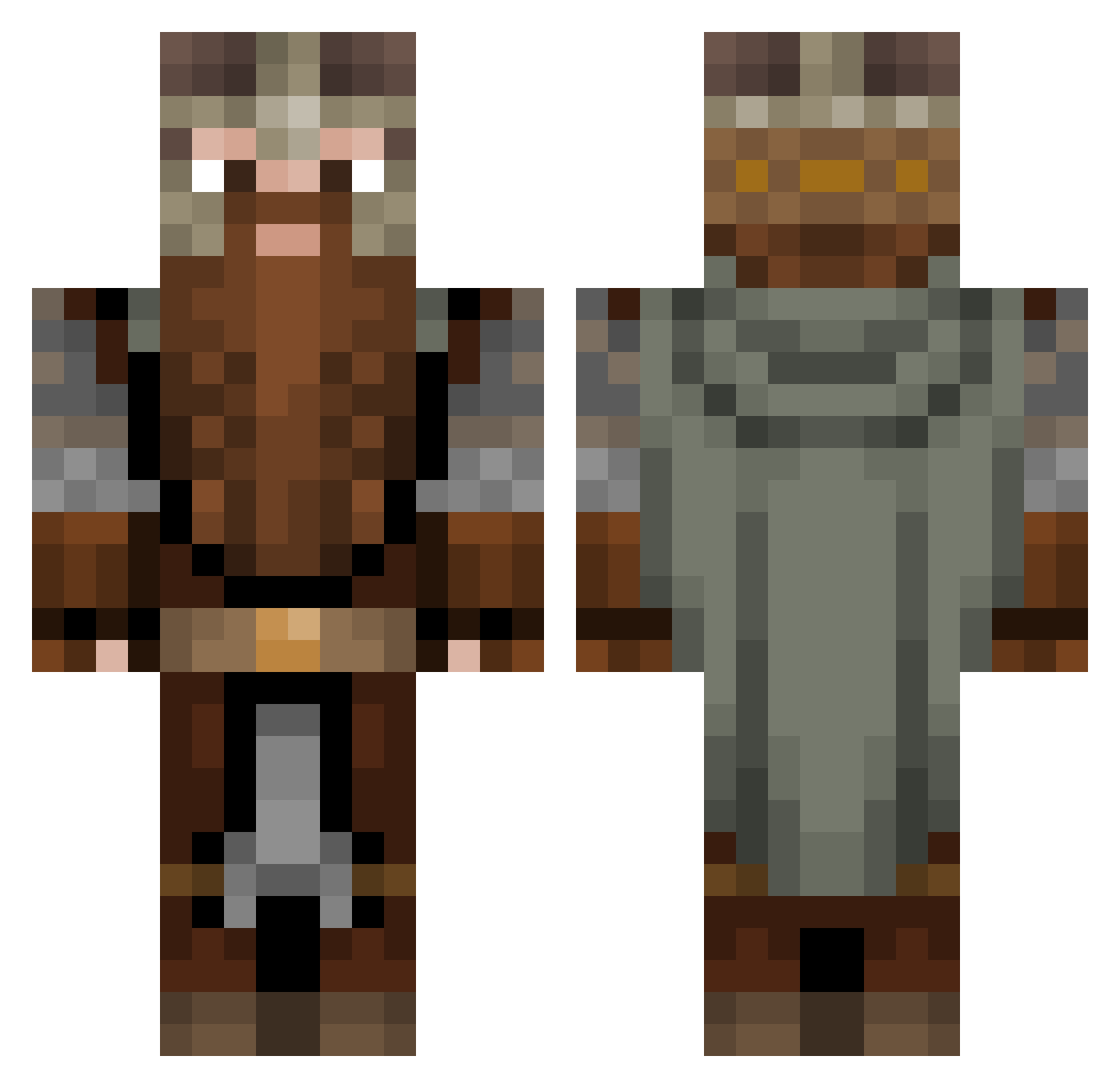
Current Minecraft skin of the player beanbandit42069, loaded from the official Mojang API. Rotate the 3D model with your mouse or finger, then download the skin as a PNG file and use it in Minecraft: Bedrock Edition or Java Edition for free. When beanbandit42069 changes their skin, this page updates automatically and the old skin stays in the history below.
Other players with this skin (1308)
beanbandit42069 was the 1164th player we have seen with this skin, first spotted on 08.11.2026. The same skin was seen on these players. Open a nickname to see their current skin and skin history.
 ALEJANDROXX80 ropaque SentinelEquinox SwagDaddy_69 Atmaspada Kevtaine Spooky696 Zeleid The_MSO Oertschl Altoniio RomoFin Siyabend68 II8Fenrir8II Gunner44444 Nehima97 TheSmetiiee AEVMax Am_Nolan jonn70 LOCKLIN07 _Vaperz_ maartje__ omegablackX Dumb_Monkey012 a7704 ThatsLOTTAdamag lcbbl TuFtY123 Litwicki ArteModzz SunicaTheKing Feuergollem sampa449 AresPL TheKingSmasher guigui241000 Talaveraa Banditks joops69 punysausages killerleon4 DurinUn Prapic1 Tytanos ShoopEH M4THY45 War2king SuperOmnes VonWalrusberger Chuckjirka Jorritio PolaireBear Skjoldraudr GrimGardener Allgrimm Hardnlong Sativaz Ronhaaan AndiieeWand
More Dwarf Minecraft skins
How to install the beanbandit42069 skin
- Press the Download button above to save the skin as a PNG file.
- Minecraft: Bedrock Edition (PE): open the Dressing Room from the main menu (or tap your character → Edit Character), go to Classic Skins → Owned, press the + (new skin) button, choose the downloaded PNG and pick the Classic (Steve) model. Works on PC and mobile; consoles cannot import custom skins.
- Minecraft: Java Edition: open the Minecraft Launcher, go to the Skins tab, click New Skin, load the PNG, pick the Classic (Steve) model and press Save & Use. You can also upload it at minecraft.net → Profile → Change Skin.
The skin does not show up after import - what should I do?
Restart Minecraft and open the Dressing Room again - imported skins sometimes appear only after a restart. Also make sure you selected the imported skin and picked the Classic (Steve) model.
Which model should I choose, Classic or Slim?
This skin is designed for the Classic (Steve) model. If you pick the wrong model, the arms of the skin will look stretched or squeezed.
Is the skin of beanbandit42069 free to download?
Yes. Press Download, save the PNG file and use it in Minecraft: Bedrock Edition or Java Edition - no payment or registration needed. The skin also works on multiplayer servers and Realms.
More skins
Looking for more? Go back to all Minecraft skins and check the top skins of the week, month and all time, or find any player's skin by nickname.