
awesome2_dude - Minecraft Skins & Skin History
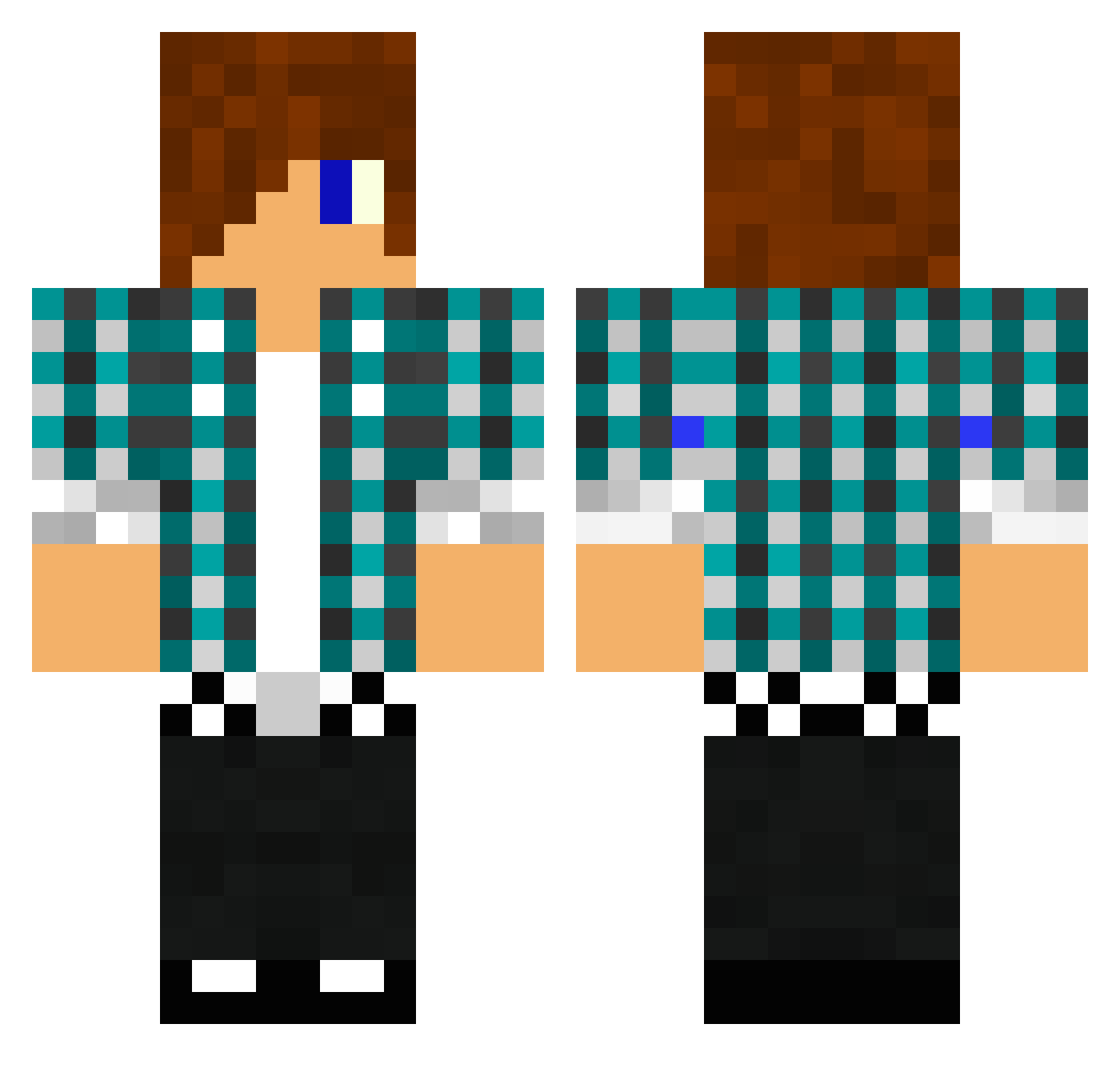
Current Minecraft skin of the player awesome2_dude, loaded from the official Mojang API. Rotate the 3D model with your mouse or finger, then download the skin as a PNG file and use it in Minecraft: Bedrock Edition or Java Edition for free. When awesome2_dude changes their skin, this page updates automatically and the old skin stays in the history below.
Other players with this skin (1476)
awesome2_dude was the 393rd player we have seen with this skin, first spotted on 24.08.2026. The same skin was seen on these players. Open a nickname to see their current skin and skin history.
 LurtoW 3conor pascal32321 newabsolute reese2x AwesomeDayne taylorwill27 Fingersfishy ozyperryschlu15 DDHHTT KingKick100 maxmaxmax0906 mixmaker345 hardcore358 KarlManuel Duude9 k86686867 Rune_Fang Alterix phil629 Dalton53 DennisFCZ coolcraft006 northie1111 Exny CollyBunny itsDougxD lukasbss Laxanoh Tyrellgoldsbery mikae9 acklop2001 Misirs xReaperkiller NorthernStar_AUS dmluther17 spiffyhawk1313 iggyBrendan mastercrafter22 knight_rider99 build1211 Bull_L johe2005 DJDreamz100 Shammy45 jolieblanc Devil528 PonchoPilatos tat789 smking59 Blazzingwinner KingChubacca NicoJusto22 nikke2640 revbot46 basici BlackRa98 KillerGamingLP zeilki2 DeesShop
More Emo Minecraft skins
How to install the awesome2_dude skin
- Press the Download button above to save the skin as a PNG file.
- Minecraft: Bedrock Edition (PE): open the Dressing Room from the main menu (or tap your character → Edit Character), go to Classic Skins → Owned, press the + (new skin) button, choose the downloaded PNG and pick the Classic (Steve) model. Works on PC and mobile; consoles cannot import custom skins.
- Minecraft: Java Edition: open the Minecraft Launcher, go to the Skins tab, click New Skin, load the PNG, pick the Classic (Steve) model and press Save & Use. You can also upload it at minecraft.net → Profile → Change Skin.
The skin does not show up after import - what should I do?
Restart Minecraft and open the Dressing Room again - imported skins sometimes appear only after a restart. Also make sure you selected the imported skin and picked the Classic (Steve) model.
Which model should I choose, Classic or Slim?
This skin is designed for the Classic (Steve) model. If you pick the wrong model, the arms of the skin will look stretched or squeezed.
Is the skin of awesome2_dude free to download?
Yes. Press Download, save the PNG file and use it in Minecraft: Bedrock Edition or Java Edition - no payment or registration needed. The skin also works on multiplayer servers and Realms.
More skins
Looking for more? Go back to all Minecraft skins and check the top skins of the week, month and all time, or find any player's skin by nickname.