
attack9124 - Minecraft Skins & Skin History
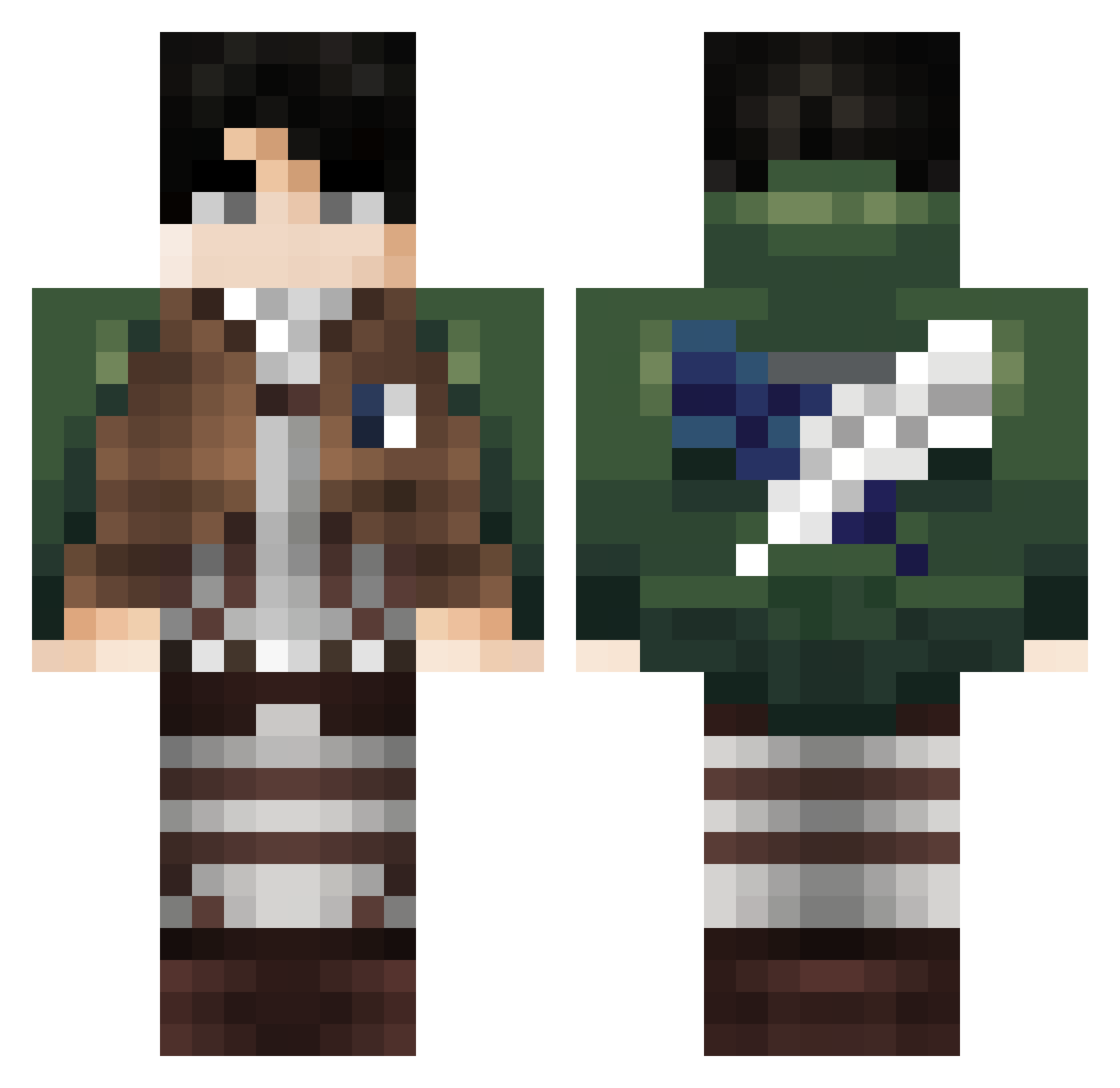
Current Minecraft skin of the player attack9124, loaded from the official Mojang API. Rotate the 3D model with your mouse or finger, then download the skin as a PNG file and use it in Minecraft: Bedrock Edition or Java Edition for free. When attack9124 changes their skin, this page updates automatically and the old skin stays in the history below.
Other players with this skin (310)
attack9124 was the 147th player we have seen with this skin, first spotted on 05.09.2026. The same skin was seen on these players. Open a nickname to see their current skin and skin history.
 JeevesXIII vector34 szajzaa Kaaidoh PandaGuyBD2010 RoundedJungle71 Apache808 Hadess2323 Pipe017 Xyez1 DUDUNGTAC BrotherOfVirus thetroy _a1RoN JoSsAp21 RogerRoger83 Carlongas simosban HansPaul21 HoshinoAi151 xCinkix Grifigga GN_8726 huguuurr LeviAckerman0341 PoidsPlumeu LFLUCA16K pipitoung Cristianverr southkoreaguy59 Jojolapin888 Kokomak Oadix Leckerman CLMQPLR CEMORAKUJO LeviOUSSA Sunfish22 Ertonyy_ Utmosthail ODeusPereira LegendHacker69 whoLevi Nakai__ ValdemarDoUber Ji_C_M9 jindori501 Warrior2371 azfdk Ryu_poyo adamol1345789 Clown_k Chema12345 serat34 Pellac7 AayanSHzD HE_IS_YOU D7m_2 DeGeib tapintoyou
More Levi Ackerman Minecraft skins
See all 172 Levi Ackerman skins
How to install the attack9124 skin
- Press the Download button above to save the skin as a PNG file.
- Minecraft: Bedrock Edition (PE): open the Dressing Room from the main menu (or tap your character → Edit Character), go to Classic Skins → Owned, press the + (new skin) button, choose the downloaded PNG and pick the Classic (Steve) model. Works on PC and mobile; consoles cannot import custom skins.
- Minecraft: Java Edition: open the Minecraft Launcher, go to the Skins tab, click New Skin, load the PNG, pick the Classic (Steve) model and press Save & Use. You can also upload it at minecraft.net → Profile → Change Skin.
The skin does not show up after import - what should I do?
Restart Minecraft and open the Dressing Room again - imported skins sometimes appear only after a restart. Also make sure you selected the imported skin and picked the Classic (Steve) model.
Which model should I choose, Classic or Slim?
This skin is designed for the Classic (Steve) model. If you pick the wrong model, the arms of the skin will look stretched or squeezed.
Is the skin of attack9124 free to download?
Yes. Press Download, save the PNG file and use it in Minecraft: Bedrock Edition or Java Edition - no payment or registration needed. The skin also works on multiplayer servers and Realms.
More skins
Looking for more? Go back to all Minecraft skins and check the top skins of the week, month and all time, or find any player's skin by nickname.