
arnie1942 - Minecraft Skins & Skin History
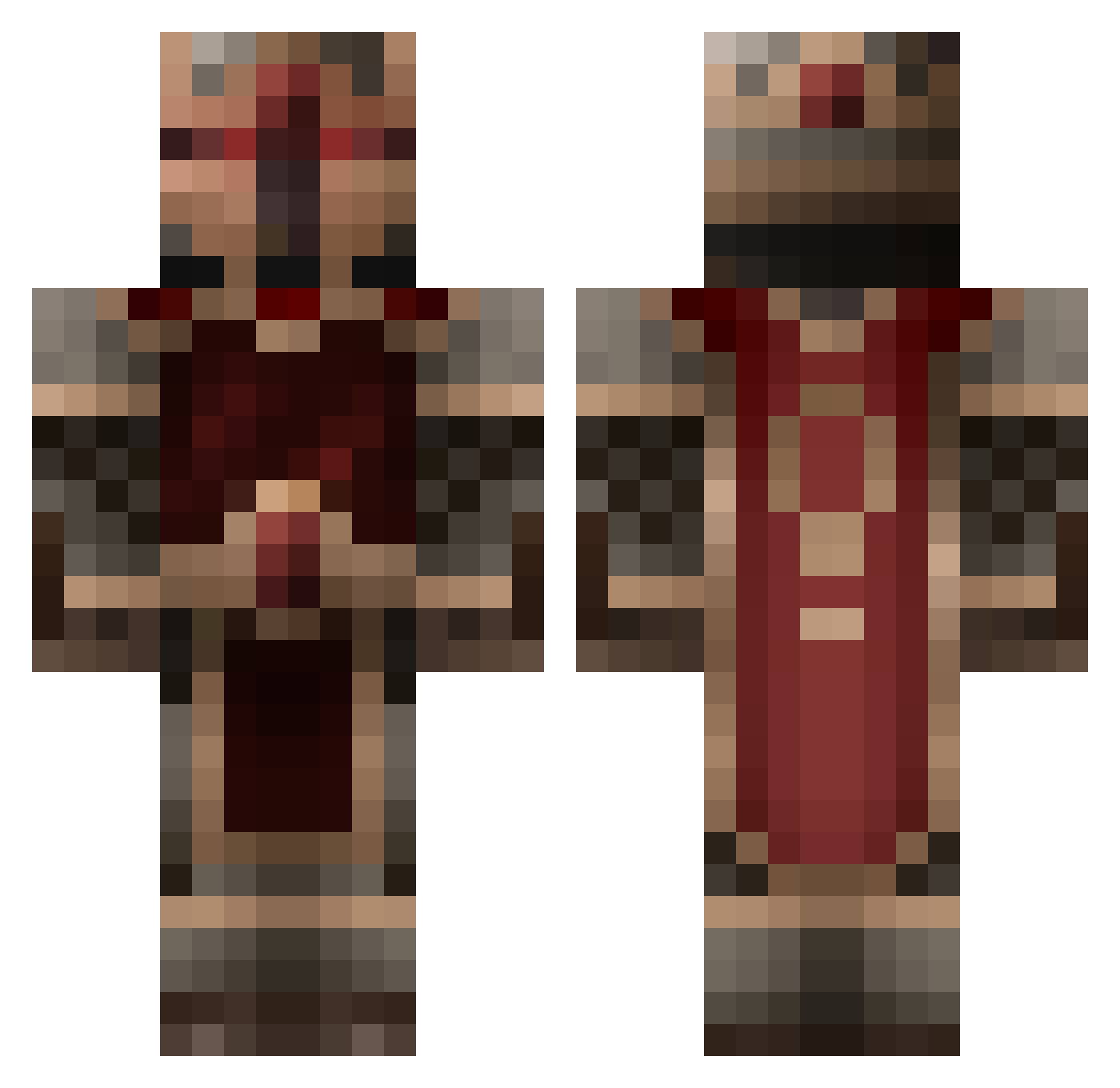
Current Minecraft skin of the player arnie1942, loaded from the official Mojang API. Rotate the 3D model with your mouse or finger, then download the skin as a PNG file and use it in Minecraft: Bedrock Edition or Java Edition for free. When arnie1942 changes their skin, this page updates automatically and the old skin stays in the history below.
Other players with this skin (856)
arnie1942 was the 636th player we have seen with this skin, first spotted on 18.10.2026. The same skin was seen on these players. Open a nickname to see their current skin and skin history.
 Kempain krabat797 SeedBox WinterWarfare Aze_Zaz MaxiOO7 crazywhite tuckerduddleston samc5555 giantpuffball Chaotic_Pendulum Benne_banana leo8700 DrFrodlheimer Saintd0g Firefoot155 Krackattack TheBasil MY_ASS_STINKS Andus007 Dankarkitty King_Nada aric1961 windrunner73 Bann_the_Man sammo111 barnaby714 Fanfare maxibuck1998 artix00001 Antonioo1998 lucaoddis WeskerSTARS twilizer2 Dewarius eme3637 jakeboy15 Ravenso Makman22 Tshkotei elliotth18 FilthyLolicon zecke12b Elrohir97 mikkelater Goldenpackage iziii78 StrikeRevolution Zombicat SavaWolf fabian123x juan_kamber OlympeCrafter schwarzwolf07 Dirtyphonics zaortharain Dworfenstein Wolffe001 Austin_LY Strikeman5
More Knight Minecraft skins
How to install the arnie1942 skin
- Press the Download button above to save the skin as a PNG file.
- Minecraft: Bedrock Edition (PE): open the Dressing Room from the main menu (or tap your character → Edit Character), go to Classic Skins → Owned, press the + (new skin) button, choose the downloaded PNG and pick the Classic (Steve) model. Works on PC and mobile; consoles cannot import custom skins.
- Minecraft: Java Edition: open the Minecraft Launcher, go to the Skins tab, click New Skin, load the PNG, pick the Classic (Steve) model and press Save & Use. You can also upload it at minecraft.net → Profile → Change Skin.
The skin does not show up after import - what should I do?
Restart Minecraft and open the Dressing Room again - imported skins sometimes appear only after a restart. Also make sure you selected the imported skin and picked the Classic (Steve) model.
Which model should I choose, Classic or Slim?
This skin is designed for the Classic (Steve) model. If you pick the wrong model, the arms of the skin will look stretched or squeezed.
Is the skin of arnie1942 free to download?
Yes. Press Download, save the PNG file and use it in Minecraft: Bedrock Edition or Java Edition - no payment or registration needed. The skin also works on multiplayer servers and Realms.
More skins
Looking for more? Go back to all Minecraft skins and check the top skins of the week, month and all time, or find any player's skin by nickname.