
aguero_1908 - Minecraft Skins & Skin History
Current Minecraft skin of the player aguero_1908, loaded from the official Mojang API. Rotate the 3D model with your mouse or finger, then download the skin as a PNG file and use it in Minecraft: Bedrock Edition or Java Edition for free. When aguero_1908 changes their skin, this page updates automatically and the old skin stays in the history below.
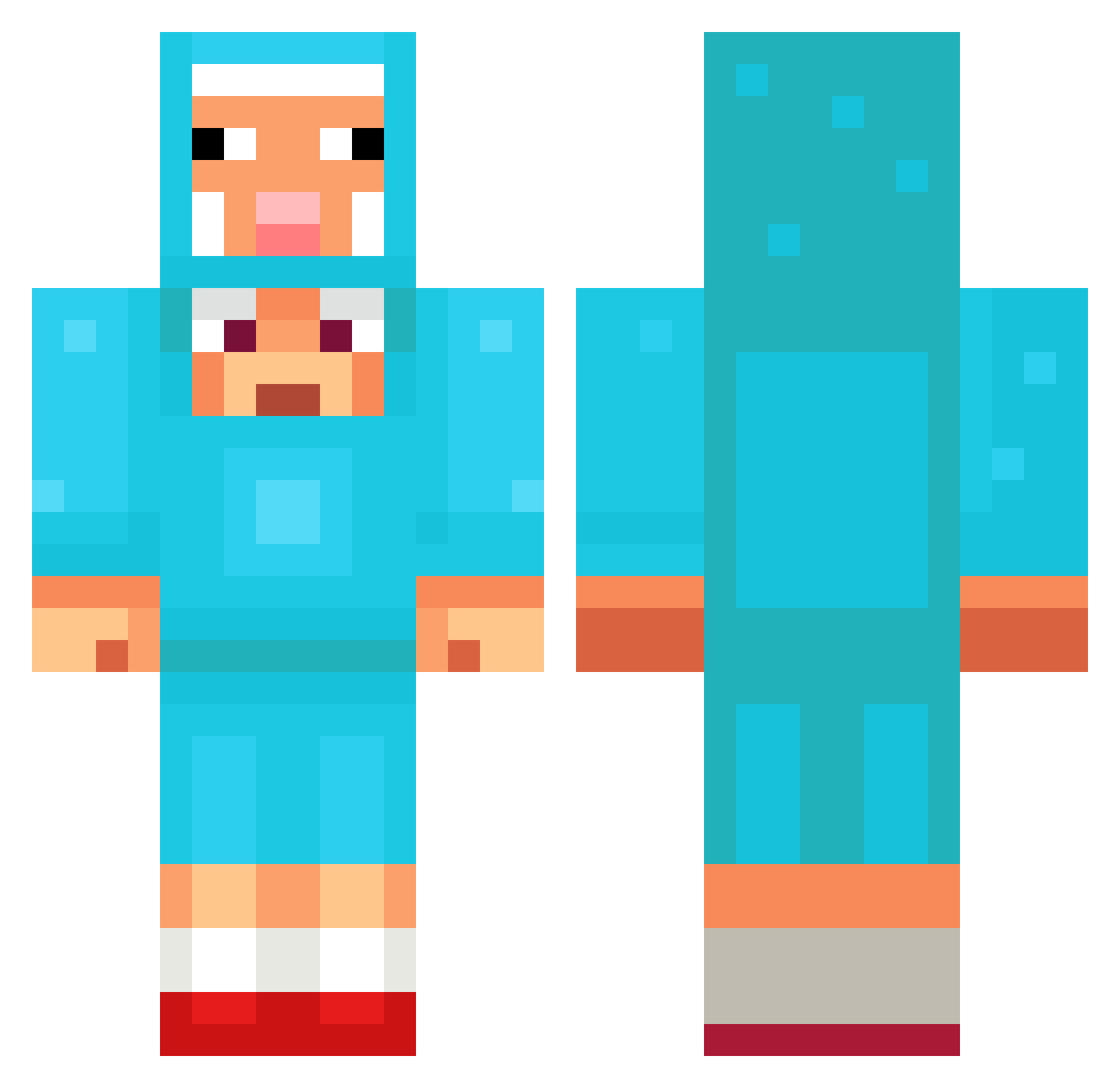
Other players with this skin (1097)
aguero_1908 was the 260th player we have seen with this skin, first spotted on 16.08.2026. The same skin was seen on these players. Open a nickname to see their current skin and skin history.
 Glozui timblays
 AnimalSea837255 Kessauce shkaper2 JamesTLV1
 inturnz_
 LiwKu
LiwKu big_duck_boy Leo12012015 oxlongg forestfriend666 Sampo0306 vonekun TheoM2007 Motorrad_ 19989 rodolfo99 Bauskis__ Llanww fartisia43 Cherrylady43 totalynotjeffrey
 Ricsi_14 Catgirl_u_6 DSchatt AliWasi Hyuk_burger GraVeX06 jkhkn OmerGamer24 Trunkmonkey99 benbenji
 cozypack rileyfam25 Smizy15 OverRank
 Dazon_ xxdavidxxz AgentJENDD materialu _brn shadow372 AidsPatient69 iker1432 nmx46 RoboJit FinerBasil37301 Twinkami CuloMuncherJr SHK2305
 5starEvan 4KTMinty Avocado929 lildiorxx F1kos_Senpai
 massivecrack2012 VENA30 jerrybruh Taz84700
More Sheep Minecraft skins
How to install the aguero_1908 skin
- Press the Download button above to save the skin as a PNG file.
- Minecraft: Bedrock Edition (PE): open the Dressing Room from the main menu (or tap your character → Edit Character), go to Classic Skins → Owned, press the + (new skin) button, choose the downloaded PNG and pick the Classic (Steve) model. Works on PC and mobile; consoles cannot import custom skins.
- Minecraft: Java Edition: open the Minecraft Launcher, go to the Skins tab, click New Skin, load the PNG, pick the Classic (Steve) model and press Save & Use. You can also upload it at minecraft.net → Profile → Change Skin.
The skin does not show up after import - what should I do?
Restart Minecraft and open the Dressing Room again - imported skins sometimes appear only after a restart. Also make sure you selected the imported skin and picked the Classic (Steve) model.
Which model should I choose, Classic or Slim?
This skin is designed for the Classic (Steve) model. If you pick the wrong model, the arms of the skin will look stretched or squeezed.
Is the skin of aguero_1908 free to download?
Yes. Press Download, save the PNG file and use it in Minecraft: Bedrock Edition or Java Edition - no payment or registration needed. The skin also works on multiplayer servers and Realms.
More skins
Looking for more? Go back to all Minecraft skins and check the top skins of the week, month and all time, or find any player's skin by nickname.