
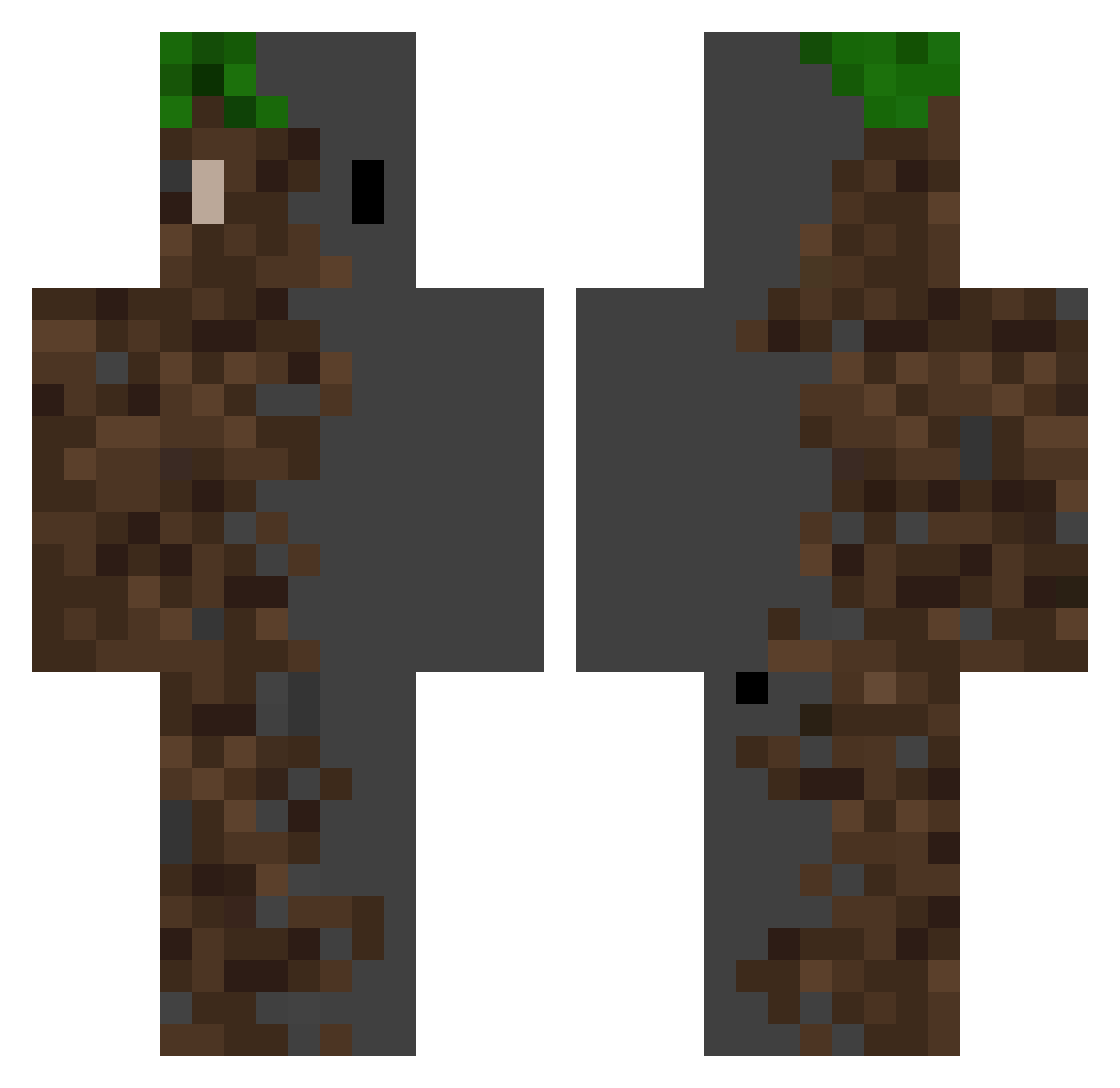
Current Minecraft skin of the player ZianB, loaded from the official Mojang API. Rotate the 3D model with your mouse or finger, then download the skin as a PNG file and use it in Minecraft: Bedrock Edition or Java Edition for free. When ZianB changes their skin, this page updates automatically and the old skin stays in the history below.
Other players with this skin (409)
ZianB was the 192nd player we have seen with this skin, first spotted on 05.09.2026. The same skin was seen on these players. Open a nickname to see their current skin and skin history.
 Gyumin1 Shooting_G MaXxXElite pogi15 qKayzen Lizzy_fh ZolvMC Pessoa20 lv_p Cold_A27 RG_ReapR _IDankI_ SneakyC1000 MigAleSan HighDjam roromanv CreeperIce OMEGA7CN jimin0710 aruin8 kerimans 58efecan elreyproman GhostM00n
 gaetanx98 SamiDM Hirossaan SIX66SHEEP NordoBarato monpoo WalluE AMANKIND FJX520 Yanakiiin vPoisxn xiao_gong666 OpenZeus3835908 Moko_komo Sila_22 airhead818 Morc85 Aurora156 KronoxTheReal Danielleid99 Djo1707 Thrush911 VMP0310 Tren45 Eldelicioso7v7 Joseph070916 Nima19D EmeraldSaucer46
 ParraDMC RS_AGE Lysart Awlin09 Kingkevthebest GX_9900_BlackAsh Mixer1003 c6ll
More Dirt Block Minecraft skins
How to install the ZianB skin
- Press the Download button above to save the skin as a PNG file.
- Minecraft: Bedrock Edition (PE): open the Dressing Room from the main menu (or tap your character → Edit Character), go to Classic Skins → Owned, press the + (new skin) button, choose the downloaded PNG and pick the Classic (Steve) model. Works on PC and mobile; consoles cannot import custom skins.
- Minecraft: Java Edition: open the Minecraft Launcher, go to the Skins tab, click New Skin, load the PNG, pick the Classic (Steve) model and press Save & Use. You can also upload it at minecraft.net → Profile → Change Skin.
The skin does not show up after import - what should I do?
Restart Minecraft and open the Dressing Room again - imported skins sometimes appear only after a restart. Also make sure you selected the imported skin and picked the Classic (Steve) model.
Which model should I choose, Classic or Slim?
This skin is designed for the Classic (Steve) model. If you pick the wrong model, the arms of the skin will look stretched or squeezed.
Is the skin of ZianB free to download?
Yes. Press Download, save the PNG file and use it in Minecraft: Bedrock Edition or Java Edition - no payment or registration needed. The skin also works on multiplayer servers and Realms.
More skins
Looking for more? Go back to all Minecraft skins and check the top skins of the week, month and all time, or find any player's skin by nickname.