
Zetroxz - Minecraft Skins & Skin History
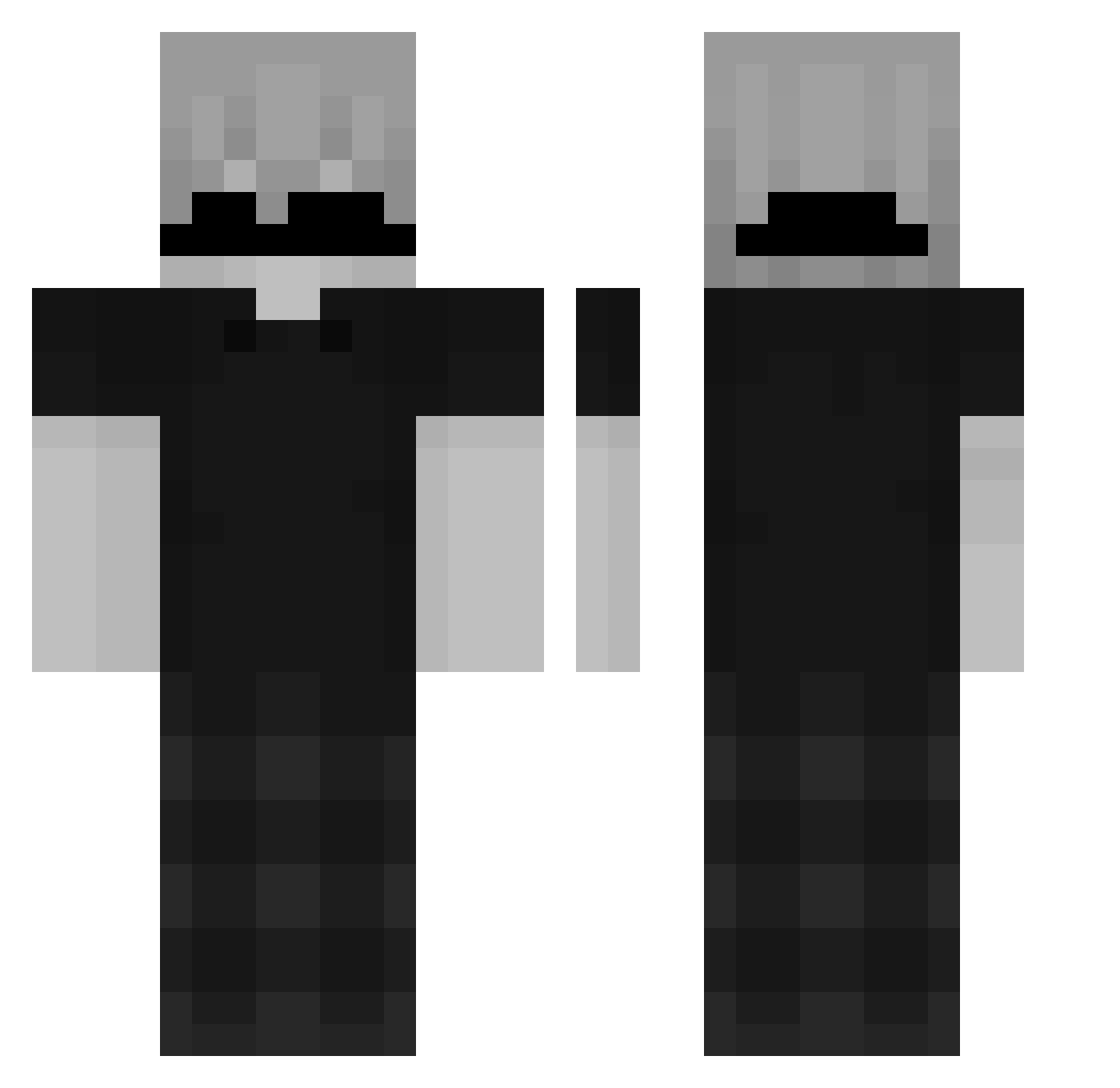
Current Minecraft skin of the player Zetroxz, loaded from the official Mojang API. Rotate the 3D model with your mouse or finger, then download the skin as a PNG file and use it in Minecraft: Bedrock Edition or Java Edition for free. When Zetroxz changes their skin, this page updates automatically and the old skin stays in the history below.
Other players with this skin (163)
Zetroxz was the 83rd player we have seen with this skin, first spotted on 26.09.2026. The same skin was seen on these players. Open a nickname to see their current skin and skin history.
 ItzdRealAli novacain3 Acendrado jose_luiz155 Lazoryn Minexos Unsteady_ FUNKYELEPHANT89 Kaushik181211 Player_0202 Rafhaa16 rohi1309 FallBoss_ ItzzSneaXx IamZio strikerpog PotionSlayer jhonvi011 Dropped_by_Iqex autoboots yerezdsd reassumes Jonas_686 tHeBeStPlayer___ P3ntr4keBW unrandom221 ThatBloodNight yowozo kryoxtz Jg_2390 guwerfy Wasserburg Kapliozo alimonydodger ItzStitchtoan Dohoney_71 DeadSkyZ0 saucpro64 K_Choki Zxjosue dtmlclm3 housty1910 Svartsjuka nicelowkey iTzPainn Sebasigma dxnzy Antoo33 LuizDKF sexy_viper tureconevida whymejasin RiftSlayer_2 NuLi_12 Mr_Blaster18 egehantkGG NOPONDX2 Fbxzz_ kreize yeet7099
How to install the Zetroxz skin
- Press the Download button above to save the skin as a PNG file.
- Minecraft: Bedrock Edition (PE): open the Dressing Room from the main menu (or tap your character → Edit Character), go to Classic Skins → Owned, press the + (new skin) button, choose the downloaded PNG and pick the Classic (Steve) model. Works on PC and mobile; consoles cannot import custom skins.
- Minecraft: Java Edition: open the Minecraft Launcher, go to the Skins tab, click New Skin, load the PNG, pick the Classic (Steve) model and press Save & Use. You can also upload it at minecraft.net → Profile → Change Skin.
The skin does not show up after import - what should I do?
Restart Minecraft and open the Dressing Room again - imported skins sometimes appear only after a restart. Also make sure you selected the imported skin and picked the Classic (Steve) model.
Which model should I choose, Classic or Slim?
This skin is designed for the Classic (Steve) model. If you pick the wrong model, the arms of the skin will look stretched or squeezed.
Is the skin of Zetroxz free to download?
Yes. Press Download, save the PNG file and use it in Minecraft: Bedrock Edition or Java Edition - no payment or registration needed. The skin also works on multiplayer servers and Realms.
More skins
Looking for more? Go back to all Minecraft skins and check the top skins of the week, month and all time, or find any player's skin by nickname.