
YNCEV - Minecraft Skins & Skin History
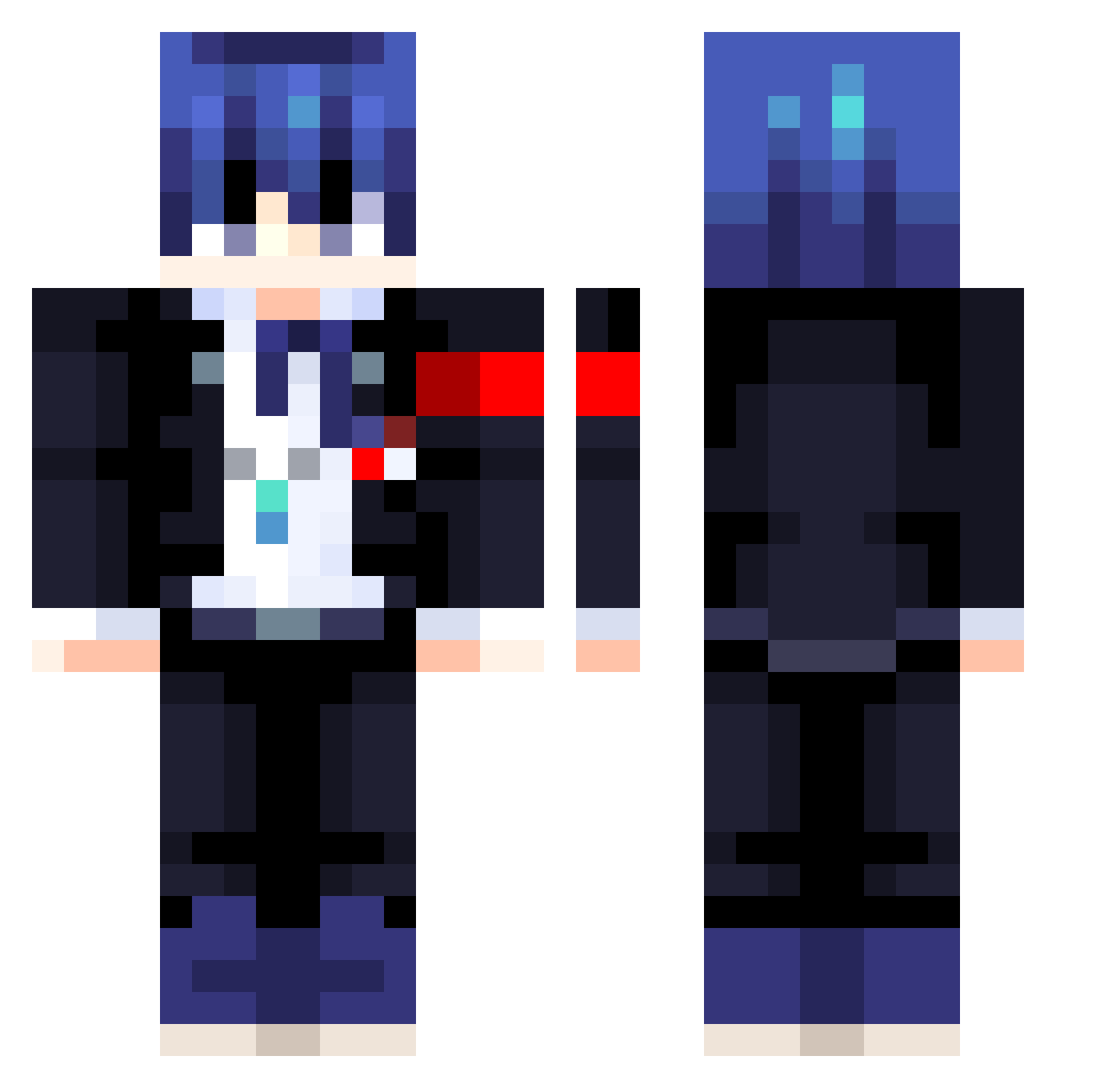
Current Minecraft skin of the player YNCEV, loaded from the official Mojang API. Rotate the 3D model with your mouse or finger, then download the skin as a PNG file and use it in Minecraft: Bedrock Edition or Java Edition for free. When YNCEV changes their skin, this page updates automatically and the old skin stays in the history below.
Other players with this skin (413)
YNCEV was the 218th player we have seen with this skin, first spotted on 18.09.2026. The same skin was seen on these players. Open a nickname to see their current skin and skin history.
 As1anP1ngu XxMakenshixX AZMHALP07 Papush10 Psychonamix DryifteR nomajonarres misatosus tamakon58 L3tttuce HyperMilo23 KOP_Milu Cris_VC Mrpremium87 monoland Phang01 ProPlayerRoblox KRF23 rii4199 AriaofBoltz WingedAngel436 Leoncheto23 RxseEXE jimygamer HHubble miyu_kishi amasagi_ Camatas dekanoji BriskOu _Aqly_ DEST_INY_ Newnoob6 arsenio_ oqoa poporo3066 JuliWisward tatiraaan TRIOSAN Emp4nadaC0nQueso Star_nuo HockeyJockDJ R0XAS_
 bihuabihua shaqy34 rohas0210 Tinkle_ball papillon728 paGowofre cloudp61 Riddlingjet306 Its_Zoom Waffle1544 Ex_Raven MrRaily07 Salty3082 Misaka11012 Skernox Neitdk UselessAndroid
More Makoto Naegi Minecraft skins
How to install the YNCEV skin
- Press the Download button above to save the skin as a PNG file.
- Minecraft: Bedrock Edition (PE): open the Dressing Room from the main menu (or tap your character → Edit Character), go to Classic Skins → Owned, press the + (new skin) button, choose the downloaded PNG and pick the Classic (Steve) model. Works on PC and mobile; consoles cannot import custom skins.
- Minecraft: Java Edition: open the Minecraft Launcher, go to the Skins tab, click New Skin, load the PNG, pick the Classic (Steve) model and press Save & Use. You can also upload it at minecraft.net → Profile → Change Skin.
The skin does not show up after import - what should I do?
Restart Minecraft and open the Dressing Room again - imported skins sometimes appear only after a restart. Also make sure you selected the imported skin and picked the Classic (Steve) model.
Which model should I choose, Classic or Slim?
This skin is designed for the Classic (Steve) model. If you pick the wrong model, the arms of the skin will look stretched or squeezed.
Is the skin of YNCEV free to download?
Yes. Press Download, save the PNG file and use it in Minecraft: Bedrock Edition or Java Edition - no payment or registration needed. The skin also works on multiplayer servers and Realms.
More skins
Looking for more? Go back to all Minecraft skins and check the top skins of the week, month and all time, or find any player's skin by nickname.