
Venom_Snake34 - Minecraft Skins & Skin History
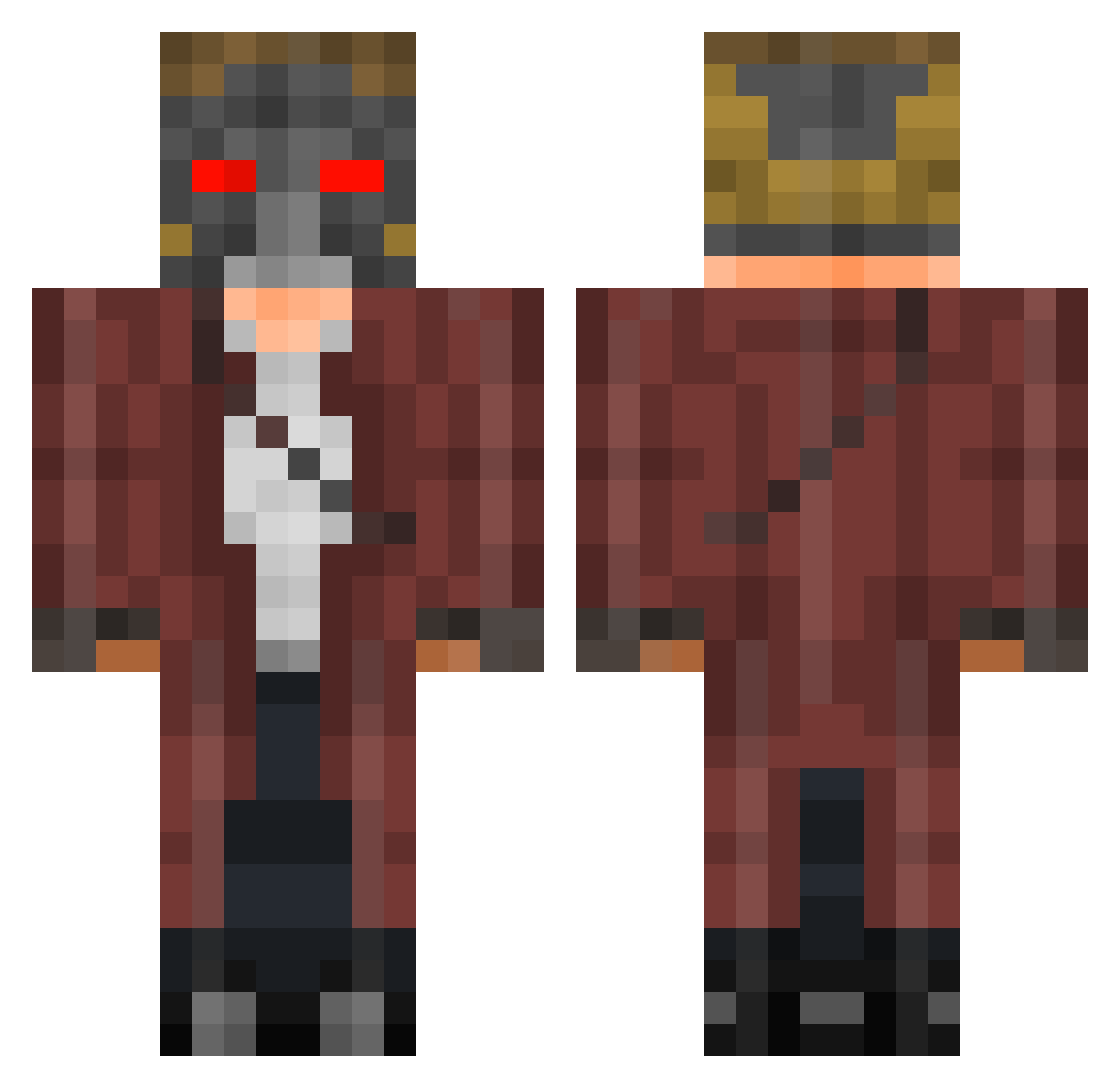
Current Minecraft skin of the player Venom_Snake34, loaded from the official Mojang API. Rotate the 3D model with your mouse or finger, then download the skin as a PNG file and use it in Minecraft: Bedrock Edition or Java Edition for free. When Venom_Snake34 changes their skin, this page updates automatically and the old skin stays in the history below.
Other players with this skin (401)
Venom_Snake34 was the 308th player we have seen with this skin, first spotted on 10.10.2026. The same skin was seen on these players. Open a nickname to see their current skin and skin history.
 enfipy Bob_Barley hazrac Blaze_demon DarkShanks_21 _Blue_Arrow_ swisfodiss AMV20000 985323 BlandMine Asger2000 loole97 JK731_ MultipleArrows Atronix51100 larcios Destre1234 PeterQ Creeper021107 jutskii dalex03 GetGibbed Mr_Vash NeatherReactorTM theblking Louisbetting92 loco14NIKE JayKrush UltimateBear25 phunky123 abosyaka solidsnake1456 RodcL 12kackerman VoplerBR Misterbueno13 jodo_2CH3 Charmandify lisandrojei HunterOfficials Alle1 Rick_Roller pokrsem64 InfantiIe MinimistompiV3 27timma CourtingFish DeusRekks ANARCHYGAMNG WMhurts Bolivia19 Naitch OneAwani Inting_Potato OhhitsEli skylordminmin2 BeeBeeDoo BitchNigger tvbitsme HarlockJoJo
More Star-Lord Minecraft skins
How to install the Venom_Snake34 skin
- Press the Download button above to save the skin as a PNG file.
- Minecraft: Bedrock Edition (PE): open the Dressing Room from the main menu (or tap your character → Edit Character), go to Classic Skins → Owned, press the + (new skin) button, choose the downloaded PNG and pick the Classic (Steve) model. Works on PC and mobile; consoles cannot import custom skins.
- Minecraft: Java Edition: open the Minecraft Launcher, go to the Skins tab, click New Skin, load the PNG, pick the Classic (Steve) model and press Save & Use. You can also upload it at minecraft.net → Profile → Change Skin.
The skin does not show up after import - what should I do?
Restart Minecraft and open the Dressing Room again - imported skins sometimes appear only after a restart. Also make sure you selected the imported skin and picked the Classic (Steve) model.
Which model should I choose, Classic or Slim?
This skin is designed for the Classic (Steve) model. If you pick the wrong model, the arms of the skin will look stretched or squeezed.
Is the skin of Venom_Snake34 free to download?
Yes. Press Download, save the PNG file and use it in Minecraft: Bedrock Edition or Java Edition - no payment or registration needed. The skin also works on multiplayer servers and Realms.
More skins
Looking for more? Go back to all Minecraft skins and check the top skins of the week, month and all time, or find any player's skin by nickname.