
Unwichtxg - Minecraft Skins & Skin History
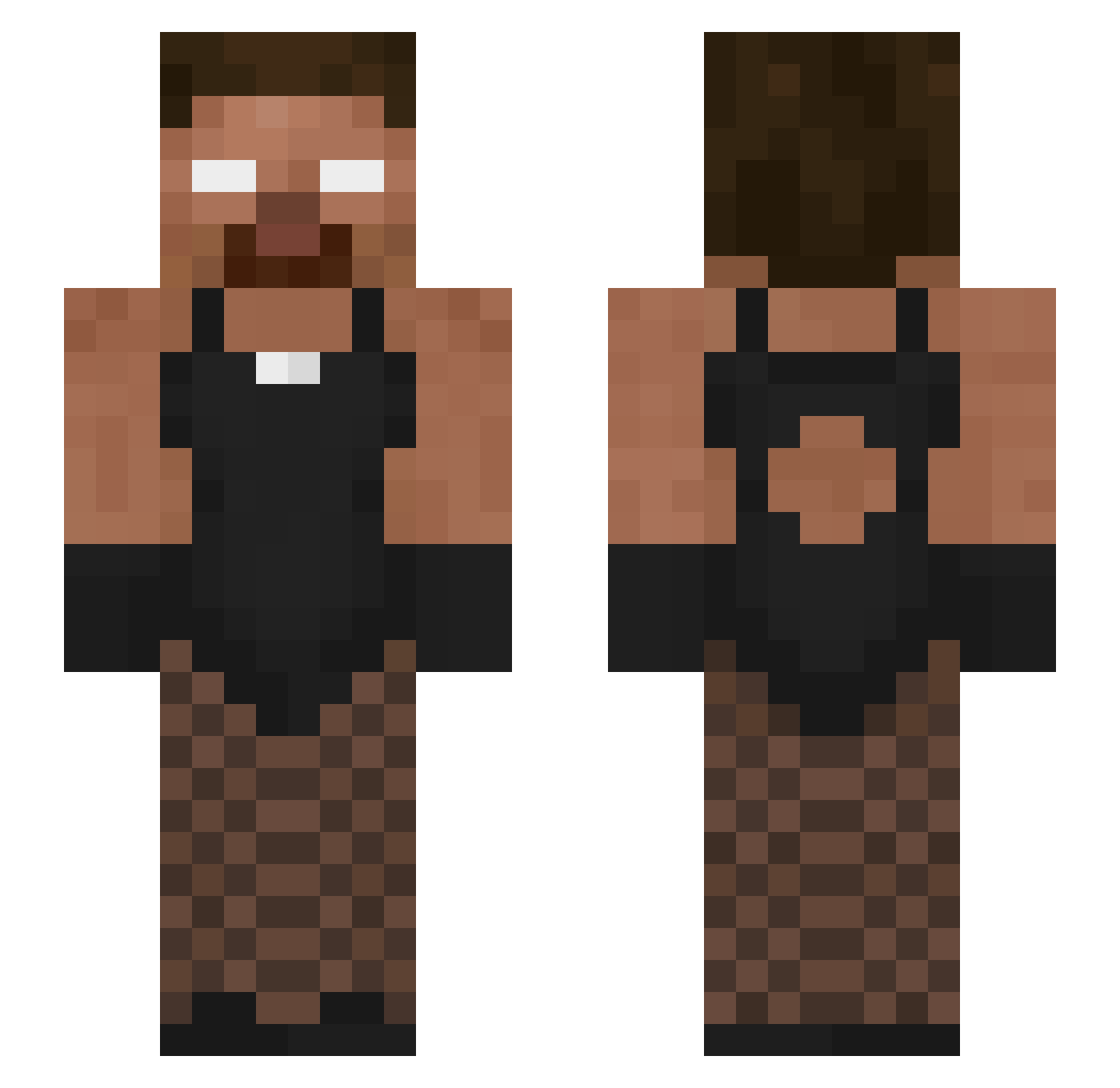
Current Minecraft skin of the player Unwichtxg, loaded from the official Mojang API. Rotate the 3D model with your mouse or finger, then download the skin as a PNG file and use it in Minecraft: Bedrock Edition or Java Edition for free. When Unwichtxg changes their skin, this page updates automatically and the old skin stays in the history below.
Other players with this skin (64)
Unwichtxg was the 38th player we have seen with this skin, first spotted on 22.09.2026. The same skin was seen on these players. Open a nickname to see their current skin and skin history.
 BroskiTay matimat69 _XGameVortexX_ JJolD1 tomateyo Bekosyy ODCC_ PurpoloHadAutism wierman 2amonG slowaze whichdoctor242 ohNawaf TigerV23 Sapito54321 Feconito CerexLovesCam alyeph
 DIFFERENT_DAY anyadapja deathyw Atlantis_oeo Oftok s0ulfax 5drx BenAMangoMuncher littlejack108 psyger0 Ausst_99 ombaomba Aeirox Armae__ BrutusekPL Mxklj BubbleShawty Seggsi
 Cbu123 lilylcd modoopjo w1gsFKDR Philip3005 Permex00 1hazzy Bogzdel_Baron AtrocksBtw Naxoy_fps kingsmallz123 daylanc_
 aeeryin duncanson mingodied TvSwizzy gusglob wldptls duljune BEST_NAGAMER ShezowBuh EARFQUAKE1102 taxiukas Luiz7287
More Herobrine Minecraft skins
How to install the Unwichtxg skin
- Press the Download button above to save the skin as a PNG file.
- Minecraft: Bedrock Edition (PE): open the Dressing Room from the main menu (or tap your character → Edit Character), go to Classic Skins → Owned, press the + (new skin) button, choose the downloaded PNG and pick the Slim (Alex) model. Works on PC and mobile; consoles cannot import custom skins.
- Minecraft: Java Edition: open the Minecraft Launcher, go to the Skins tab, click New Skin, load the PNG, pick the Slim (Alex) model and press Save & Use. You can also upload it at minecraft.net → Profile → Change Skin.
The skin does not show up after import - what should I do?
Restart Minecraft and open the Dressing Room again - imported skins sometimes appear only after a restart. Also make sure you selected the imported skin and picked the Slim (Alex) model.
Which model should I choose, Classic or Slim?
This skin is designed for the Slim (Alex) model. If you pick the wrong model, the arms of the skin will look stretched or squeezed.
Is the skin of Unwichtxg free to download?
Yes. Press Download, save the PNG file and use it in Minecraft: Bedrock Edition or Java Edition - no payment or registration needed. The skin also works on multiplayer servers and Realms.
More skins
Looking for more? Go back to all Minecraft skins and check the top skins of the week, month and all time, or find any player's skin by nickname.