
Unl_ckyMe - Minecraft Skins & Skin History
Current Minecraft skin of the player Unl_ckyMe, loaded from the official Mojang API. Rotate the 3D model with your mouse or finger, then download the skin as a PNG file and use it in Minecraft: Bedrock Edition or Java Edition for free. When Unl_ckyMe changes their skin, this page updates automatically and the old skin stays in the history below.
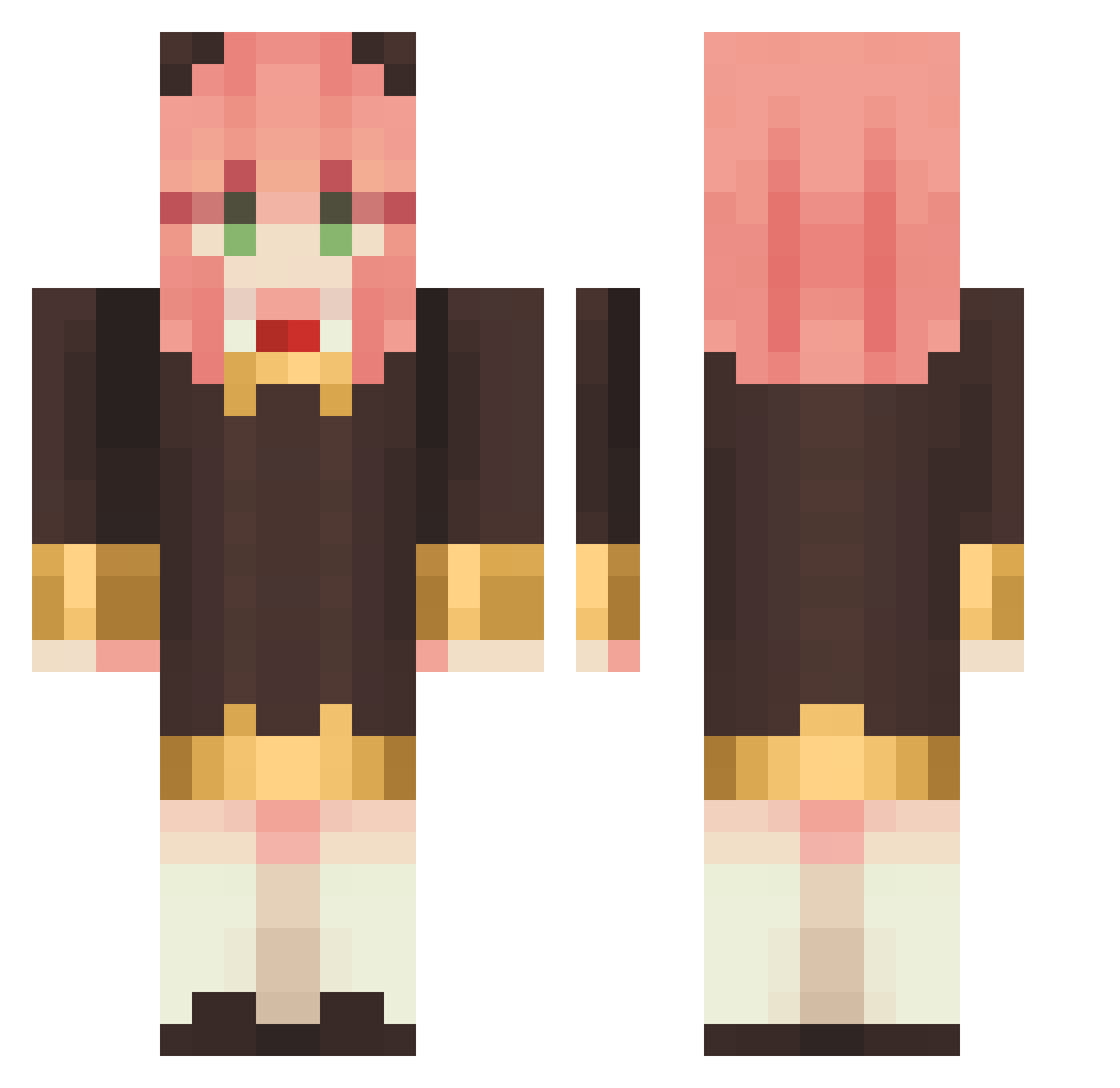
Other players with this skin (1148)
Unl_ckyMe was the 120th player we have seen with this skin, first spotted on 05.08.2026. The same skin was seen on these players. Open a nickname to see their current skin and skin history.
 BloodGodUQU colorme niche_tan Leonechan mar1nes2 unagikou violet3233 Morris007 TKMR70103 soumq YANJUNPAN Newtype3265 FalafelJohnson
 AichiJ13 lgz998 DFfishlin TONG2210 MinhPhatVN REGIS0050 minye0724 RoUwUge Dntqme Crenilla kervintot shiwera peachdan JUJU513 yotyan_72 otsun nedseung Supermark721 Eunjibias Gai_Jiao_Fan Darlaa ketlyn_tk SakamataUwU Flechaz2 ju_young13 Noooooom Sh4dyRo0kyst3r RizzyOnChakra Jackzin_ Franky520 sweetmouthlove 9ZZI MeTheCat LF_soymilk mengyuyou Floralgarbage ALEXcoin B_Things_Cupcake Aa_Ram TrakinasdeLimao MikkaXD
 HP_0621 Stone112233 bg909 nickyehhhh becomochi96 SemanHeo
More Anya Forger Minecraft skins
How to install the Unl_ckyMe skin
- Press the Download button above to save the skin as a PNG file.
- Minecraft: Bedrock Edition (PE): open the Dressing Room from the main menu (or tap your character → Edit Character), go to Classic Skins → Owned, press the + (new skin) button, choose the downloaded PNG and pick the Classic (Steve) model. Works on PC and mobile; consoles cannot import custom skins.
- Minecraft: Java Edition: open the Minecraft Launcher, go to the Skins tab, click New Skin, load the PNG, pick the Classic (Steve) model and press Save & Use. You can also upload it at minecraft.net → Profile → Change Skin.
The skin does not show up after import - what should I do?
Restart Minecraft and open the Dressing Room again - imported skins sometimes appear only after a restart. Also make sure you selected the imported skin and picked the Classic (Steve) model.
Which model should I choose, Classic or Slim?
This skin is designed for the Classic (Steve) model. If you pick the wrong model, the arms of the skin will look stretched or squeezed.
Is the skin of Unl_ckyMe free to download?
Yes. Press Download, save the PNG file and use it in Minecraft: Bedrock Edition or Java Edition - no payment or registration needed. The skin also works on multiplayer servers and Realms.
More skins
Looking for more? Go back to all Minecraft skins and check the top skins of the week, month and all time, or find any player's skin by nickname.