
Turtleweebz - Minecraft Skins & Skin History
Current Minecraft skin of the player Turtleweebz, loaded from the official Mojang API. Rotate the 3D model with your mouse or finger, then download the skin as a PNG file and use it in Minecraft: Bedrock Edition or Java Edition for free. When Turtleweebz changes their skin, this page updates automatically and the old skin stays in the history below.
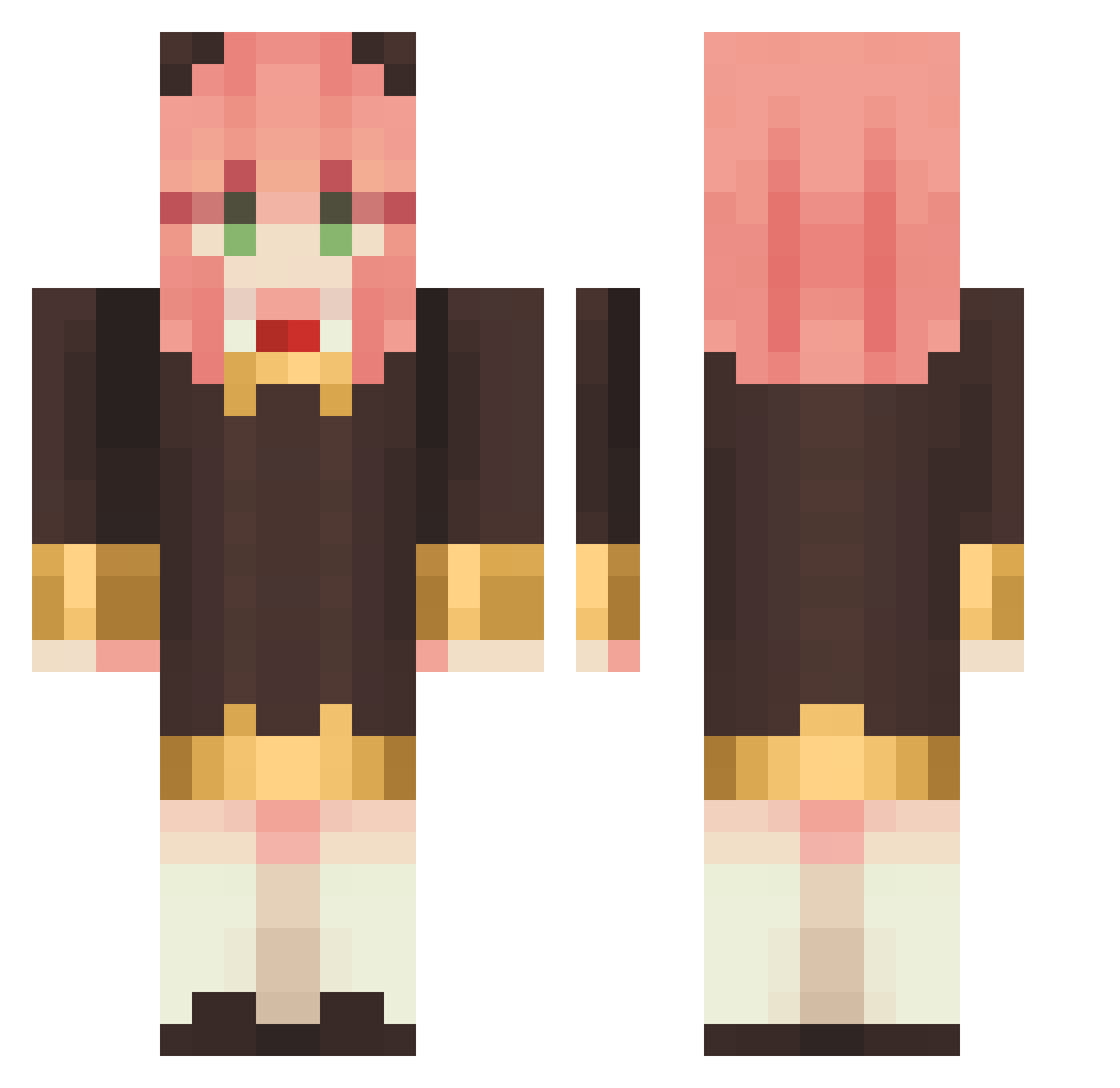
Other players with this skin (1138)
Turtleweebz was the 754th player we have seen with this skin, first spotted on 08.10.2026. The same skin was seen on these players. Open a nickname to see their current skin and skin history.
 _LOTION_ Alex_wu CircleEden kkieuu KevinWang14 MrNonow MOMOM040729 mwkingofjapan roseessence chonikifr ACVelohampenn meowgoo seven_eyedFenrir SillyYX2 Double_Shuang Lustrouus odinwillows Nasu03 mochico_o niwatori8810 Mimitsu Avocado19623 JerryGian Rainbow_Frosting xiaotian2333em LuciusGiang jgyup rajrams MAYOPOYO julinam1457 _Cheshire wishappy zulineuwu serngamer FARQUADZILLA akua11567 Aluardilla waterup666 MELLYLING Daphniaa RaksaaIsNPC waleee souta1956 mmelatoninaa Aguso0407 B4NG95 pil_gyu jhkliop gu1zin_ erikacams13 Chrisinha Rinkey24 JoacoSAMA kattea19 KD0223 natsumi0718 TamaraLopezR Nekota13 LuckyCat0124 ALAN_enjoy
More Anya Forger Minecraft skins
How to install the Turtleweebz skin
- Press the Download button above to save the skin as a PNG file.
- Minecraft: Bedrock Edition (PE): open the Dressing Room from the main menu (or tap your character → Edit Character), go to Classic Skins → Owned, press the + (new skin) button, choose the downloaded PNG and pick the Classic (Steve) model. Works on PC and mobile; consoles cannot import custom skins.
- Minecraft: Java Edition: open the Minecraft Launcher, go to the Skins tab, click New Skin, load the PNG, pick the Classic (Steve) model and press Save & Use. You can also upload it at minecraft.net → Profile → Change Skin.
The skin does not show up after import - what should I do?
Restart Minecraft and open the Dressing Room again - imported skins sometimes appear only after a restart. Also make sure you selected the imported skin and picked the Classic (Steve) model.
Which model should I choose, Classic or Slim?
This skin is designed for the Classic (Steve) model. If you pick the wrong model, the arms of the skin will look stretched or squeezed.
Is the skin of Turtleweebz free to download?
Yes. Press Download, save the PNG file and use it in Minecraft: Bedrock Edition or Java Edition - no payment or registration needed. The skin also works on multiplayer servers and Realms.
More skins
Looking for more? Go back to all Minecraft skins and check the top skins of the week, month and all time, or find any player's skin by nickname.