
Tubbieheroo - Minecraft Skins & Skin History
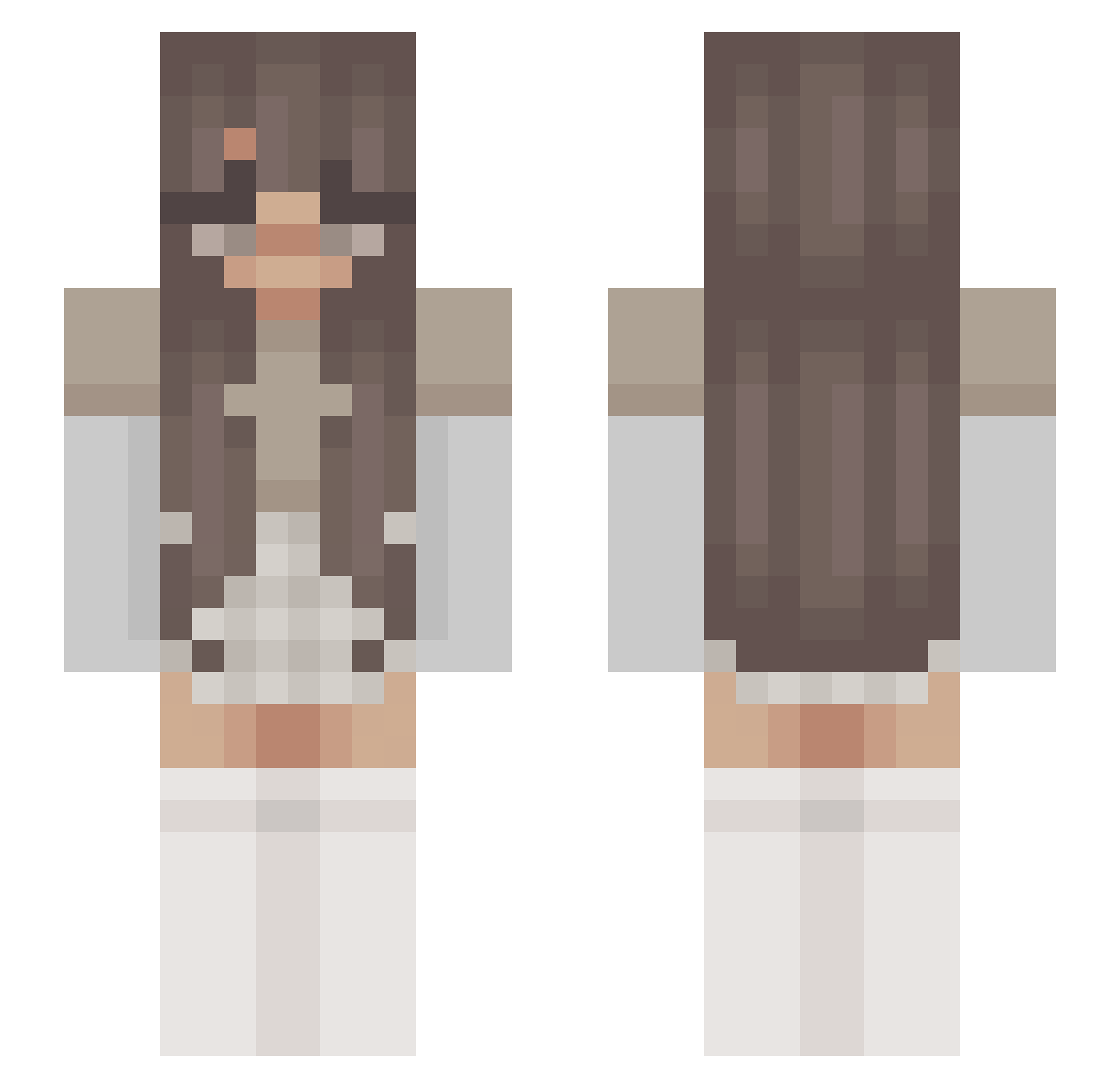
Current Minecraft skin of the player Tubbieheroo, loaded from the official Mojang API. Rotate the 3D model with your mouse or finger, then download the skin as a PNG file and use it in Minecraft: Bedrock Edition or Java Edition for free. When Tubbieheroo changes their skin, this page updates automatically and the old skin stays in the history below.
Other players with this skin (210)
Tubbieheroo was the 38th player we have seen with this skin, first spotted on 12.08.2026. The same skin was seen on these players. Open a nickname to see their current skin and skin history.
 LindseyBB Kamoxa Miraydx GeeQuigg_ nzinga Lelly7 SweetLemonLime SimpIyy annag214 _Closter Noevv Snow_Fawn PandaGrisou The_Spear abby_OMG millimrk neicythetraveler sarah_1704 misscamcam cheesmonster LoveLegends26 jasminaaa Aswath SleepClinic Olivvciav 4year goodhuman1239 Naoki_34 speedytiger17 Humony Galaaxy_ miloisacoolkid mightblana Pandarules54 minecraftmerkzz xmoonnx ZytaNoMames amystockbert youtubelover1234 Kou177 lola429 tagab AiKasu zxraaa gretcehn Meilhy RubyRoss2001 OrchidCrescent itsely Ohjeezz elephant2 z0eD laLasagna Ameelyuh cute_kitty23 nnadiaa LittleeBee Mechanicalgibbon dialstyle Gruly
More Aesthetic Minecraft skins
How to install the Tubbieheroo skin
- Press the Download button above to save the skin as a PNG file.
- Minecraft: Bedrock Edition (PE): open the Dressing Room from the main menu (or tap your character → Edit Character), go to Classic Skins → Owned, press the + (new skin) button, choose the downloaded PNG and pick the Slim (Alex) model. Works on PC and mobile; consoles cannot import custom skins.
- Minecraft: Java Edition: open the Minecraft Launcher, go to the Skins tab, click New Skin, load the PNG, pick the Slim (Alex) model and press Save & Use. You can also upload it at minecraft.net → Profile → Change Skin.
The skin does not show up after import - what should I do?
Restart Minecraft and open the Dressing Room again - imported skins sometimes appear only after a restart. Also make sure you selected the imported skin and picked the Slim (Alex) model.
Which model should I choose, Classic or Slim?
This skin is designed for the Slim (Alex) model. If you pick the wrong model, the arms of the skin will look stretched or squeezed.
Is the skin of Tubbieheroo free to download?
Yes. Press Download, save the PNG file and use it in Minecraft: Bedrock Edition or Java Edition - no payment or registration needed. The skin also works on multiplayer servers and Realms.
More skins
Looking for more? Go back to all Minecraft skins and check the top skins of the week, month and all time, or find any player's skin by nickname.