
Tsukao - Minecraft Skins & Skin History
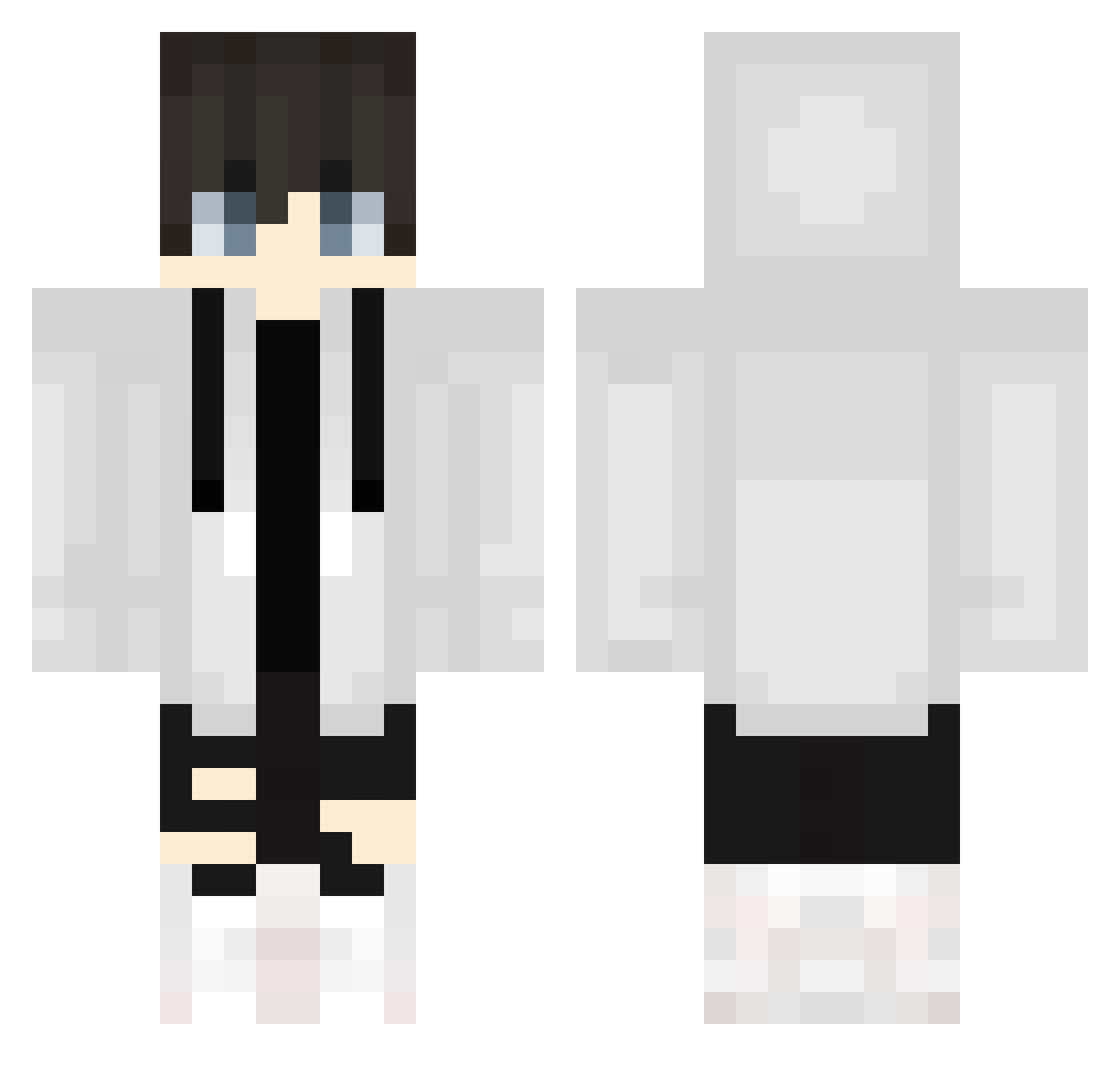
Current Minecraft skin of the player Tsukao, loaded from the official Mojang API. Rotate the 3D model with your mouse or finger, then download the skin as a PNG file and use it in Minecraft: Bedrock Edition or Java Edition for free. When Tsukao changes their skin, this page updates automatically and the old skin stays in the history below.
Other players with this skin (582)
Tsukao was the 500th player we have seen with this skin, first spotted on 11.10.2026. The same skin was seen on these players. Open a nickname to see their current skin and skin history.
 KUROIcecream kamdohaiseotaku VN_Robbyy DeadmansBallad ui_ui GorillamanJP _hot_sauce bennyjb369 Septemise lami00 tetranitride nia1101 SaltAndPepper695 Ilikethiccs Pharamicst Netarooo Ryan1049 eRrOr_aNalysIS Lin14416 TehSenseiCoala todeo90 Screwball_Rob Qu0n2525 OlafBrumbass Yuukihara DaniellaLa Xprince69 NOT_YT_GAMING CrisBPM kintagorou Okidally Gamer_Volder Han2015_ Ludvi9 Ch1cken_Shawarma RZalpha10 Choco_cake3150 ernbsrn mo_taku DidUSee btrnmcn daichi6545 SoftFeather1429 NagisaXerta33 nadavwas D3cypher2 Miro1912 kEKK3 Mido8824ri seung_min1 tastybiscuits towachi825 an21c Yuki008411 Scorpionsyk8080 selecarpt Sky_90 Ninja333 TyTyjaden _Begonia
More Streetwear Minecraft skins
How to install the Tsukao skin
- Press the Download button above to save the skin as a PNG file.
- Minecraft: Bedrock Edition (PE): open the Dressing Room from the main menu (or tap your character → Edit Character), go to Classic Skins → Owned, press the + (new skin) button, choose the downloaded PNG and pick the Classic (Steve) model. Works on PC and mobile; consoles cannot import custom skins.
- Minecraft: Java Edition: open the Minecraft Launcher, go to the Skins tab, click New Skin, load the PNG, pick the Classic (Steve) model and press Save & Use. You can also upload it at minecraft.net → Profile → Change Skin.
The skin does not show up after import - what should I do?
Restart Minecraft and open the Dressing Room again - imported skins sometimes appear only after a restart. Also make sure you selected the imported skin and picked the Classic (Steve) model.
Which model should I choose, Classic or Slim?
This skin is designed for the Classic (Steve) model. If you pick the wrong model, the arms of the skin will look stretched or squeezed.
Is the skin of Tsukao free to download?
Yes. Press Download, save the PNG file and use it in Minecraft: Bedrock Edition or Java Edition - no payment or registration needed. The skin also works on multiplayer servers and Realms.
More skins
Looking for more? Go back to all Minecraft skins and check the top skins of the week, month and all time, or find any player's skin by nickname.