
ThomasYTB - Minecraft Skins & Skin History
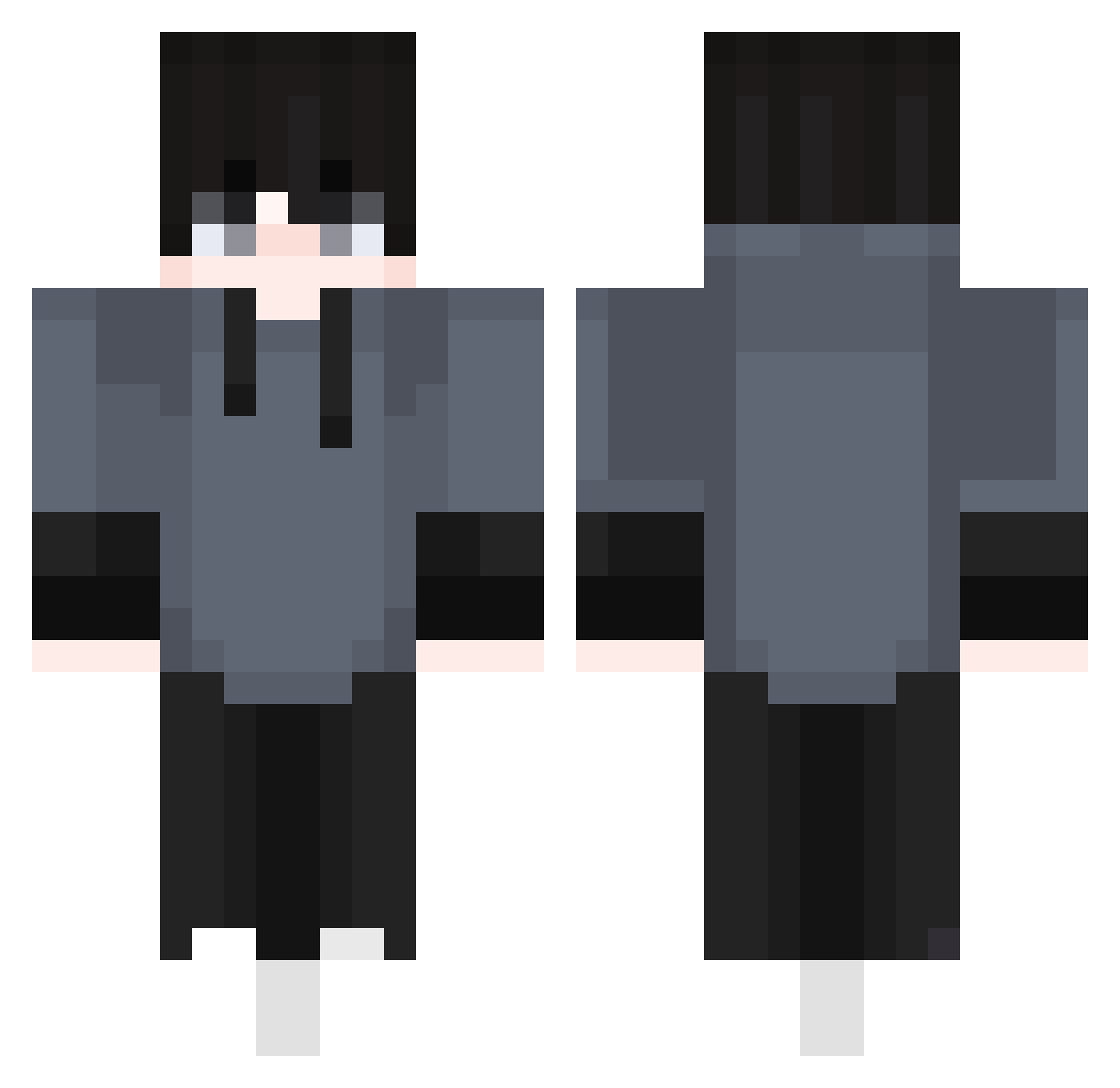
Current Minecraft skin of the player ThomasYTB, loaded from the official Mojang API. Rotate the 3D model with your mouse or finger, then download the skin as a PNG file and use it in Minecraft: Bedrock Edition or Java Edition for free. When ThomasYTB changes their skin, this page updates automatically and the old skin stays in the history below.
Other players with this skin (410)
ThomasYTB was the 24th player we have seen with this skin, first spotted on 28.07.2026. The same skin was seen on these players. Open a nickname to see their current skin and skin history.
 Enqtry r2kq0 Eunseong0929 SotaTSk8 under2113 Kasha8 lipkos997 dao_hao_si_ma SiGnoReIIi LinkWeHume mare0221 GamingSound bentherock11 toibingu69 Belmodz JasperPlayz1 Bevarsh Noxiou_S Klakeor Hamdigan123
 matata3 Jaden_24 tzi_4PtDw_07_22 Yimuzzz DK_ShowMaker1 MaT_HL kaluch2011 RTPhotography MrKilled
 olbi1984 GhostBlack2006 Urasmete UwUCraftYT sanojg qKyoko Axiom_08 1xco
 nctst werdegeddost FlipProkiller Gotye__ AleCraft_21 JioRosc Astrowayed 3oNeright_ Samello01 LoZurdo Nathan1427 uhamir R628 indolentlife0123 narutosasuke123 JsnYeuaHoig arctickiit SrDani_MC lomakevin blizylol AthenaWiz27 Bensodz FGeco254
How to install the ThomasYTB skin
- Press the Download button above to save the skin as a PNG file.
- Minecraft: Bedrock Edition (PE): open the Dressing Room from the main menu (or tap your character → Edit Character), go to Classic Skins → Owned, press the + (new skin) button, choose the downloaded PNG and pick the Classic (Steve) model. Works on PC and mobile; consoles cannot import custom skins.
- Minecraft: Java Edition: open the Minecraft Launcher, go to the Skins tab, click New Skin, load the PNG, pick the Classic (Steve) model and press Save & Use. You can also upload it at minecraft.net → Profile → Change Skin.
The skin does not show up after import - what should I do?
Restart Minecraft and open the Dressing Room again - imported skins sometimes appear only after a restart. Also make sure you selected the imported skin and picked the Classic (Steve) model.
Which model should I choose, Classic or Slim?
This skin is designed for the Classic (Steve) model. If you pick the wrong model, the arms of the skin will look stretched or squeezed.
Is the skin of ThomasYTB free to download?
Yes. Press Download, save the PNG file and use it in Minecraft: Bedrock Edition or Java Edition - no payment or registration needed. The skin also works on multiplayer servers and Realms.
More skins
Looking for more? Go back to all Minecraft skins and check the top skins of the week, month and all time, or find any player's skin by nickname.