
Theo7509 - Minecraft Skins & Skin History
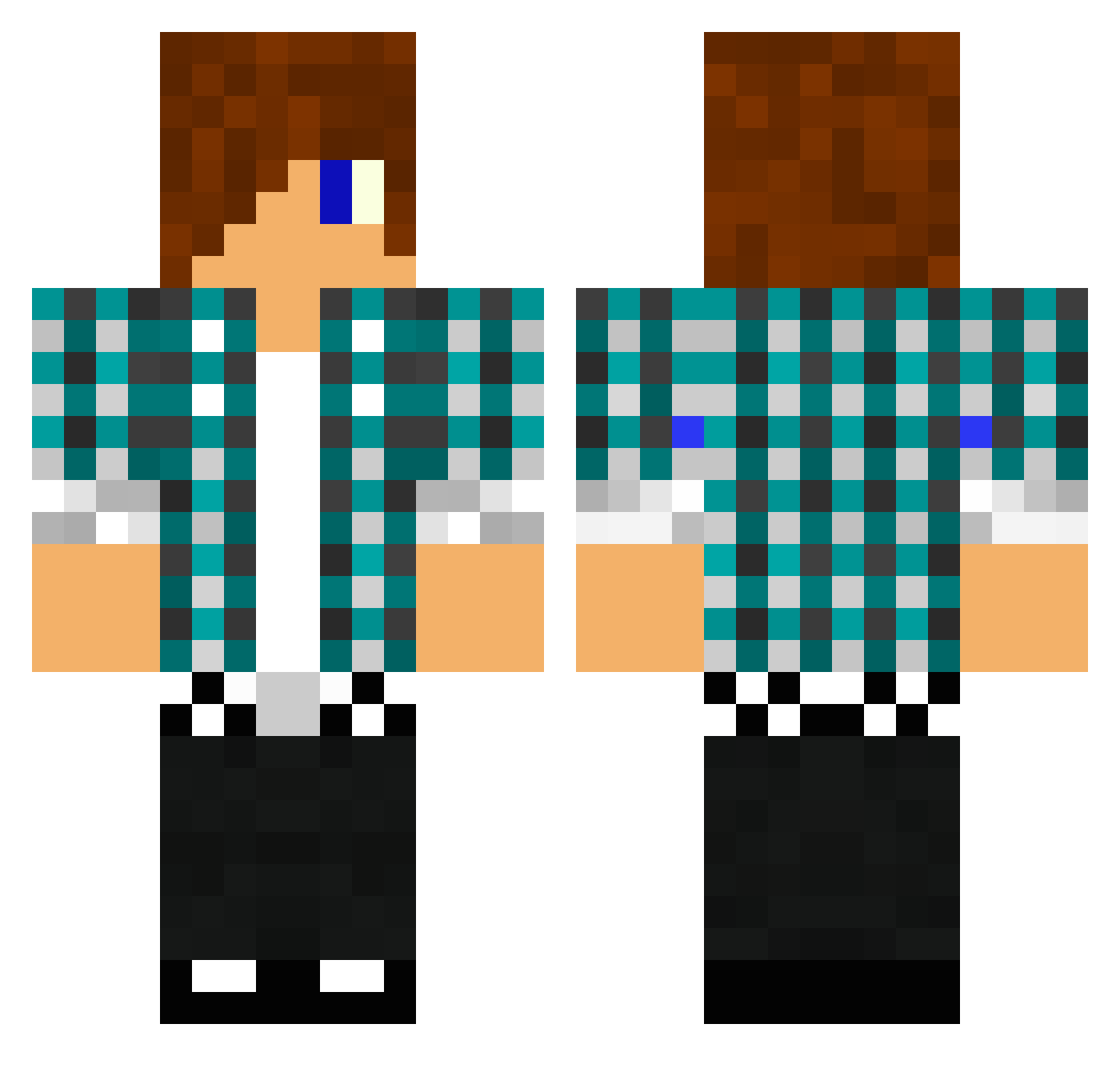
Current Minecraft skin of the player Theo7509, loaded from the official Mojang API. Rotate the 3D model with your mouse or finger, then download the skin as a PNG file and use it in Minecraft: Bedrock Edition or Java Edition for free. When Theo7509 changes their skin, this page updates automatically and the old skin stays in the history below.
Other players with this skin (1476)
Theo7509 was the 1068th player we have seen with this skin, first spotted on 16.10.2026. The same skin was seen on these players. Open a nickname to see their current skin and skin history.
 PCamp2005 TheKaroliz RazerTooth hailmary999 BerryBomber04 ryanbella SamOscar jamhead15 MC_KAI_QLD Mr_Teenager kungfucow191 mortalcombat114 strandby2002 wereduck02 jens5112 stingray0412 bazingagoldfish MrSammyP BEASTxxNINJA ilbert001 mr_amazing98 BMAN2142 Jakie1212 rundo53 The_Swiss_Zombie demoncoyote13 poquie1 FCDallas14 CrafterBen Niklas007 TheMiningSheep hyp3rsniper TomClick Jespethouber Furlow166 swAWP tisen000 avengers1231 parkminhee manthos07 ellisl3007 iman48230 pontusjw11 HomeMadeMars925 thomasmok 2000diamonds WilkPL7788 Tony6000 sampentje Maoam2012 monkola17 Knuckleball12 Sander7744 durpdurp01 elow84 Tylerch2000 tryhards101 spikedcat DrSSoccer kratosnoa
More Emo Minecraft skins
How to install the Theo7509 skin
- Press the Download button above to save the skin as a PNG file.
- Minecraft: Bedrock Edition (PE): open the Dressing Room from the main menu (or tap your character → Edit Character), go to Classic Skins → Owned, press the + (new skin) button, choose the downloaded PNG and pick the Classic (Steve) model. Works on PC and mobile; consoles cannot import custom skins.
- Minecraft: Java Edition: open the Minecraft Launcher, go to the Skins tab, click New Skin, load the PNG, pick the Classic (Steve) model and press Save & Use. You can also upload it at minecraft.net → Profile → Change Skin.
The skin does not show up after import - what should I do?
Restart Minecraft and open the Dressing Room again - imported skins sometimes appear only after a restart. Also make sure you selected the imported skin and picked the Classic (Steve) model.
Which model should I choose, Classic or Slim?
This skin is designed for the Classic (Steve) model. If you pick the wrong model, the arms of the skin will look stretched or squeezed.
Is the skin of Theo7509 free to download?
Yes. Press Download, save the PNG file and use it in Minecraft: Bedrock Edition or Java Edition - no payment or registration needed. The skin also works on multiplayer servers and Realms.
More skins
Looking for more? Go back to all Minecraft skins and check the top skins of the week, month and all time, or find any player's skin by nickname.