
TheRealBrotha - Minecraft Skins & Skin History
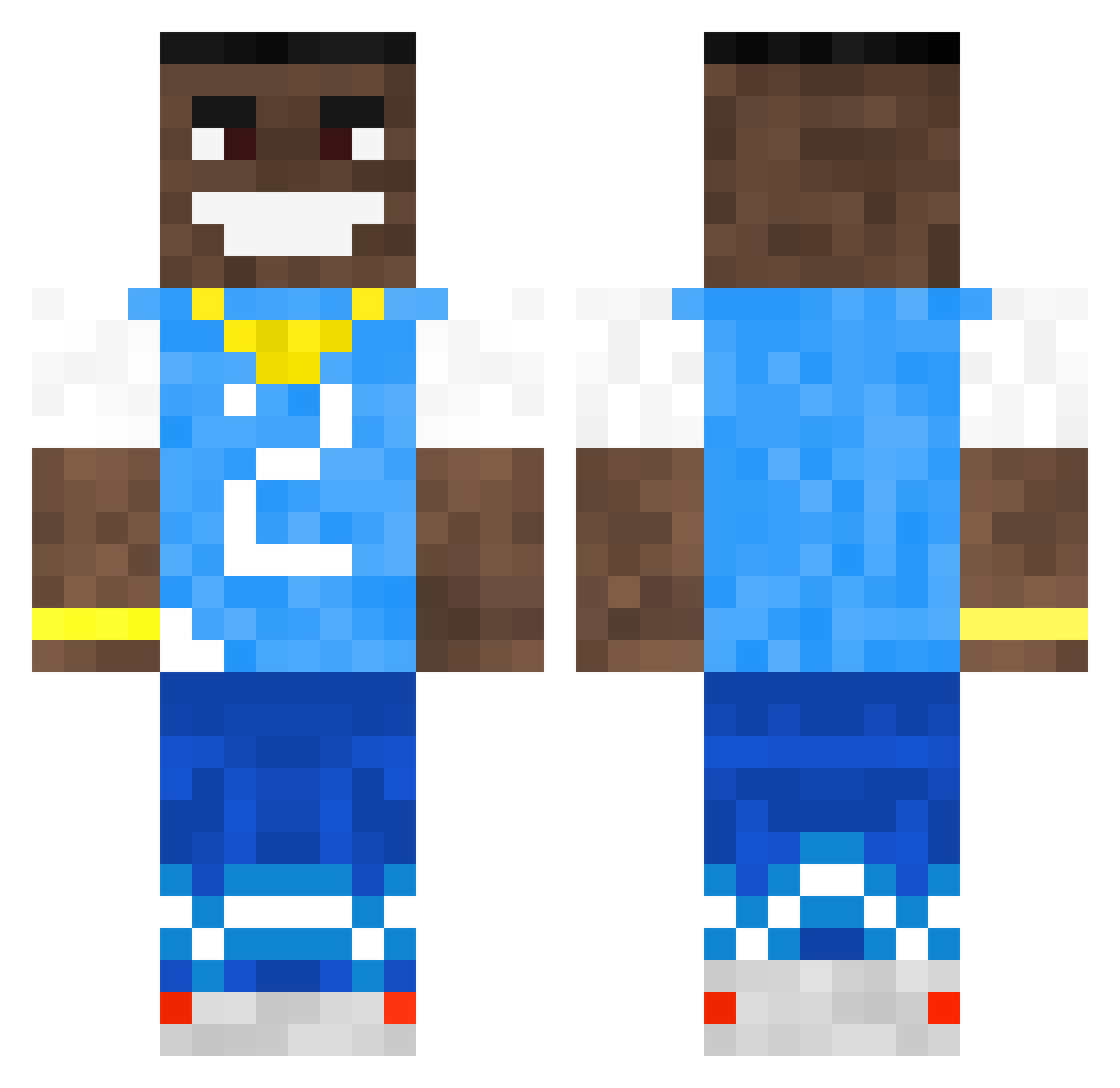
Current Minecraft skin of the player TheRealBrotha, loaded from the official Mojang API. Rotate the 3D model with your mouse or finger, then download the skin as a PNG file and use it in Minecraft: Bedrock Edition or Java Edition for free. When TheRealBrotha changes their skin, this page updates automatically and the old skin stays in the history below.
Other players with this skin (502)
TheRealBrotha was the 84th player we have seen with this skin, first spotted on 11.08.2026. The same skin was seen on these players. Open a nickname to see their current skin and skin history.
 Fainter Moltensoul101 PJxQ KrampusHelm DArealLIA LuvJay BlazeBrewer02 kspeed14 _0fu Poopoodealer_69 FaXious later222 MsK4_ Mehliz Iwan3310 BITCONNNNECT llamaboi946 dababy_lessgooo3 turtle200805
 Polarchu Jame04 ClicksAndGiggles Bratos42 XXxVruh locomandi yulong24 chriss12 Im_About_To_Bust TheDentistman piekid1238 SquireNiglet Just_M1cah550 BassMaster lolmine4lox Duffy05 KornArd MSang skri420 Etanja OliveOil__ praulick BigChiefenn Bognsuch spajuuu YoungStig Lobottomy Beratungsstelle Acraze209 kechdestr0yer Cazhhh Nooblx095 Bry_an_R SheH0t discobiscuit105 LeoptimusPrime76 WhatsAMinecraft T4rkov laleeps armuzi_1 Ouhaj13
More Dababy Minecraft skins
How to install the TheRealBrotha skin
- Press the Download button above to save the skin as a PNG file.
- Minecraft: Bedrock Edition (PE): open the Dressing Room from the main menu (or tap your character → Edit Character), go to Classic Skins → Owned, press the + (new skin) button, choose the downloaded PNG and pick the Classic (Steve) model. Works on PC and mobile; consoles cannot import custom skins.
- Minecraft: Java Edition: open the Minecraft Launcher, go to the Skins tab, click New Skin, load the PNG, pick the Classic (Steve) model and press Save & Use. You can also upload it at minecraft.net → Profile → Change Skin.
The skin does not show up after import - what should I do?
Restart Minecraft and open the Dressing Room again - imported skins sometimes appear only after a restart. Also make sure you selected the imported skin and picked the Classic (Steve) model.
Which model should I choose, Classic or Slim?
This skin is designed for the Classic (Steve) model. If you pick the wrong model, the arms of the skin will look stretched or squeezed.
Is the skin of TheRealBrotha free to download?
Yes. Press Download, save the PNG file and use it in Minecraft: Bedrock Edition or Java Edition - no payment or registration needed. The skin also works on multiplayer servers and Realms.
More skins
Looking for more? Go back to all Minecraft skins and check the top skins of the week, month and all time, or find any player's skin by nickname.