
TheAnthroShark - Minecraft Skins & Skin History
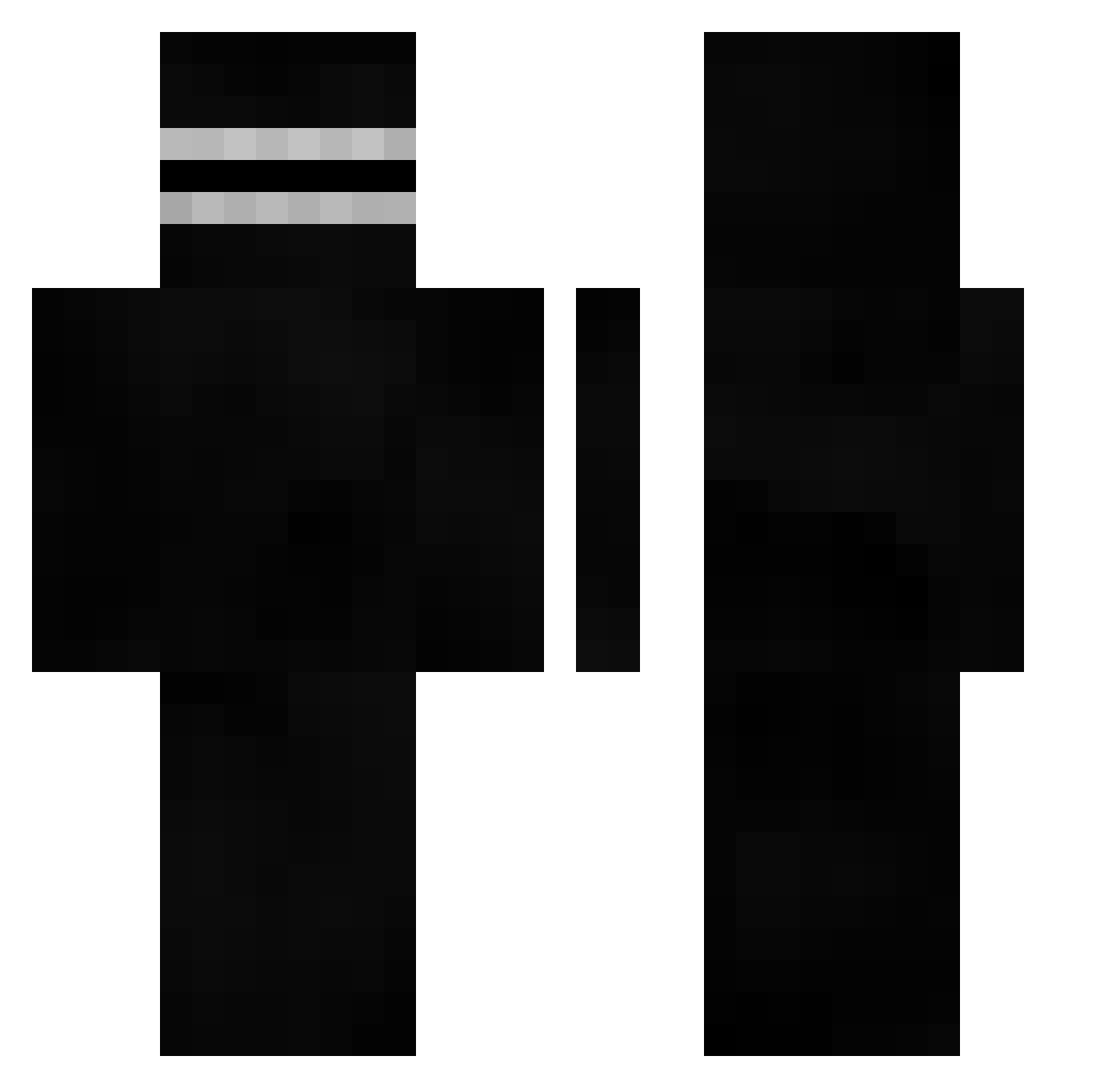
Current Minecraft skin of the player TheAnthroShark, loaded from the official Mojang API. Rotate the 3D model with your mouse or finger, then download the skin as a PNG file and use it in Minecraft: Bedrock Edition or Java Edition for free. When TheAnthroShark changes their skin, this page updates automatically and the old skin stays in the history below.
Other players with this skin (401)
TheAnthroShark was the 96th player we have seen with this skin, first spotted on 13.08.2026. The same skin was seen on these players. Open a nickname to see their current skin and skin history.
 gregoryheffley69 TillaBobs23 Bruntek babuka20 ruskanu
 Gagss__ NyKrush DotL_ anchousx cursorest TravvyPaty Croc_YT ayato0o _droopy_ AdriGr01 Filipek3695 Mihael_1K TheChxos ciroelgoat10 Anzeyyy j1k03 EmiilP95 uRm7 FuelTzy eliatm SomSimpleton Rafa20045 ___Ouzi___ Fragmok1 NoVanIck15 ShifusDias NIC_casa Zainwer ePiicPwned __jellyfish__ Myrzo Peng13543 ImNotDux ErrorClone h33w mOSdd BurpOfTheMan MajoeBex FROOF23 ____Darko____ DotL
 DemonHunter022 OliviaLuv Fewze szyszka_333 b5w1 bosy_damian jgfebles d13p iZvk Richat WHITTERX EphGee 3am_Bean_Demon ravioluuuuu
How to install the TheAnthroShark skin
- Press the Download button above to save the skin as a PNG file.
- Minecraft: Bedrock Edition (PE): open the Dressing Room from the main menu (or tap your character → Edit Character), go to Classic Skins → Owned, press the + (new skin) button, choose the downloaded PNG and pick the Classic (Steve) model. Works on PC and mobile; consoles cannot import custom skins.
- Minecraft: Java Edition: open the Minecraft Launcher, go to the Skins tab, click New Skin, load the PNG, pick the Classic (Steve) model and press Save & Use. You can also upload it at minecraft.net → Profile → Change Skin.
The skin does not show up after import - what should I do?
Restart Minecraft and open the Dressing Room again - imported skins sometimes appear only after a restart. Also make sure you selected the imported skin and picked the Classic (Steve) model.
Which model should I choose, Classic or Slim?
This skin is designed for the Classic (Steve) model. If you pick the wrong model, the arms of the skin will look stretched or squeezed.
Is the skin of TheAnthroShark free to download?
Yes. Press Download, save the PNG file and use it in Minecraft: Bedrock Edition or Java Edition - no payment or registration needed. The skin also works on multiplayer servers and Realms.
More skins
Looking for more? Go back to all Minecraft skins and check the top skins of the week, month and all time, or find any player's skin by nickname.