
Tekawave - Minecraft Skins & Skin History
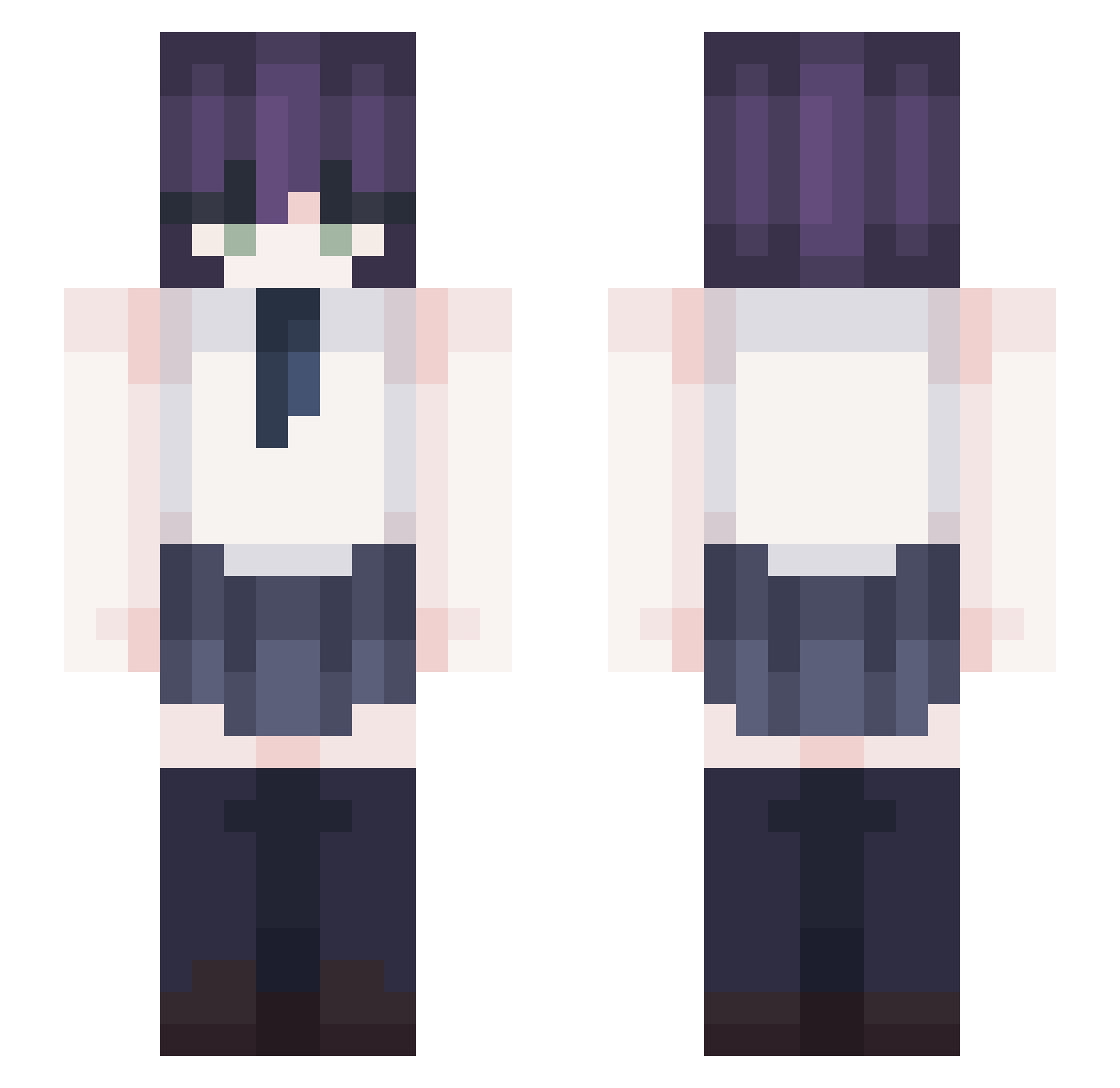
Current Minecraft skin of the player Tekawave, loaded from the official Mojang API. Rotate the 3D model with your mouse or finger, then download the skin as a PNG file and use it in Minecraft: Bedrock Edition or Java Edition for free. When Tekawave changes their skin, this page updates automatically and the old skin stays in the history below.
Other players with this skin (416)
Tekawave was the 370th player we have seen with this skin, first spotted on 06.11.2026. The same skin was seen on these players. Open a nickname to see their current skin and skin history.
 BokuWaTony dilld saltycandy0418 Wyraza GoldenGooner88 Nyekolynn warmice bonanchi09 Palandeas K_pzx Alex_rugbyer16 FaiN69 bocilapl Marini7688 ColdBossam minong2 Qang acousticfr Blue_heart_ HibikiSato tmtm1 bin173 Rose14 Aouter Shirakamik1q_ PL4SM4_FOX IL1_1 admin0716 EldritchHorror O_o_______ Nya_ni Lavender0312 Dot0217 rezelmao sehobbang BubbleYue Nether7546 daidai_0628 rice_potato loslos_b Akutto ye0n_hoking NeloeR sutupit Stinkoh MonkeyDseungkyu ySu1n hutamichi PrimeHeitor mel_hyung yepimvin Larien29 hanjun0208 youan0923 Darku0_0 BeyondCrim MotivateN _Loquaciouss marsybars Kakatulu007
More School Uniform Minecraft skins
See all 7633 School Uniform skins
How to install the Tekawave skin
- Press the Download button above to save the skin as a PNG file.
- Minecraft: Bedrock Edition (PE): open the Dressing Room from the main menu (or tap your character → Edit Character), go to Classic Skins → Owned, press the + (new skin) button, choose the downloaded PNG and pick the Slim (Alex) model. Works on PC and mobile; consoles cannot import custom skins.
- Minecraft: Java Edition: open the Minecraft Launcher, go to the Skins tab, click New Skin, load the PNG, pick the Slim (Alex) model and press Save & Use. You can also upload it at minecraft.net → Profile → Change Skin.
The skin does not show up after import - what should I do?
Restart Minecraft and open the Dressing Room again - imported skins sometimes appear only after a restart. Also make sure you selected the imported skin and picked the Slim (Alex) model.
Which model should I choose, Classic or Slim?
This skin is designed for the Slim (Alex) model. If you pick the wrong model, the arms of the skin will look stretched or squeezed.
Is the skin of Tekawave free to download?
Yes. Press Download, save the PNG file and use it in Minecraft: Bedrock Edition or Java Edition - no payment or registration needed. The skin also works on multiplayer servers and Realms.
More skins
Looking for more? Go back to all Minecraft skins and check the top skins of the week, month and all time, or find any player's skin by nickname.