
SwordSmith - Minecraft Skins & Skin History
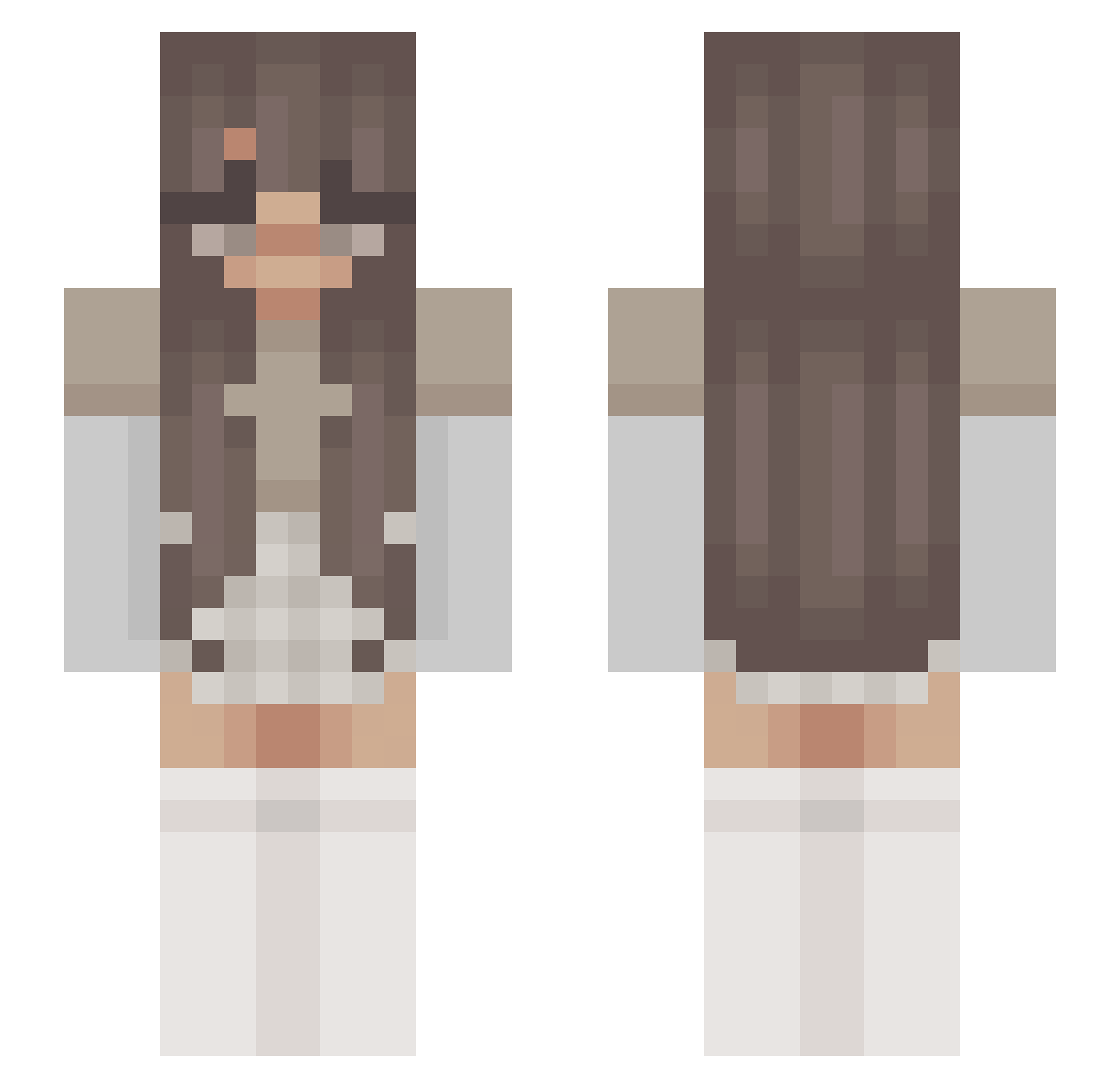
Current Minecraft skin of the player SwordSmith, loaded from the official Mojang API. Rotate the 3D model with your mouse or finger, then download the skin as a PNG file and use it in Minecraft: Bedrock Edition or Java Edition for free. When SwordSmith changes their skin, this page updates automatically and the old skin stays in the history below.
Other players with this skin (210)
SwordSmith was the 168th player we have seen with this skin, first spotted on 15.10.2026. The same skin was seen on these players. Open a nickname to see their current skin and skin history.
 Cloudyxmills masacvikl _Suniii WolfiiXYT iviiex Purpunikorn09 gwales Fuwarinn DudeThatsAwesome ParihsStan444 yanzzii3 Marco3213 Geannuleerd YaJoNL Kiwibadatlife12 itsqlovely Michelle2021 Alexanevs Lucy_2o_ Gummy_Pandas lienciks nikialexo sydneefaith 9nf HalfBloodPrinces Kira_a_a ichheissekay Ohjeez lilyszewo Awalker_98 Sabrina9114 moohdia valetrab01 louizatjj notparihs JustShirah ElinRaud saiphlynx SavyyLeigh bonniegrvn tylertyrant ConradoMoreno OliviaAB13 _AsalT_ astriival cinnamynn MarpoSpeaks 1zzy_ Provincialz Was_not parihss AnnabelleIsLame dialpile RoyaleGalaxia BayleeDyke lanareldey WikaIstCool ninsnn ItzMaddyHere CINNABOON
More Aesthetic Minecraft skins
How to install the SwordSmith skin
- Press the Download button above to save the skin as a PNG file.
- Minecraft: Bedrock Edition (PE): open the Dressing Room from the main menu (or tap your character → Edit Character), go to Classic Skins → Owned, press the + (new skin) button, choose the downloaded PNG and pick the Slim (Alex) model. Works on PC and mobile; consoles cannot import custom skins.
- Minecraft: Java Edition: open the Minecraft Launcher, go to the Skins tab, click New Skin, load the PNG, pick the Slim (Alex) model and press Save & Use. You can also upload it at minecraft.net → Profile → Change Skin.
The skin does not show up after import - what should I do?
Restart Minecraft and open the Dressing Room again - imported skins sometimes appear only after a restart. Also make sure you selected the imported skin and picked the Slim (Alex) model.
Which model should I choose, Classic or Slim?
This skin is designed for the Slim (Alex) model. If you pick the wrong model, the arms of the skin will look stretched or squeezed.
Is the skin of SwordSmith free to download?
Yes. Press Download, save the PNG file and use it in Minecraft: Bedrock Edition or Java Edition - no payment or registration needed. The skin also works on multiplayer servers and Realms.
More skins
Looking for more? Go back to all Minecraft skins and check the top skins of the week, month and all time, or find any player's skin by nickname.