
SweanzyYT - Minecraft Skins & Skin History
Current Minecraft skin of the player SweanzyYT, loaded from the official Mojang API. Rotate the 3D model with your mouse or finger, then download the skin as a PNG file and use it in Minecraft: Bedrock Edition or Java Edition for free. When SweanzyYT changes their skin, this page updates automatically and the old skin stays in the history below.
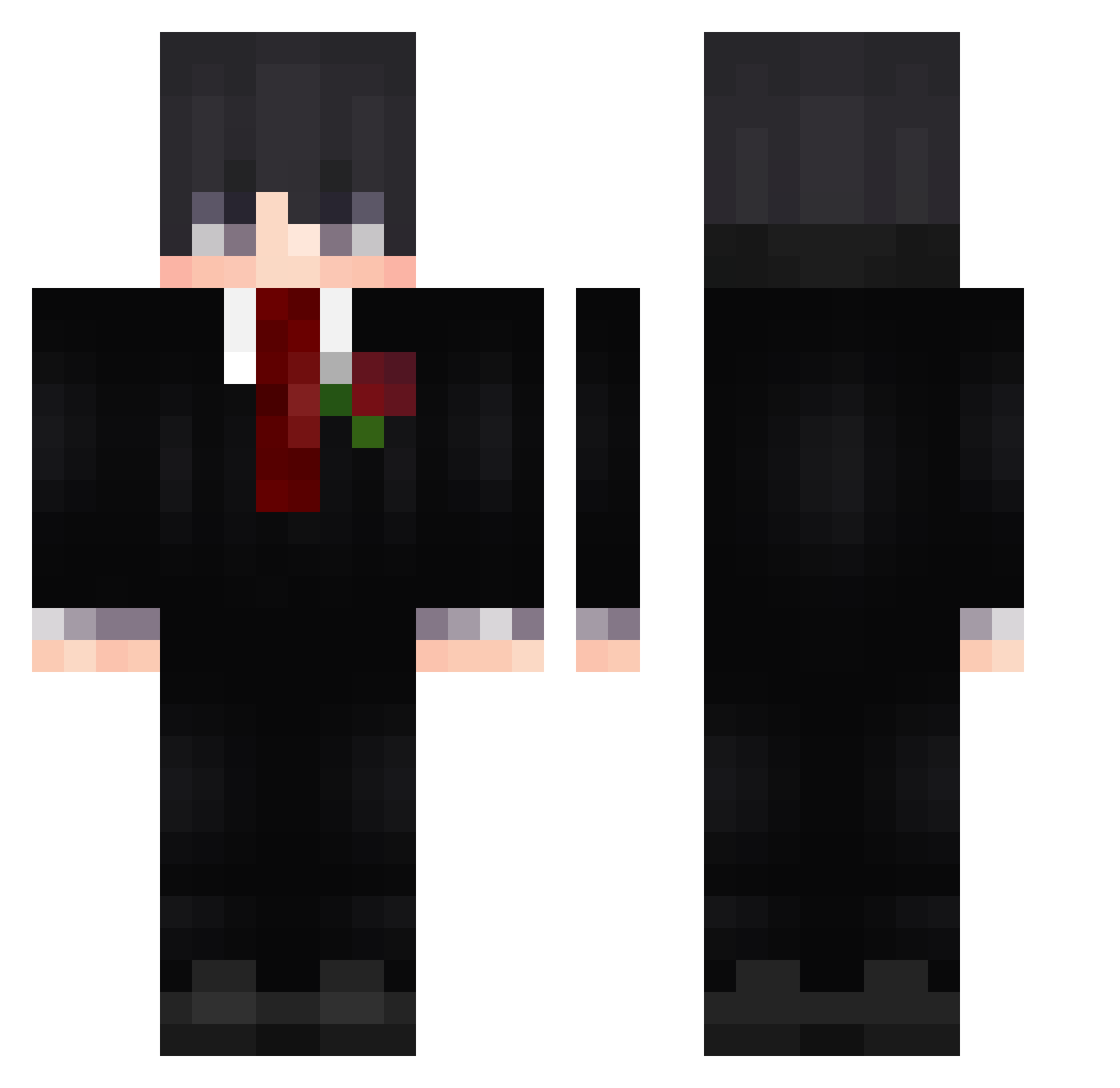
Other players with this skin (522)
SweanzyYT was the 54th player we have seen with this skin, first spotted on 06.08.2026. The same skin was seen on these players. Open a nickname to see their current skin and skin history.
 Dnalll firstlovestory johnnie_walker64 YellowoneX_X PR7omil Alpha893 TNTCream N101683 Jona1412 X3washed Carpte
 k9icker mnPinoia n0tdAe tangxh sticcx AugustoGam3re123 395kk Snezzy_59 Gustavontw12 Xulingran L1N5 liuer62 KaidoisBack ImInACurry Stariny Gyosaa_ kolibereQ Deriannz Arayzer28 Flpziin The_NamelessGuy ThatGuyZam WuYing0609 Daystax AdrielW10 FELLOClash xiaoxiaoran Vermai ppangz Tangyuan345
 szc66677 Dearminecraft_ leofilho2805 romulus789 ear_buds Eduaard_jf MiniZippi danyend22 briston1369 xqwzite PapiFabiooo KsyzIsChefIaxHO SirNLX_ Bary_Cuda911 Takensianth
 OlliW3 _bleyzu_ qwodya Kikitai
More Rose Minecraft skins
How to install the SweanzyYT skin
- Press the Download button above to save the skin as a PNG file.
- Minecraft: Bedrock Edition (PE): open the Dressing Room from the main menu (or tap your character → Edit Character), go to Classic Skins → Owned, press the + (new skin) button, choose the downloaded PNG and pick the Classic (Steve) model. Works on PC and mobile; consoles cannot import custom skins.
- Minecraft: Java Edition: open the Minecraft Launcher, go to the Skins tab, click New Skin, load the PNG, pick the Classic (Steve) model and press Save & Use. You can also upload it at minecraft.net → Profile → Change Skin.
The skin does not show up after import - what should I do?
Restart Minecraft and open the Dressing Room again - imported skins sometimes appear only after a restart. Also make sure you selected the imported skin and picked the Classic (Steve) model.
Which model should I choose, Classic or Slim?
This skin is designed for the Classic (Steve) model. If you pick the wrong model, the arms of the skin will look stretched or squeezed.
Is the skin of SweanzyYT free to download?
Yes. Press Download, save the PNG file and use it in Minecraft: Bedrock Edition or Java Edition - no payment or registration needed. The skin also works on multiplayer servers and Realms.
More skins
Looking for more? Go back to all Minecraft skins and check the top skins of the week, month and all time, or find any player's skin by nickname.