
Stanley_2009 - Minecraft Skins & Skin History
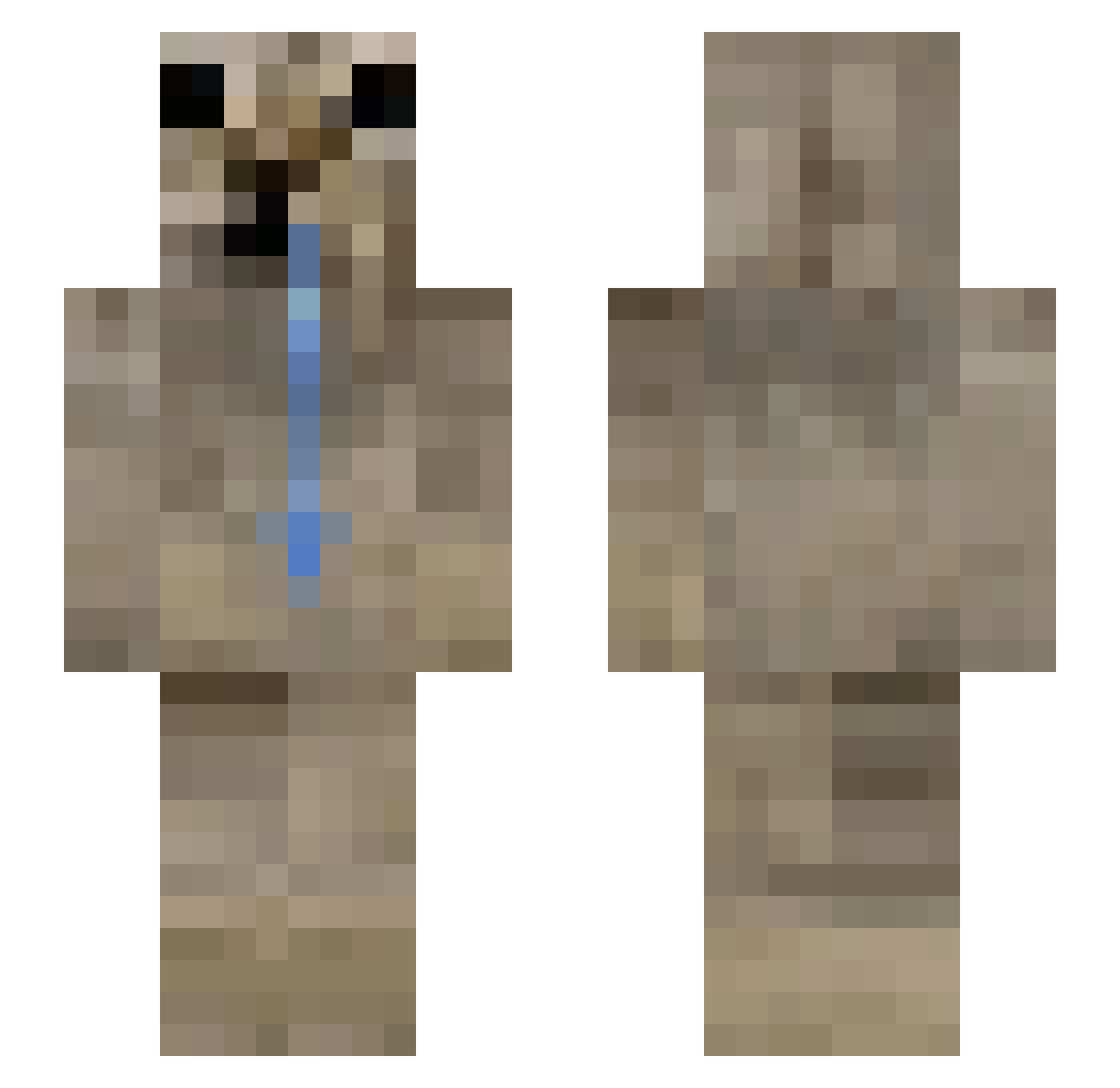
Current Minecraft skin of the player Stanley_2009, loaded from the official Mojang API. Rotate the 3D model with your mouse or finger, then download the skin as a PNG file and use it in Minecraft: Bedrock Edition or Java Edition for free. When Stanley_2009 changes their skin, this page updates automatically and the old skin stays in the history below.
Other players with this skin (197)
Stanley_2009 was the 18th player we have seen with this skin, first spotted on 15.08.2026. The same skin was seen on these players. Open a nickname to see their current skin and skin history.
 Rokkermox
 froidboy_ solodef N3VASCA
 JianBing155
 Redlaifir Muxwi PotatoeHansz Zangetsu098 _Mince N4ikn3t fame333 BELLAKOH
 pez_dispenzer
 unnomiro deerling_7w7
 bignejm27 Chewerry
 Tom075036 DualTwo Botanquash BOO_RTX Flougerh Alone_zero PABLO_6996 TriVos1207
 DOGBLACKKX
 Nimsai_sz kiko0542
 MOKLING
 ilikeflowers43 Annelyzz aea4 Zjoey shuwk
 Yunhakim15 BLacK403
 Migass_ Angelusxz cscory rottedworms BonxFB_ Qah_ NotAntont M1shhh MORAXIANGALE jericolegend z1tron
 potterpuppetpals Noisykiddo gaston_zucar orangekiss
 waiste PotatoCrafter_1 KreciXtt mrzjinxx NikitoDoDeus glxcian oweenie_ butter1210
More Appa Minecraft skins
How to install the Stanley_2009 skin
- Press the Download button above to save the skin as a PNG file.
- Minecraft: Bedrock Edition (PE): open the Dressing Room from the main menu (or tap your character → Edit Character), go to Classic Skins → Owned, press the + (new skin) button, choose the downloaded PNG and pick the Slim (Alex) model. Works on PC and mobile; consoles cannot import custom skins.
- Minecraft: Java Edition: open the Minecraft Launcher, go to the Skins tab, click New Skin, load the PNG, pick the Slim (Alex) model and press Save & Use. You can also upload it at minecraft.net → Profile → Change Skin.
The skin does not show up after import - what should I do?
Restart Minecraft and open the Dressing Room again - imported skins sometimes appear only after a restart. Also make sure you selected the imported skin and picked the Slim (Alex) model.
Which model should I choose, Classic or Slim?
This skin is designed for the Slim (Alex) model. If you pick the wrong model, the arms of the skin will look stretched or squeezed.
Is the skin of Stanley_2009 free to download?
Yes. Press Download, save the PNG file and use it in Minecraft: Bedrock Edition or Java Edition - no payment or registration needed. The skin also works on multiplayer servers and Realms.
More skins
Looking for more? Go back to all Minecraft skins and check the top skins of the week, month and all time, or find any player's skin by nickname.