
SrPollar - Minecraft Skins & Skin History
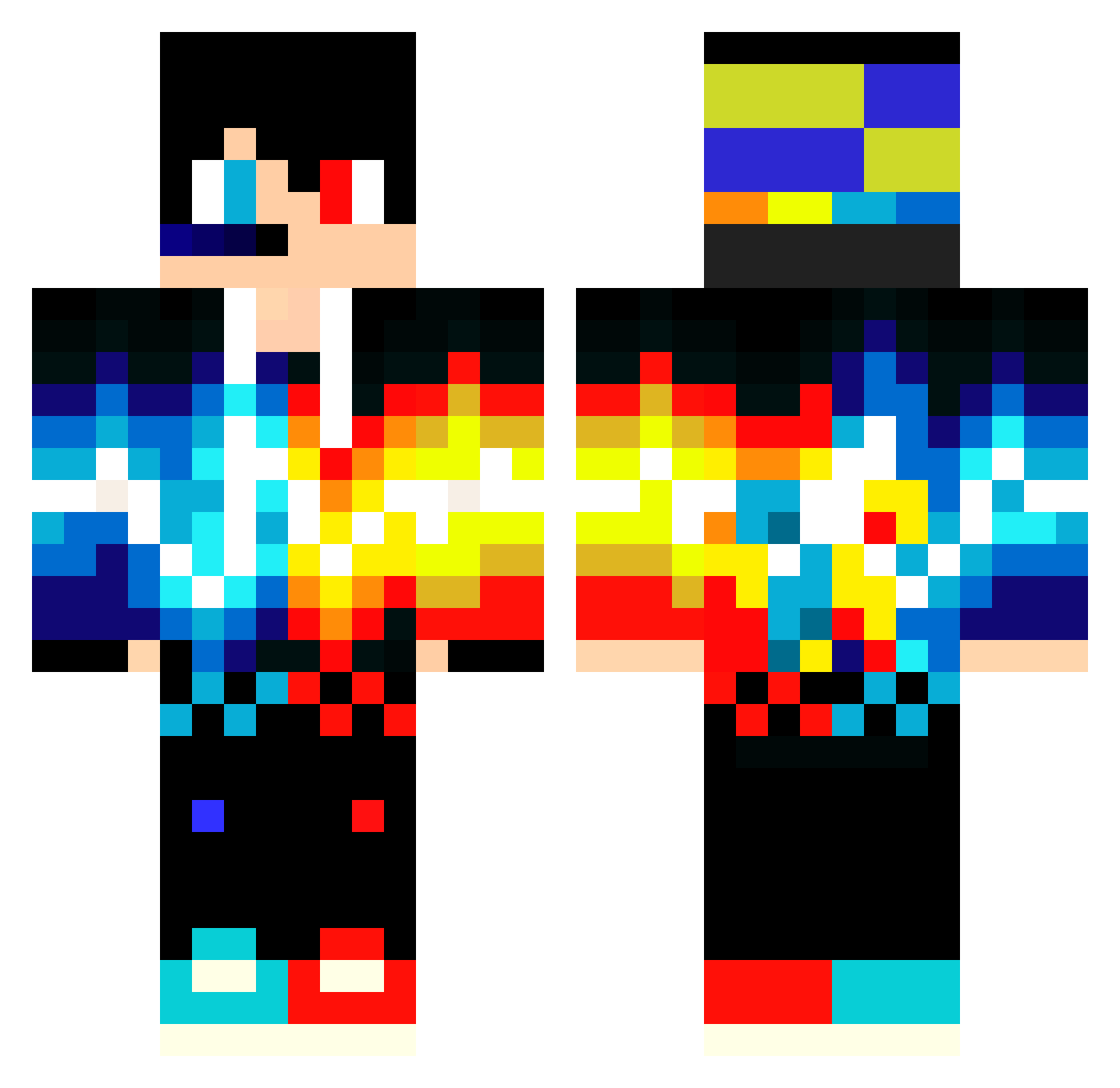
Current Minecraft skin of the player SrPollar, loaded from the official Mojang API. Rotate the 3D model with your mouse or finger, then download the skin as a PNG file and use it in Minecraft: Bedrock Edition or Java Edition for free. When SrPollar changes their skin, this page updates automatically and the old skin stays in the history below.
Other players with this skin (636)
SrPollar was the 588th player we have seen with this skin, first spotted on 10.11.2026. The same skin was seen on these players. Open a nickname to see their current skin and skin history.
 niverd Spean0FF lapourito PanBalwanek_YT Alesteve_2 yeyouziling Denzobeast Yi_Cheng0406 Fayerman3 DanimitoPlay samu0922 vincentz12 Damien264 Mazzo21 Lorvix GOLDEN_NINJ44 Vovan_king Benjboy9276 ReDClare thiagoprouno BlockBarril ZuineSun Ryan_0805 MadCap7 Adventure3W MrProlyMan fanchangdemao SathXD artificialgamer7 BlackJack_100 sajmo65 Skidic hayappisoul luckyng jaygoki DvGaming094 Benjamuffinman Michael_so_OP X4NDI Psycho_Chicken benyosmind TTDDUU DinsdaleP galwenger Nkoo Qemista Hexti_7 Leatz__ Hannes714 therussniper PaulH503541009 botslayer420 Junkie4Life nickplayspro NightTornado9 Khonsrakh PITAN001 4E_Ttvx Danilo650 Fallen_angel2024
More Fire And Ice Minecraft skins
See all 823 Fire And Ice skins
How to install the SrPollar skin
- Press the Download button above to save the skin as a PNG file.
- Minecraft: Bedrock Edition (PE): open the Dressing Room from the main menu (or tap your character → Edit Character), go to Classic Skins → Owned, press the + (new skin) button, choose the downloaded PNG and pick the Classic (Steve) model. Works on PC and mobile; consoles cannot import custom skins.
- Minecraft: Java Edition: open the Minecraft Launcher, go to the Skins tab, click New Skin, load the PNG, pick the Classic (Steve) model and press Save & Use. You can also upload it at minecraft.net → Profile → Change Skin.
The skin does not show up after import - what should I do?
Restart Minecraft and open the Dressing Room again - imported skins sometimes appear only after a restart. Also make sure you selected the imported skin and picked the Classic (Steve) model.
Which model should I choose, Classic or Slim?
This skin is designed for the Classic (Steve) model. If you pick the wrong model, the arms of the skin will look stretched or squeezed.
Is the skin of SrPollar free to download?
Yes. Press Download, save the PNG file and use it in Minecraft: Bedrock Edition or Java Edition - no payment or registration needed. The skin also works on multiplayer servers and Realms.
More skins
Looking for more? Go back to all Minecraft skins and check the top skins of the week, month and all time, or find any player's skin by nickname.