
Solzzz8 - Minecraft Skins & Skin History
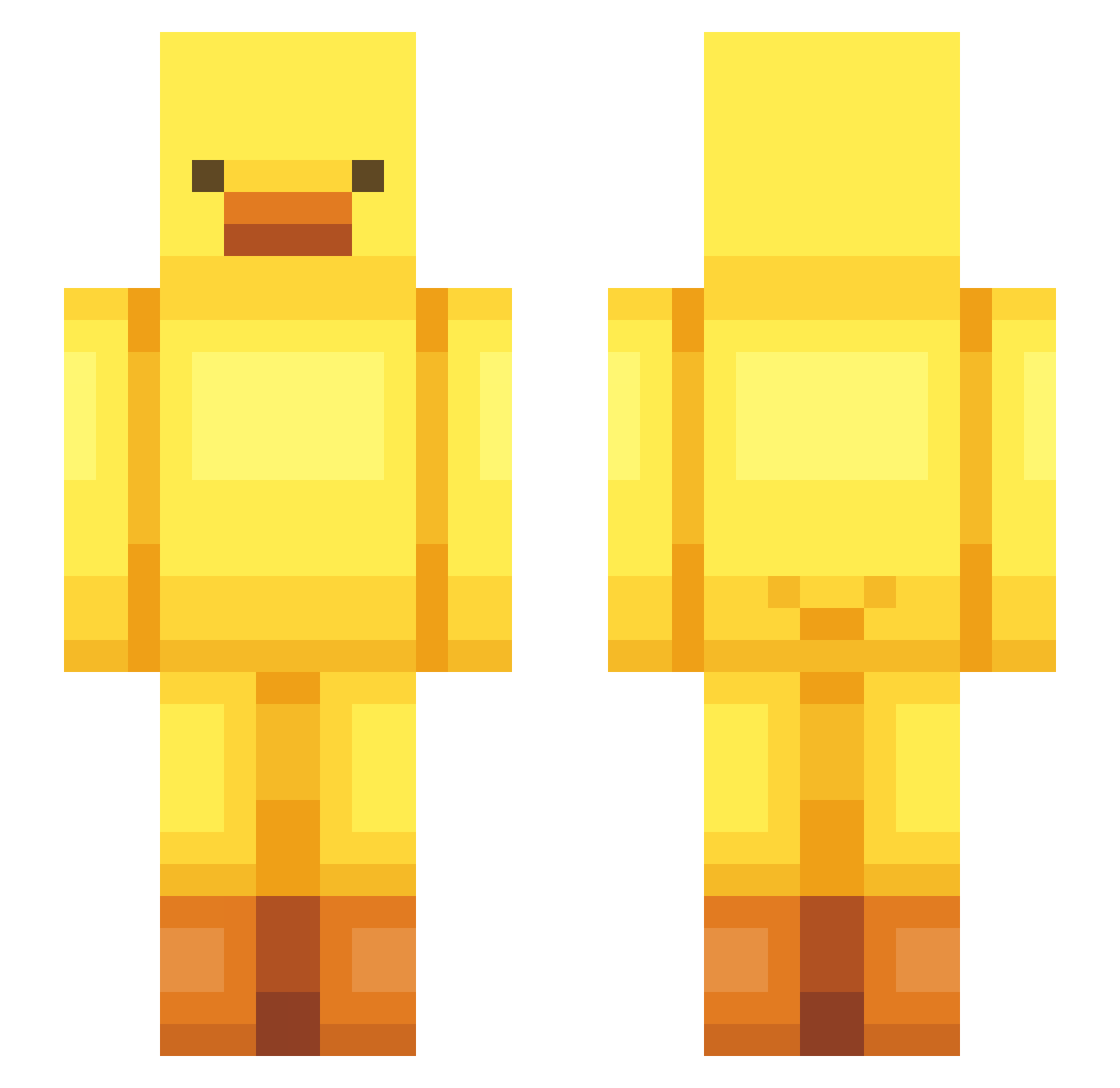
Current Minecraft skin of the player Solzzz8, loaded from the official Mojang API. Rotate the 3D model with your mouse or finger, then download the skin as a PNG file and use it in Minecraft: Bedrock Edition or Java Edition for free. When Solzzz8 changes their skin, this page updates automatically and the old skin stays in the history below.
Other players with this skin (548)
Solzzz8 was the 518th player we have seen with this skin, first spotted on 04.11.2026. The same skin was seen on these players. Open a nickname to see their current skin and skin history.
 adf123w Coy45 Neurotoxin9405 Ssum0620 Chang3Zz yxng7n vmeadows14 kay19583 KOMARY23 BeegYun catmilk3213 BoomanCraft Joechi824 CrafterBlack Olciafasolcia23 sleepyfroggy331 Kasaminek BlueTom Szimbeq1 poro_02 CcorshIA Serios4427 AkgyV2 Maccha_0_0 pacza suupoong oqdnq0odq0odnimq ADjr megamoose1216 ProstoFabik ssgiyo Salieri1126 na0m_l nikoladynn chengoot KatieeeWatieee T0NK74 sudoku1101 coolki97 Parkdian Leviticus72 22MAYOLEE Jalinho dltkdals10 HanTan123 pepper9892 GOGUMAAAAAAA t4haDev hyunananan zedislame LiveInk jacmk Jaleaitaa Valoup1905 kadealan p_zoo ttoleug02 burnableInappro ymui0913 choofabowl
More Bird Minecraft skins
How to install the Solzzz8 skin
- Press the Download button above to save the skin as a PNG file.
- Minecraft: Bedrock Edition (PE): open the Dressing Room from the main menu (or tap your character → Edit Character), go to Classic Skins → Owned, press the + (new skin) button, choose the downloaded PNG and pick the Slim (Alex) model. Works on PC and mobile; consoles cannot import custom skins.
- Minecraft: Java Edition: open the Minecraft Launcher, go to the Skins tab, click New Skin, load the PNG, pick the Slim (Alex) model and press Save & Use. You can also upload it at minecraft.net → Profile → Change Skin.
The skin does not show up after import - what should I do?
Restart Minecraft and open the Dressing Room again - imported skins sometimes appear only after a restart. Also make sure you selected the imported skin and picked the Slim (Alex) model.
Which model should I choose, Classic or Slim?
This skin is designed for the Slim (Alex) model. If you pick the wrong model, the arms of the skin will look stretched or squeezed.
Is the skin of Solzzz8 free to download?
Yes. Press Download, save the PNG file and use it in Minecraft: Bedrock Edition or Java Edition - no payment or registration needed. The skin also works on multiplayer servers and Realms.
More skins
Looking for more? Go back to all Minecraft skins and check the top skins of the week, month and all time, or find any player's skin by nickname.