
Snowfishli - Minecraft Skins & Skin History
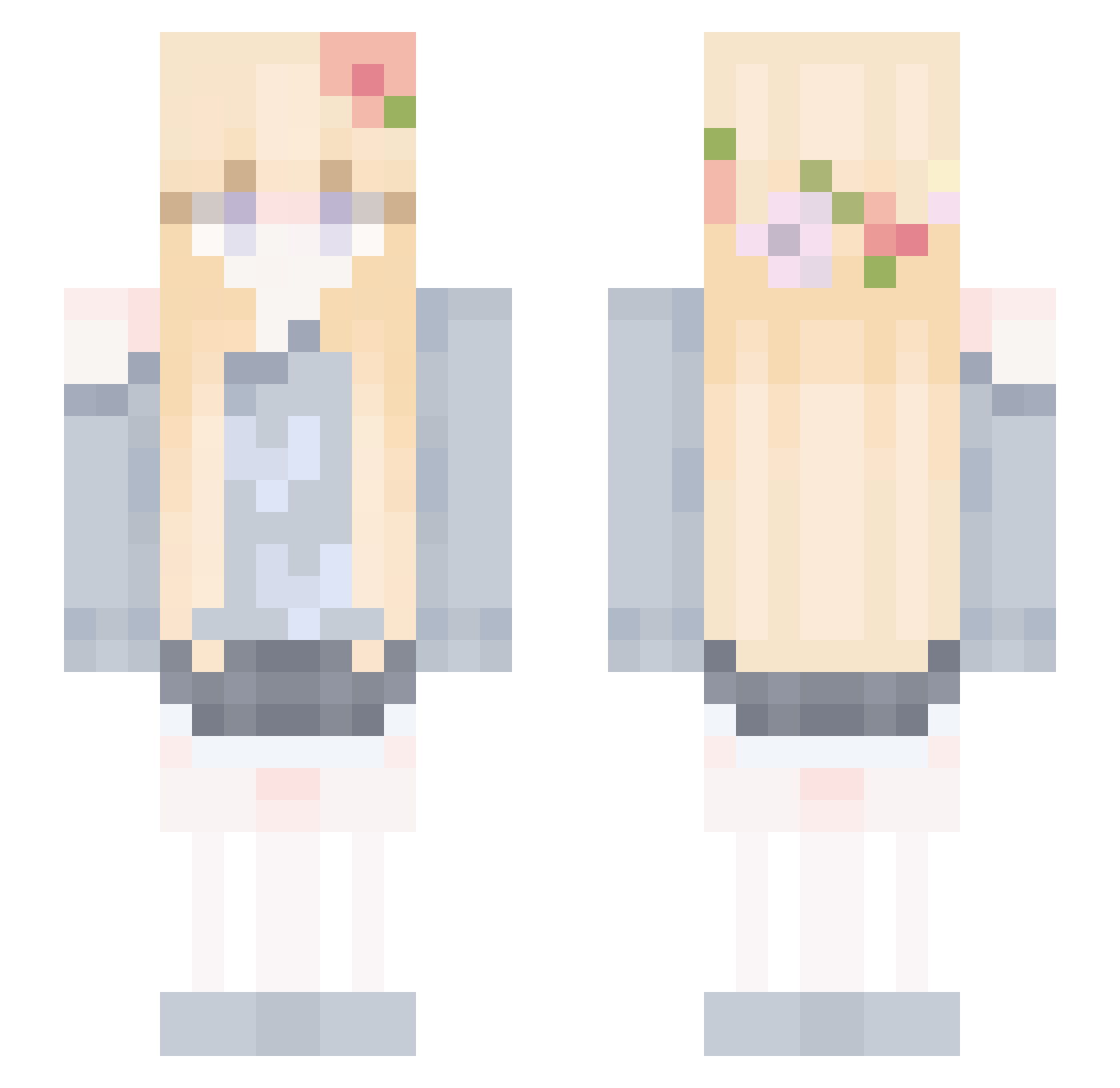
Current Minecraft skin of the player Snowfishli, loaded from the official Mojang API. Rotate the 3D model with your mouse or finger, then download the skin as a PNG file and use it in Minecraft: Bedrock Edition or Java Edition for free. When Snowfishli changes their skin, this page updates automatically and the old skin stays in the history below.
Other players with this skin (92)
Snowfishli was the 73rd player we have seen with this skin, first spotted on 26.10.2026. The same skin was seen on these players. Open a nickname to see their current skin and skin history.
 Enclaus CocoPuffsYum Persipitate Themuzi Amethyst43 Jiaaang moonkeyboom LuckyEEeEEEe lllllssttt Vaeloriah uga_happy xsddf Onikso lexies_altacc WhiteVoice JustTamiko Vhayu Strawberrymaca karkines Starluvero DainyZ_MC ThanhBinh2009 AtoriUzawa Beam_Mi Asnsns0 YUINGNI emiiiys im_bhoumik milkway314 MayaHittaX xixi177 starcloud520 Not_fire_but_ice Morgan501 Qinzhna_ Al1cia_ KMSMQK _Sunny_17 KamiyaSen fff6789 Fine_MC tirexavia HamChoRom T1_Mint sweet0713 pixlize Enzaa sweetwhite yulnak YURUOYI ocsu CottonCandy5562 Ashp1nk HiggsDarktide piplup1209 nyomiqt AnskuAnkka _Gervaz CelineMLB DDUGI3103
More Flower Crown Minecraft skins
See all 4086 Flower Crown skins
How to install the Snowfishli skin
- Press the Download button above to save the skin as a PNG file.
- Minecraft: Bedrock Edition (PE): open the Dressing Room from the main menu (or tap your character → Edit Character), go to Classic Skins → Owned, press the + (new skin) button, choose the downloaded PNG and pick the Slim (Alex) model. Works on PC and mobile; consoles cannot import custom skins.
- Minecraft: Java Edition: open the Minecraft Launcher, go to the Skins tab, click New Skin, load the PNG, pick the Slim (Alex) model and press Save & Use. You can also upload it at minecraft.net → Profile → Change Skin.
The skin does not show up after import - what should I do?
Restart Minecraft and open the Dressing Room again - imported skins sometimes appear only after a restart. Also make sure you selected the imported skin and picked the Slim (Alex) model.
Which model should I choose, Classic or Slim?
This skin is designed for the Slim (Alex) model. If you pick the wrong model, the arms of the skin will look stretched or squeezed.
Is the skin of Snowfishli free to download?
Yes. Press Download, save the PNG file and use it in Minecraft: Bedrock Edition or Java Edition - no payment or registration needed. The skin also works on multiplayer servers and Realms.
More skins
Looking for more? Go back to all Minecraft skins and check the top skins of the week, month and all time, or find any player's skin by nickname.