
DDUGI3103 - Minecraft Skins & Skin History
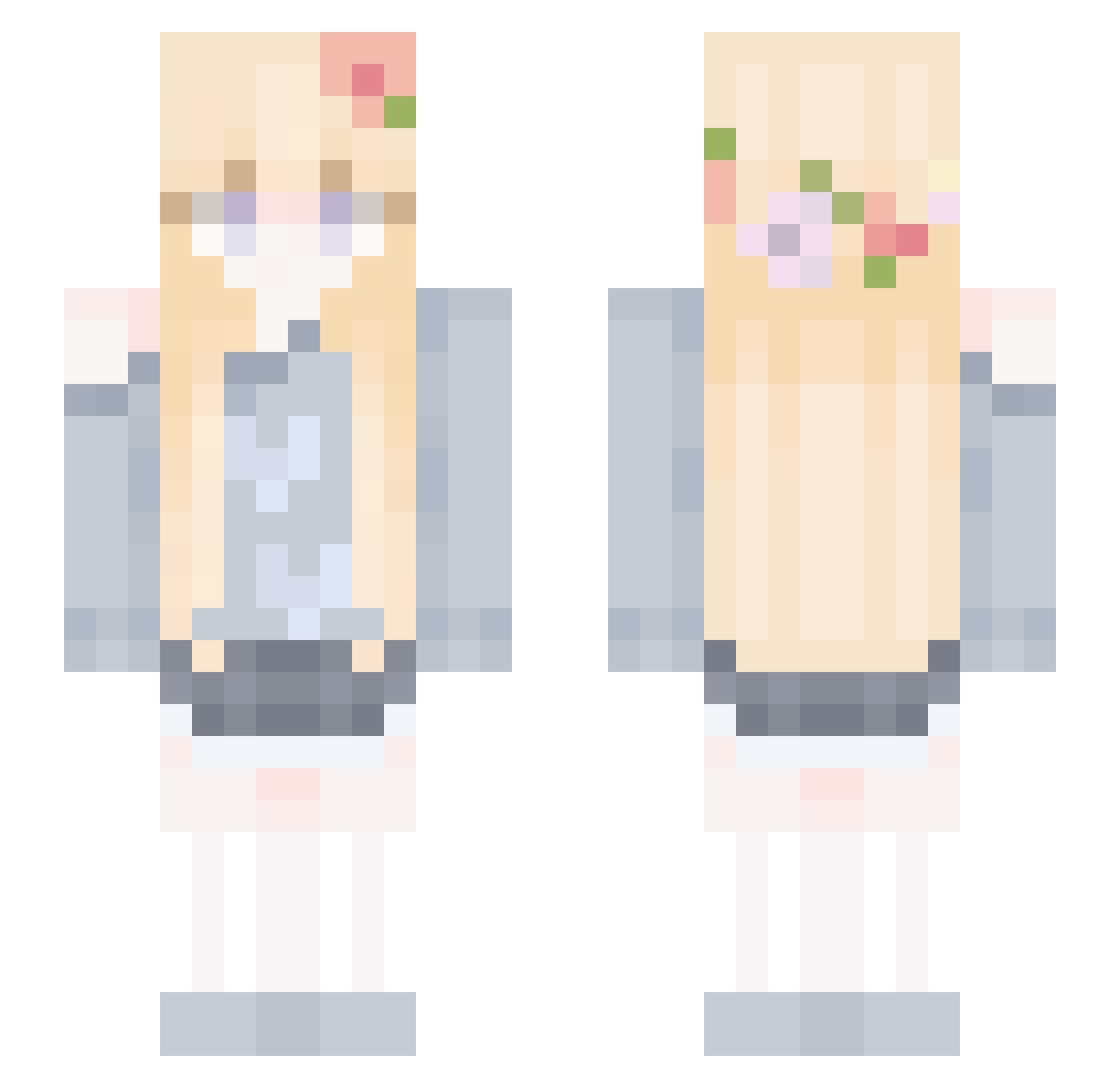
Current Minecraft skin of the player DDUGI3103, loaded from the official Mojang API. Rotate the 3D model with your mouse or finger, then download the skin as a PNG file and use it in Minecraft: Bedrock Edition or Java Edition for free. When DDUGI3103 changes their skin, this page updates automatically and the old skin stays in the history below.
Other players with this skin (78)
DDUGI3103 was the 33rd player we have seen with this skin, first spotted on 29.08.2026. The same skin was seen on these players. Open a nickname to see their current skin and skin history.
 CelineMLB Arthemis8 ChamomileTe Nancy77 _Gervaz AnskuAnkka NQCT_ Iuuthao
 ClayCrafted LJW2015LOVE nyomiqt NotDemonNull
 SnowyPetal_ piplup1209 AfloatZulu35 Siesta0217 CutegirlAmelia HiggsDarktide ciallo_ic _Kanatip_ Nqh c1aud1aa
 ol_3_ki Ashp1nk CottonCandy5562
 Fvnsenpai ocsu YURUOYI Aluphe yulnak sweetwhite Enzaa Freedom_to_love YCUZKFI pixlize sweet0713 Pleng1 barunkaa_1 StrayNomad_CN T1_Mint tomaattihiiri HamChoRom figaanc tirexavia lua1lua Ulricakay Fine_MC ClaraxOoOx fff6789
 Xilaqro SyncFailed Tian_Nuo Al1cia_ starcloud520 MayaHittaX im_bhoumik YUINGNI Asnsns0 Beam_Mi AtoriUzawa
More Flower Crown Minecraft skins
See all 3467 Flower Crown skins
How to install the DDUGI3103 skin
- Press the Download button above to save the skin as a PNG file.
- Minecraft: Bedrock Edition (PE): open the Dressing Room from the main menu (or tap your character → Edit Character), go to Classic Skins → Owned, press the + (new skin) button, choose the downloaded PNG and pick the Slim (Alex) model. Works on PC and mobile; consoles cannot import custom skins.
- Minecraft: Java Edition: open the Minecraft Launcher, go to the Skins tab, click New Skin, load the PNG, pick the Slim (Alex) model and press Save & Use. You can also upload it at minecraft.net → Profile → Change Skin.
The skin does not show up after import - what should I do?
Restart Minecraft and open the Dressing Room again - imported skins sometimes appear only after a restart. Also make sure you selected the imported skin and picked the Slim (Alex) model.
Which model should I choose, Classic or Slim?
This skin is designed for the Slim (Alex) model. If you pick the wrong model, the arms of the skin will look stretched or squeezed.
Is the skin of DDUGI3103 free to download?
Yes. Press Download, save the PNG file and use it in Minecraft: Bedrock Edition or Java Edition - no payment or registration needed. The skin also works on multiplayer servers and Realms.
More skins
Looking for more? Go back to all Minecraft skins and check the top skins of the week, month and all time, or find any player's skin by nickname.