
Snipe2Die - Minecraft Skins & Skin History
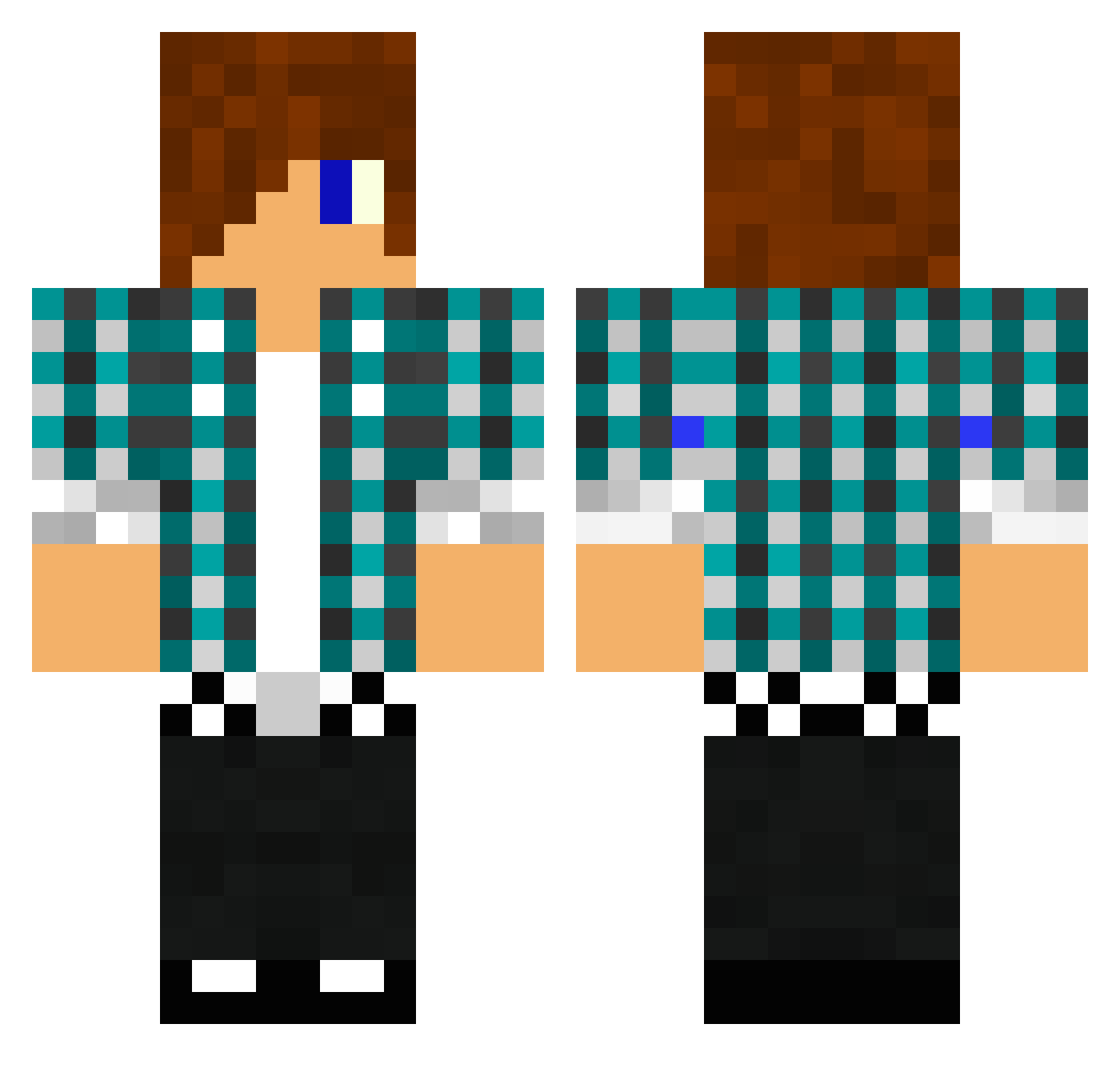
Current Minecraft skin of the player Snipe2Die, loaded from the official Mojang API. Rotate the 3D model with your mouse or finger, then download the skin as a PNG file and use it in Minecraft: Bedrock Edition or Java Edition for free. When Snipe2Die changes their skin, this page updates automatically and the old skin stays in the history below.
Other players with this skin (1475)
Snipe2Die was the 889th player we have seen with this skin, first spotted on 04.10.2026. The same skin was seen on these players. Open a nickname to see their current skin and skin history.
 renee1970 MrEasyGames77 Rikardo9 Heizer_edt25 marcusbeast7 ShadowOPHJ joshdooley2002 DarkWolf1303 Riley719 Thee_Grubbe abcdeath22 awesomedude55678 maeximum1 ParanoidGamerX SynisterG8s Sand3rDutchGam3r zpinc McFabian the_poet_245 littlegarnek danie27 LaPlanT1223 jinovy Ulrikalundin stormperdue josvanderwoerd CoasterSV ONLY5 robbienjosh kingtigran fu1877 Ektospam ek_jk_ok TheGameKiller15 zionxskillz catfishlegand tazerkinz evelina01 MysteriousTvirus Defender_dude JJackG graffitiking1 FRAGoMATIQ Paulaner_CC Slurp_10 Samanthab0702 JoeyGutz Ryantheskeleton0 Snowme Darkbronzefire Bcass2001 doing456 SchusterMax Henning2000 SnykeDawg xSNiiPZz xMax3 Willrocks123 adibong999 TimmiBubi
More Emo Minecraft skins
How to install the Snipe2Die skin
- Press the Download button above to save the skin as a PNG file.
- Minecraft: Bedrock Edition (PE): open the Dressing Room from the main menu (or tap your character → Edit Character), go to Classic Skins → Owned, press the + (new skin) button, choose the downloaded PNG and pick the Classic (Steve) model. Works on PC and mobile; consoles cannot import custom skins.
- Minecraft: Java Edition: open the Minecraft Launcher, go to the Skins tab, click New Skin, load the PNG, pick the Classic (Steve) model and press Save & Use. You can also upload it at minecraft.net → Profile → Change Skin.
The skin does not show up after import - what should I do?
Restart Minecraft and open the Dressing Room again - imported skins sometimes appear only after a restart. Also make sure you selected the imported skin and picked the Classic (Steve) model.
Which model should I choose, Classic or Slim?
This skin is designed for the Classic (Steve) model. If you pick the wrong model, the arms of the skin will look stretched or squeezed.
Is the skin of Snipe2Die free to download?
Yes. Press Download, save the PNG file and use it in Minecraft: Bedrock Edition or Java Edition - no payment or registration needed. The skin also works on multiplayer servers and Realms.
More skins
Looking for more? Go back to all Minecraft skins and check the top skins of the week, month and all time, or find any player's skin by nickname.