
SlowllY - Minecraft Skins & Skin History
Current Minecraft skin of the player SlowllY, loaded from the official Mojang API. Rotate the 3D model with your mouse or finger, then download the skin as a PNG file and use it in Minecraft: Bedrock Edition or Java Edition for free. When SlowllY changes their skin, this page updates automatically and the old skin stays in the history below.
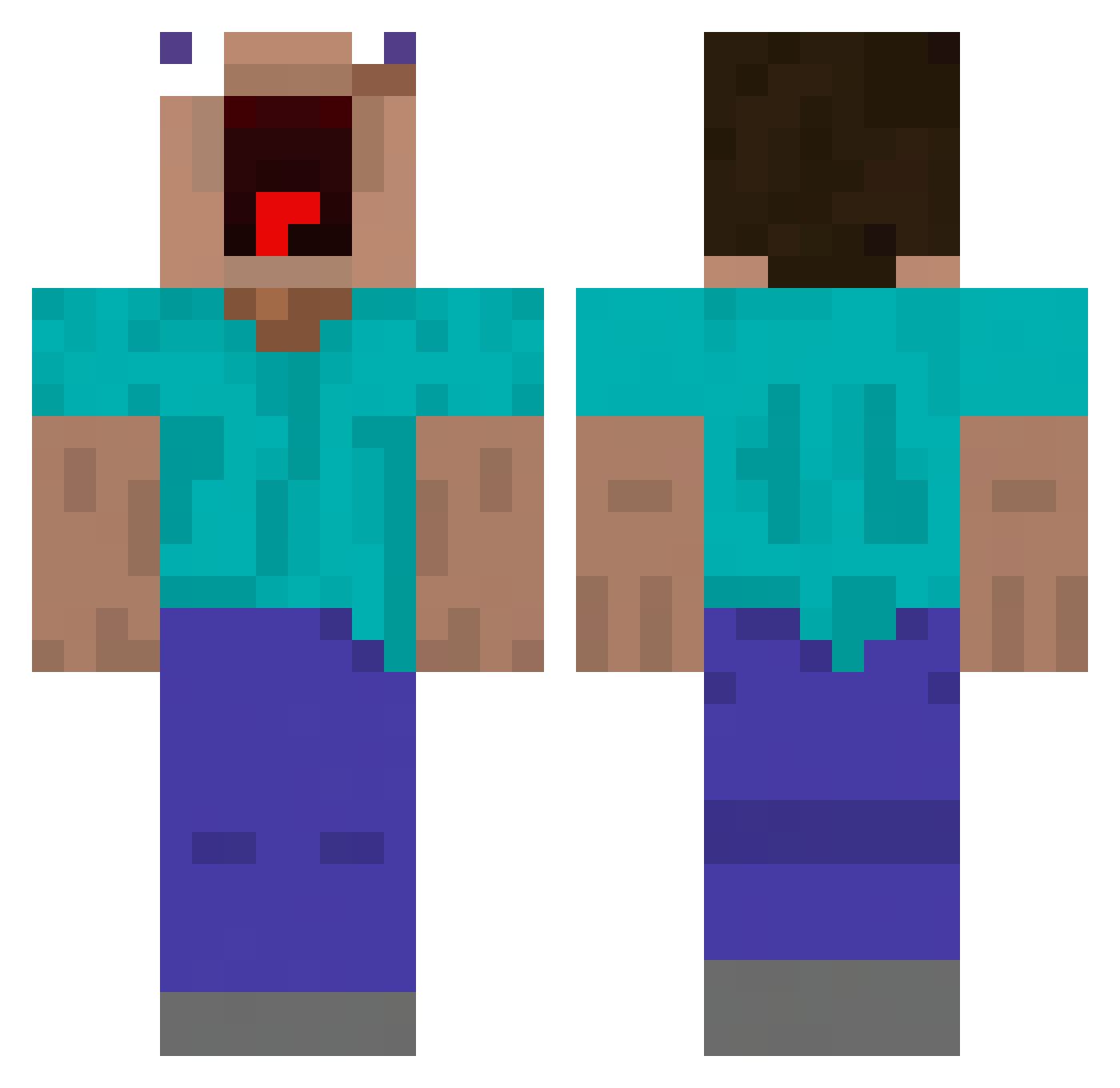
Other players with this skin (456)
SlowllY was the 303rd player we have seen with this skin, first spotted on 03.10.2026. The same skin was seen on these players. Open a nickname to see their current skin and skin history.
 TheGesshoku sleeper92 RucaOsCarecas Mutres Payan047 nicetrymybad P1LotZzZ ISmokeyTheBear Whangs arnon_123 Luckyyylion abcde132458 Snomatron JXXSeo Tr1k0 MoloLost CorrivalBench freddysuper Anomaly9403 N42UTO_07 XxRizzlerOhioxX horgimorgi HeerEi Juanex526 night_knight0502 yoonjunhoo saxyyeongbae6974 rkir22 MrDuck2009 reimooo Capt_Zwieback cozi__ deadlywolveyt junsangbae alanWrench101 Chayechan BDGhazi AtokirinaPR Emtrac Teodorix OldVikingDude boopbopbang lilfriedrice ZensKnees FrostyReapz patatipouf Stqnly choikanghyun Flemus jotagorilao Creamated Bermurigi Shaotler madfrog1029 BAEZZANG1219 MXFish233 motimakura Crisde Rasengurey 4yk4as
More Funny Minecraft skins
How to install the SlowllY skin
- Press the Download button above to save the skin as a PNG file.
- Minecraft: Bedrock Edition (PE): open the Dressing Room from the main menu (or tap your character → Edit Character), go to Classic Skins → Owned, press the + (new skin) button, choose the downloaded PNG and pick the Classic (Steve) model. Works on PC and mobile; consoles cannot import custom skins.
- Minecraft: Java Edition: open the Minecraft Launcher, go to the Skins tab, click New Skin, load the PNG, pick the Classic (Steve) model and press Save & Use. You can also upload it at minecraft.net → Profile → Change Skin.
The skin does not show up after import - what should I do?
Restart Minecraft and open the Dressing Room again - imported skins sometimes appear only after a restart. Also make sure you selected the imported skin and picked the Classic (Steve) model.
Which model should I choose, Classic or Slim?
This skin is designed for the Classic (Steve) model. If you pick the wrong model, the arms of the skin will look stretched or squeezed.
Is the skin of SlowllY free to download?
Yes. Press Download, save the PNG file and use it in Minecraft: Bedrock Edition or Java Edition - no payment or registration needed. The skin also works on multiplayer servers and Realms.
More skins
Looking for more? Go back to all Minecraft skins and check the top skins of the week, month and all time, or find any player's skin by nickname.